Generative AI has created a particular challenge for assessment practices.
On the afternoon of Wednesday 25 November, Library Academic and Digital Services will be hosting a special good practice event focused on assessment design within the context of Generative AI.
We are inviting submissions from colleagues to share their innovative assessment practices in short 10–15-minute talks.
We’re looking for a mix of assessments that are either designed to:
Incorporate the use of Generative AI or
Prevent the use of Generative AI and enhance assessment validity
It would be great to have an example from each department.
We revisit and revise all the policies relating to digital education annually. All the changes are approved by the Quality and Standards Committee. The new policies are now available, and here are the details of the main changes. If you have any questions about the new policies, please get in touch with us using elearning@aber.ac.uk
This year’s update has clarified what is expected for AberOnline courses in Canvas. All points apply to Blackboard and Canvas unless otherwise mentioned. Any queries about AberOnline should be sent to aberonline@aber.ac.uk
Blackboard Required Minimum Presence (RMP)
The RMP outlines to staff and students the minimum standards for a Blackboard Course.
Welsh Language:
Guidelines for providing Welsh language materials in merged Welsh and English modules.
To help students plan and manage their studies:
Assignment briefs, along with a Generative AI statement for each assessment should be uploaded at the start of the semester that the course is taught in
Clarification of timescales for uploading materials for students with a Record of Support Provision
Guidance on availability of materials in a Blackboard course
To help staff managing courses:
Copy of any Turnitin rubrics to be uploaded into the External Examiners folder
E-submission Policy
The E-submission Policy outlines that all text-based word-processed work is submitted, marked, and has feedback released electronically.
To improve student access to marks and feedback:
Clarification of guidance on returning marks and feedback for work not submitted electronically
Responding to system outages:
Clarification of how outages on AU and non-AU systems will be managed.
Lecture Capture Policy
The Lecture Capture Policy outlines that all transmission style presentations are recorded electronically for students to access.
To help students with accessibility requirements
Inclusion of guidance on downloading transcripts
Inclusion of guidance on recording whiteboard notes
To help staff managing courses:
Clarification of when and how lecture summaries should be used
Use of recordings:
Guidance on when and how recordings may be used in the AU complaints process
Panopto has now been set up ready for 2026-27. This includes automatic captioning.
Automatic Captions
Automatic captioning has now been set-up for all 2026-27 folders in Panopto. The language for captioning matches the language of your Blackboard course template.
For bilingual courses we recommend creating a sub-folder to hold the recordings for one of the languages of your course delivery (see FAQ).
When you make your recordings, you must select the correct language folder before pressing record. This is because Welsh captions cannot be added to recordings copied or moved from other folders.
You can create a link to the Panopto folder in your Blackboard course. This means that students will be able to see the recordings for the course all in one place.
Finding your Panopto folder
Panopto folders for all this year’s modules are in the 2026-27 folder.
To find the Panopto folder you want to record into:
Click the dropdown button on the right-hand side of the Folder box.
Click the dropdown arrow to the left of the academic year folder to expand it.
Select the Panopto folder you want to record into.
You can also search for the Panopto folder you want to record into:
In the Folder box start typing the module code or name of the Panopto folder you want to Record into.
Select the folder you want to record into.
What to do if you can’t see your Panopto folder
In a small number of courses, the Panopto folder wasn’t created over the summer. If you can’t find your Panopto folder using the steps above, you can create a folder from Blackboard:
Login to Blackboard and find your course
Click on Books and Tools [Llyfrau ac Offer] > View course and institution tools [Gweld cwrs ac offer sefydliad]
Click on Holl Fideo Panopto / All Panopto Videos
You should then be able to find the Panopto folder to make a recording.
If you have any questions, please contact the Digital Education Team on elearning@aber.ac.uk.
We’re delighted to welcome some more external speakers to our Annual Education and Student Experience Conference.
On Thursday 10 September, Blackboard’s Ruben Jacquart will be joining us.
Ruben Jacquart is a Senior Solutions Engineer with over 10 years of experience supporting higher education institutions in their digital learning transformation journeys. Based in Amsterdam, he works closely with universities and business schools across Europe and the UK to help institutions enhance teaching, learning, accessibility, and student success through innovative educational technology.
His expertise spans learning management systems, digital accessibility, learning analytics, artificial intelligence, interoperability standards, and enterprise integrations. Ruben regularly collaborates with institutional leaders, academic staff, and technology teams to address strategic and operational challenges in digital education.
He is particularly passionate about advancing accessibility in education and helping institutions create more inclusive learning environments. Through his work with Ally, he supports universities in improving the accessibility of digital course content, empowering educators to adopt inclusive practices, and ensuring that all learners have equitable access to educational resources. Ruben is also deeply interested in how AI and data-informed approaches can further enhance the learner experience while strengthening inclusion and student success.
Ruben will be running a 1-hour session.
The session will include latest updates to:
Blackboard Ally
Blackboard AI Design Assistant
New features roadmap for Blackboard
We’re really excited about some of the new features that are included in the Blackboard Ally update.
In the next 1-3 months, there’s going to be a new enhanced reader for students. In addition to all the great features already included in Ally, this will include features that help focus attention.
Following Blackboard’s session, Ifat Shah from Life Sciences and Jim Woolley from Student Journey will be giving a presentation on Blackboard Achievements. Colleagues in Life Sciences have been using it this year to record the DLS Skills Passport.
We’re delighted to welcome several stands across our in-person days at this year’s Annual Education and Student Experience Conference.
All stands will be in the Think Tank on Wednesday 9 September and Thursday 10 September.
AberSkills
Library Academic and Digital Services’ Non Jones will be hosting a stand to showcase the latest news from AberSkills, the home of skills development at Aberystwyth University. We’ve got some sessions as part of the conference focusing on Skills – Jim Dickinson from WONKHE and Trish McGrath from UndebAber will be leading a session, and Joy Cadwallader and Keziah Garratt-Smithson will be launching the Digital Discovery Tool.
Education and Student Experience Award Recipients
Recipients of last year’s Education and Student Experience Awards will be staffing stands so that delegates can hear all about the projects:
The Aber Medieval Physic Garden
Developing a Sustainable Student Gear Hub
Inclusivity and Accessibility in Assessment Design and Feedback Practices
Pulling together– supporting teamwork assessment more effectively
RLF Writing Stand
On Wednesday 9 and Thursday 10 September, we are delighted to welcome Samanthan Wynne-Rhydderch who will be hosting a stand.
Samantha is the Royal Literary Fellow here at Aberystwyth.
The RLF Fellowship scheme for writers was launched in autumn 1999 and is based in UK universities. About 750 writers work as Fellows at over 100 different institutions. The principal aim of the Fellow’s work is to foster good writing practice across all disciplines and media by showing students how to write with clarity and flow. Typically, a student will see the Fellow, a professional published author, one-to-one, for 50 minutes.
Our Digital Education training programme is now available for staff to book onto on the staff booking page
Our training is split across 3 levels:
E-learning Essentials:
Our E-learning Essentials sessions provide a practical introduction to the University’s core digital learning technologies and the policies that support their use. These sessions are ideal for colleagues who are new to a tool, taking on a new teaching role, or looking to refresh their knowledge.
You will gain confidence in using technologies such as Blackboard, Turnitin, Panopto, Microsoft Copilot, and Vevox, as well as learn about key processes that support learning, teaching, and assessment.
Sessions available:
Become a Document Pro
Introduction to Blackboard Ally
Introduction to Blackboard Ultra
Introduction to Component Marks Transfer
Introduction to Microsoft Copilot for Learning and Teaching Activities
Introduction to Panopto Lecture Capture and Teaching Room Equipment (bilingual)
Introduction to Turnitin (bilingual)
Introduction to Vevox Polling Software
E-learning Enhanced:
OurE-learning Enhancedsessions focus on designing and creating engaging learning activities using digital tools within your own teaching context.
These hands-on workshops will help you explore innovative approaches to learning design, assessment, accessibility, and student engagement, enabling you to make more effective use of the University’s digital learning environment.
Sessions available:
Becoming an Alternative Text Pro
Design Interactive Online Learning Activities Using Blackboard Discussions and Journals
Designing Blackboard Tests
Designing Learning and Teaching Activities Using Vevox
Introduction to the Blackboard AI Design Assistant
Measuring and Increasing Engagement Using Blackboard Tools
Peer Assessment with Turnitin
Preparing for Your Blackboard Exam
Using the Advanced Features of Panopto
E-learning Excellence:
Our E-learning Excellence programmeis designed for colleagues who want to create outstanding digital learning experiences and align their courses with recognised best practice.
Based on theBlackboard Exemplary Course Award rubric, these sessions explore the key elements of high-quality course design and effective digital pedagogy. While the sessions are designed as a complementary four-part series, you are welcome to attend individual sessions according to your interests and needs.
Sessions available:
Exemplary Assessment Design
Exemplary Course Design
Exemplary Interaction and Collaboration
Exemplary Learner Support
Submitting an Exemplary Course Award
We are committed to making our training as accessible and inclusive as possible. If you are unable to attend a session but would like access to the training materials, or if you would like to discuss any aspect of the session format or accessibility requirements, please contact the Digital Education Group at elearning@aber.ac.uk.
We look forward to seeing you at a forthcoming session.
In the August update, we want to draw your attention to the following Blackboard enhancements:
Manage group membership with drag and drop
Create multiple groups at once
Make notifications more accurate and reliable
Add sorting controls for users in Discussions
Restructured Gradebook grid view (Instructors)
Export question banks (Instructors)
Display answer-level feedback for selected options only (Instructors and Students)
Navigate courses faster with an improved user interface
Set release conditions based on journal submissions
Manage group membership with drag and drop
Managing groups is now quicker thanks to new drag-and-drop functionality.
Instructors
From the Groups management area, instructors can now:
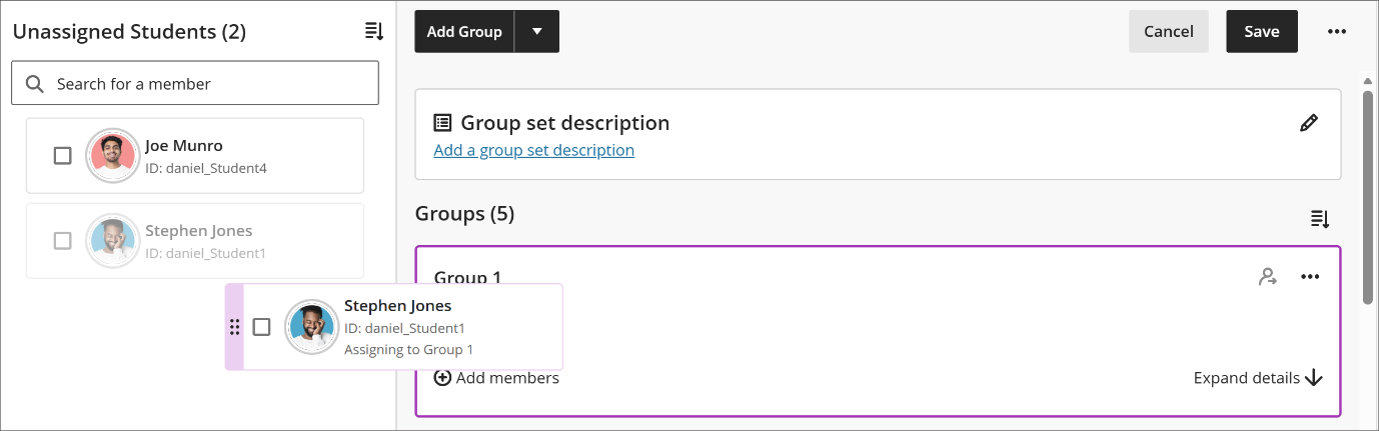
Drag students directly from the unassigned list into a group.
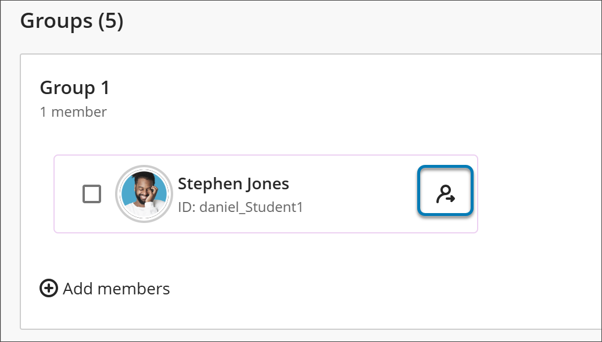
Remove individual students from a group without having to clear all members.
Continue using existing assignment methods alongside drag and drop.
This makes it much easier to create and adjust groups, particularly when making small changes to membership or balancing students across several groups.
Image 1: Instructors can drag and drop students to assign them to a group.
Image 2: Instructors can remove individual students from a group instead of removing them all at once.
Create multiple groups at once
Setting up groups has also become much more efficient.
Instructors
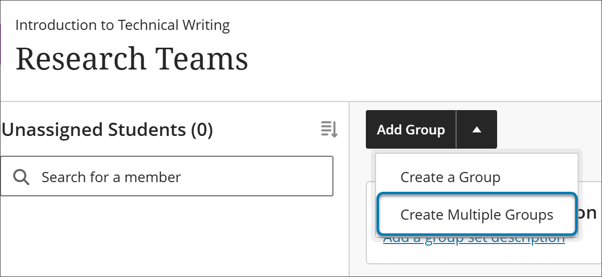
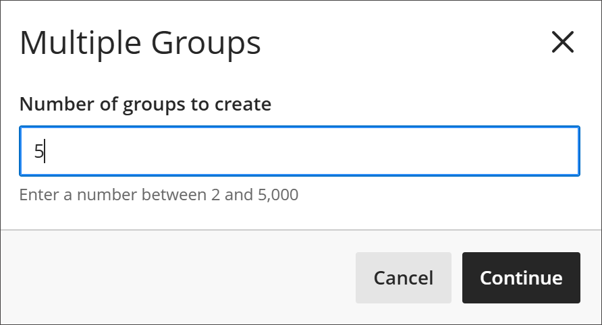
Instead of creating groups one by one, instructors can now create multiple groups in a single action. Anywhere from two to 5,000 groups can be generated at once, making setup much faster for large modules.
After groups are created, members can be added manually, imported, or assigned automatically.
A few things to note:
When using Automatically assign, Blackboard creates the required number of groups based on your chosen group size.
When using Self-enrol, three groups are created automatically. Any additional groups created through the bulk creation option are added to those existing groups.
This update significantly reduces the amount of repetitive setup required when preparing collaborative activities.
Image 1: Instructors can now create multiple groups at once instead of adding them one at a time.
Image 2: Instructors can indicate how many groups to create at once, with the minimum 2 and the maximum 5,000.
Make notifications more accurate and reliable
Blackboard has improved the reliability of its notification system by fixing several issues that previously caused missing, duplicated, or mistimed notifications.
Instructors and Students
Improvements include:
Students only receive due and overdue notifications for groups they are actually assigned to.
Duplicate notifications for copied Group Discussions have been removed.
Notifications for discussions, blogs, journals, and wikis now work correctly after course content is copied.
Digest emails now include information about grade updates and cleared grades.
Failed digest emails are no longer incorrectly marked as delivered.
Announcement emails are sent only after their configured start date, ensuring students do not receive messages before content becomes available.
These changes should reduce unnecessary notification traffic while increasing confidence that alerts reflect what is happening in a course.
Add sorting controls for users in Discussions
Discussion areas now include sorting controls to help users navigate long conversations more easily.
Instructors and Students
Users can now:
Sort posts by Newest first or Oldest first.
Return to discussions and find them displayed in the same order they previously selected.
Sorting applies throughout the discussion, including reply threads, and works consistently on mobile devices.
This makes it easier to follow active discussions, review contributions, and find recent activity.
Restructured Gradebook grid view
The Gradebook Grid View has been reorganised to provide a more streamlined grading experience for instructors.
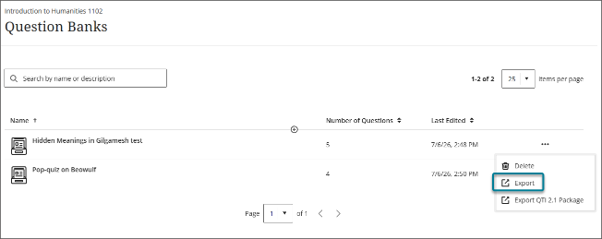
Question banks can now be exported directly from Blackboard.
Instructors
From the question bank management page, instructors can export a question bank as a file and save it locally.
This allows staff to:
Create backups of assessment content.
Share question banks with colleagues.
Reuse content across multiple courses.
The export process gives instructors greater flexibility when managing and preserving assessment materials.
Display answer-level feedback for selected options only
Blackboard has changed how feedback is displayed for multiple-choice questions.
Instructors
There are no changes to the way feedback is created. Staff can continue adding feedback to individual answer options using the existing workflow.
Students
After submitting an assessment attempt, students now only see feedback for the answer options they selected.
Previously, students could see feedback for all options. The new approach provides more focused guidance while preventing students from viewing feedback linked to answers they did not choose.
This allows feedback to remain targeted and relevant to individual responses.
Navigate courses faster with an improved user interface
Blackboard has continued its work to improve navigation and overall user experience.
These changes are intended to:
Make it easier to understand where you are within a course.
Reduce accidental navigation mistakes.
Improve consistency and performance.
Help students stay focused during assessments.
Importantly, course structures and content remain unchanged, so instructors do not need to redesign anything.
Full-page content navigation
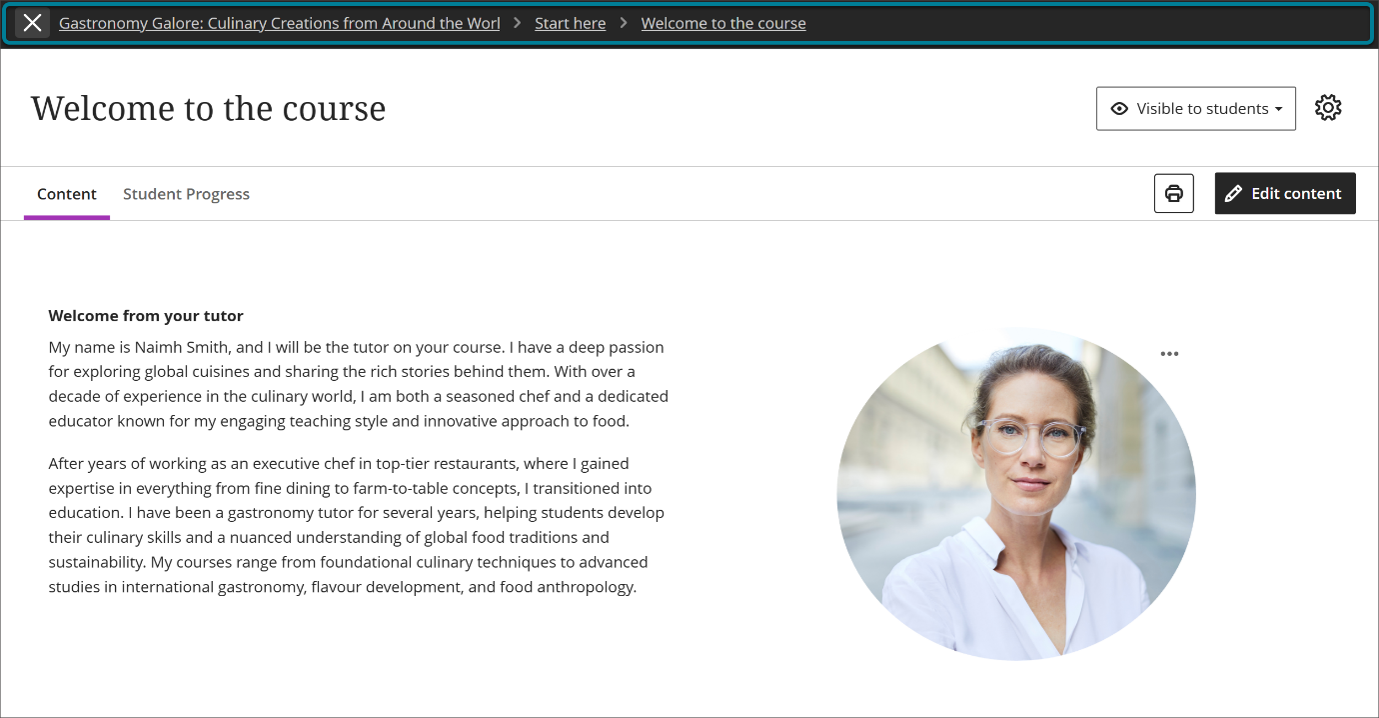
Learning modules, folders, documents, assessments, media, and other content items now open as full pages rather than in overlay panels.
Opening content in a dedicated page creates a more consistent experience and makes it easier to move back through course materials without losing your place.
Image 1: Content now opens as a full page with consistent headers and navigation, rather than as stacked overlay panels.
Breadcrumbs for contextual clarity
Content pages now include breadcrumb navigation.
Breadcrumbs show where an item sits within a course structure and provide quick access back to parent folders and modules. They are automatically generated and require no setup from instructors.
This additional context helps users keep track of their location within a course and move around more efficiently.
Image 2: Breadcrumbs on a content page show the user’s location and allow quick movement back through modules and folders.
Clearer, intentional exit from content
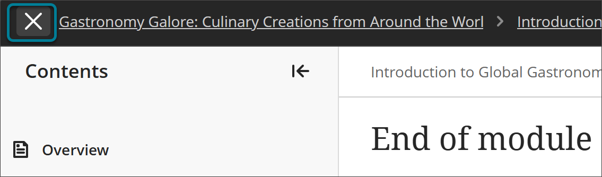
The purple “X” previously used to leave content has been replaced with a clearly labelled exit option in the navigation area.
Making the exit control more visible and deliberate helps reduce accidental page closures and makes navigation more predictable.
Image 3: The exit option now sits within the navigation banner, reducing accidental exits.
Focus state for tests and assignments (Students)
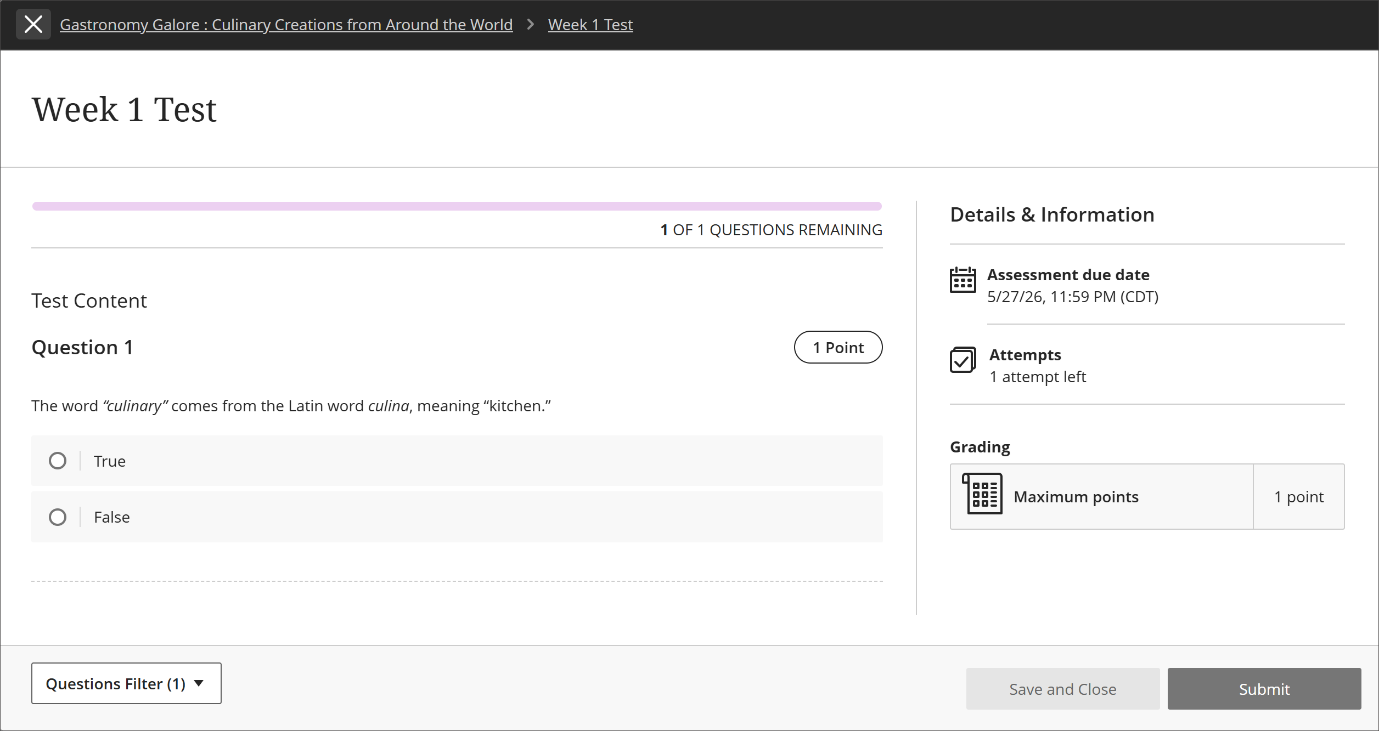
When students open a test or assignment, Blackboard automatically switches to a focus state.
This view reduces visual distractions by minimising non-essential navigation elements and presenting a cleaner assessment screen.
The feature:
Helps students concentrate on assessments.
Does not affect grading or functionality.
Still allows students to navigate elsewhere if needed.
Requires no action from instructors.
Focus state is enabled automatically and cannot be switched off.
Image 4: In focus state, nonessential navigation is minimized so students can concentrate on completing an assessment.
Set release conditions based on journal submissions
Release conditions can now be linked to journal submissions.
Instructors
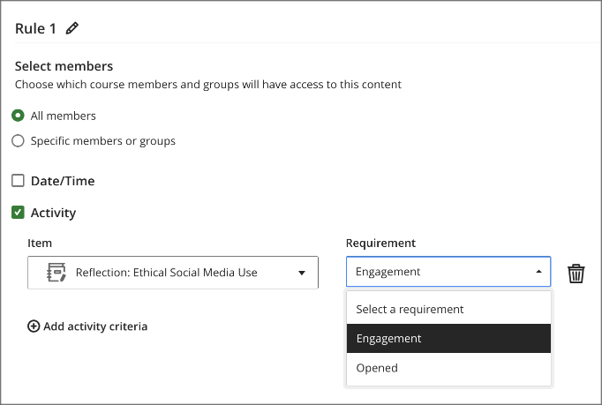
When configuring release conditions, instructors can choose journal submission status as a requirement. Once a student submits the required journal entry, the associated content becomes available automatically.
Importantly, instructors do not need to grade the journal before content is released. Blackboard records the submission as complete within progress tracking and uses that status to trigger content release.
This provides greater flexibility when designing structured learning pathways and prerequisite activities.
Image 1: Instructors select Engagement as the activity requirement for a journal.
Students
Students automatically gain access to new content once they submit the journal entry linked to a release condition.
There is no need to wait for marking or instructor approval before progressing, creating a smoother learning experience and reducing delays between activities.
The Annual Education and Student Experience Conference brings colleagues together to celebrate, share and showcase the innovative work taking place across our University to enhance learning, teaching and the student experience.
This year, a total of £10,000 is available, with applications welcomed for projects of up to £2,000 each.
Projects should align to this year’s conference themes.
Diversifying the curriculum
Skills, graduate attributes, and real-world application of competencies
Students as co-creators and collaborators
The awards are funded through the Education and Student Experience Fund and the Race Equality Charter Fund.
We encourage applications from across the University community and welcome proposals which would make a difference to our education and student experience.
Applicants should attend this year’s conference, which is taking place between 8-10 September. You can book your place using this online form.
The conference programme includes presentations from recipients of last year’s awards.
Are you thinking about coming to the Education and Student Experience conference in September? Maybe you’ve never attended before, or you are new to the university. Perhaps you’re not sure whether it would be a good use of your time. With just under a month to go, we wanted to release a blogpost outlining previous conference feedback.
Of course, we would say it’s the best three days in the diary (we do organise it!), but what do attendees from last year say?
Every year we run a feedback survey with people who have been to the conference. And last year 97% of people who responded rated the conference as 4 or 5 out of 5. And 90% said that it met their expectations.
The aspects of the conference that attendees valued the most were that it provided an opportunity to discuss up-to-date topics in learning and teaching, and community building. The mix of internal and external speakers means you have the chance to find out what’s going on in other AU departments, as well as universities in the UK and beyond. And you can meet staff in other departments who may share the same teaching or research interests as you. There’s plenty of time during breaks to meet new people as well as catch-up with colleagues you haven’t seen for a while.
Not only is the conference a great event, but attendees say that it has a direct impact on their teaching practice. Through both the conference papers and workshops, and the conversations, staff say that they use new approaches learnt from the conference in their teaching. After last year’s conference, several staff members told us they were going to explore using AI in their teaching. If you are thinking of applying for AdvanceHE fellowship, the conference is also a great way of taking part in CPD and reflecting on your teaching practice.
One of the messages that attendees suggested that we share more widely is that you’re welcome to dip in and out of the conference. We know that you may not be able to spend all three days attending, but you can come along for a couple of talks that really interest you. And of course, you can stay for as long as you like if you find that you want to carry on the conversation, or another session catches your eye.
So, it’s not just the organising team who rate the conference highly – staff from across the university agree that it’s a good way of meeting colleagues, discussing teaching topics, and learning something that they can use in their teaching. Come along and join them and find out for yourself. We’d love to see you there.