

We’ve had an issue the past couple of years with some colleagues unable to locate a folder to record into in Panopto.
When the Panopto recorder opens in a lecture theatre, the folder does not appear on the dropdown, forcing colleagues to record offline.
We have been liaising with ITS and Panopto over this matter.
If you are experiencing this issue, there are a couple of things you could try:
- Adding a link to All Panopto recordings in your Blackboard Course. Panopto permissions are synced across all modules if instructors engage with this link. See our FAQ on how to do this.
- Accessing Panopto from Blackboard.
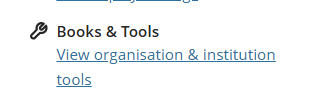
Go to your module in Blackboard and click Books & Tools from the right-hand menu.
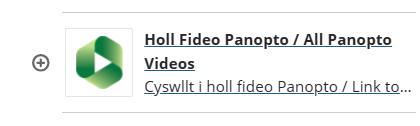
Choose Holl Fideo Panopto / All Panopto Videos
Choose Create and Panopto for Windows
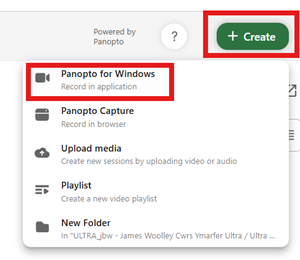
This will open the Panopto recorder and you should be able to choose the folder from the dropdown.
If you are still having difficulties, record offline, and contact the Digital Education Team (elearning@aber.ac.uk) with the following information:
- Location
- Time and date of lecture
- Module code
We’ll retrieve the recording and upload as soon as possible.
Apologies for any inconvenience caused.