Digital Education Training

Our Digital Education training programme is now available for staff to book onto on the staff booking page

Our training is split across 3 levels:

E-learning Essentials:

Our E-learning Essentials sessions provide a practical introduction to the University’s core digital learning technologies and the policies that support their use. These sessions are ideal for colleagues who are new to a tool, taking on a new teaching role, or looking to refresh their knowledge.

You will gain confidence in using technologies such as Blackboard, Turnitin, Panopto, Microsoft Copilot, and Vevox, as well as learn about key processes that support learning, teaching, and assessment.

Sessions available:

  • Become a Document Pro
  • Introduction to Blackboard Ally
  • Introduction to Blackboard Ultra
  • Introduction to Component Marks Transfer
  • Introduction to Microsoft Copilot for Learning and Teaching Activities
  • Introduction to Panopto Lecture Capture and Teaching Room Equipment (bilingual)
  • Introduction to Turnitin (bilingual)
  • Introduction to Vevox Polling Software

E-learning Enhanced:

Our E-learning Enhanced sessions focus on designing and creating engaging learning activities using digital tools within your own teaching context.

These hands-on workshops will help you explore innovative approaches to learning design, assessment, accessibility, and student engagement, enabling you to make more effective use of the University’s digital learning environment.

Sessions available:

  • Becoming an Alternative Text Pro
  • Design Interactive Online Learning Activities Using Blackboard Discussions and Journals
  • Designing Blackboard Tests
  • Designing Learning and Teaching Activities Using Vevox
  • Introduction to the Blackboard AI Design Assistant
  • Measuring and Increasing Engagement Using Blackboard Tools
  • Peer Assessment with Turnitin
  • Preparing for Your Blackboard Exam
  • Using the Advanced Features of Panopto

E-learning Excellence:

Our E-learning Excellence programme is designed for colleagues who want to create outstanding digital learning experiences and align their courses with recognised best practice.

Based on theBlackboard Exemplary Course Award rubric, these sessions explore the key elements of high-quality course design and effective digital pedagogy. While the sessions are designed as a complementary four-part series, you are welcome to attend individual sessions according to your interests and needs.

Sessions available:

  • Exemplary Assessment Design
  • Exemplary Course Design
  • Exemplary Interaction and Collaboration
  • Exemplary Learner Support
  • Submitting an Exemplary Course Award

We are committed to making our training as accessible and inclusive as possible. If you are unable to attend a session but would like access to the training materials, or if you would like to discuss any aspect of the session format or accessibility requirements, please contact the Digital Education Group at elearning@aber.ac.uk.

We look forward to seeing you at a forthcoming session.

Turnitin in Blackboard Assignment

If you use Blackboard Assignment for your assessment, you may be interested in our latest update. Staff can now use the functionality of Blackboard Assignment whiles also getting a Similarity Report from Turnitin.

This is particularly useful for multi-part assignments and assignment files that are too big to use Turnitin. Like other elements of Blackboard, Assignment is available in Welsh for both staff and students. It also means that you get the benefits of Blackboard Assignment (such as an electronic receipt for students) as well as being able to use the same Similarity Report as other colleagues.

If you already make use of Blackboard Assignment, then we encourage you to try out the new Turnitin feature. Our Guide contains all the information to help you get started. Submission and marking stay the same, but you get the additional Similarity Report alongside your marking.

We’d also be interested in your feedback – during the year, we’ll contact you for feedback on using this new Turnitin integration.

Peer Assessment Tools available in our virtual learning environment

We recently ran our E-learning Enhanced: Using Turnitin for Peer Assessment training session and wanted to highlight the different tools that are available for Peer Assessment across our Digital Education Platform.

Peer Assessment activities have several benefits to students:

  • Allow students to invest in and manage their own learning
  • Shared learning experiences
  • Reflect on learning
  • Consider communication and constructing feedback
  • Develop conversation and collaboration skills
  • Improve academic achievement
  • Share responsibility for learning
  • Develop employability skills around feedback
  • In group scenarios, identify participants’ contributions
  • Quick feedback
  • Building a learning community

For Liu & Carless (2006), “peer assessment and peer feedback … enables students to take an active role in the management of their own learning” (280). 

If you are interested in exploring this topic further, we recommend:

Liu, N.-F. & Carless, D. (2006) Peer feedback: the learning element of peer assessment. Teaching in higher education. [Online] 11 (3), 279–290.

Lynch, R., Mannix McNamara, P. & Seery, N. (2012) Promoting deep learning in a teacher education programme through self- and peer-assessment and feedback, European Journal of Teacher Education, 35:2, 179-197, DOI: 10.1080/02619768.2011.643396

Zhu, Q. & Carless, D. (2018) Dialogue within peer feedback processes: clarification and negotiation of meaning. Higher education research and development. [Online] 37 (4), 883–897.

We have several peer assessment tools that are available:

Blackboard Assignment for Peer Assignments

You can add a Rubric to the assignment – student will see this as part of their submission.

Workflow

  1. Create Assignment and set Peer Settings (see Peer Review for Qualitative Peer Assessments)
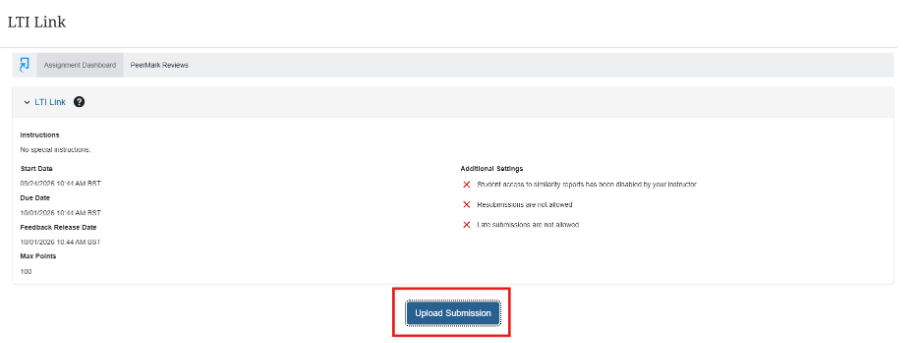
  2. Students submit their work as normal (see Blackboard web site)
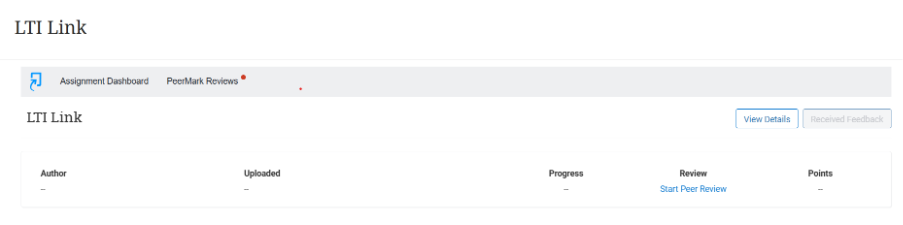
  3. After Due date and time has passed, students review submissions see Blackboard web site
  4. After the Peer Review Due Date, staff complete marking (see Blackboard web site)
  5. Student view staff feedback, peer feedback and final mark

Note that:

  1. Students won’t be allocated any reviews if not enough assignments are submitted.
  2. Late submissions will be allocated to students. Late submission is allowed automatically as part of the peer assessment process.
  3. Students do not see any names as part of the review process. You should advise all students not to include personal information on their documents.
  4. Students can provide written feedback in the review process but can’t assign a mark (unless this is included in the text feedback box)
  5. You can add a Rubric to the assignment – student will see this as part of their submission and can refer to it while reviewing. However, they can’t use it to mark work.
  6. You can hide peer reviews if you feel the content isn’t appropriate

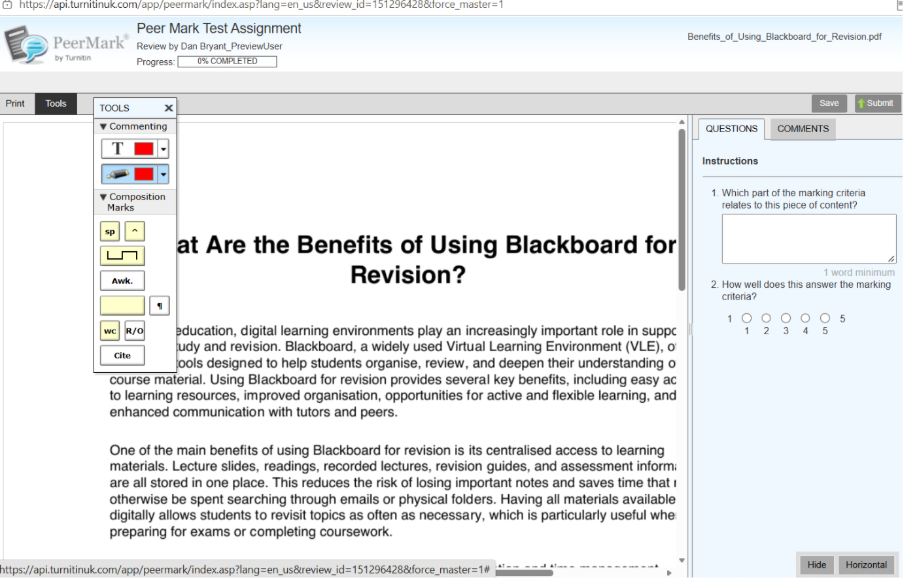
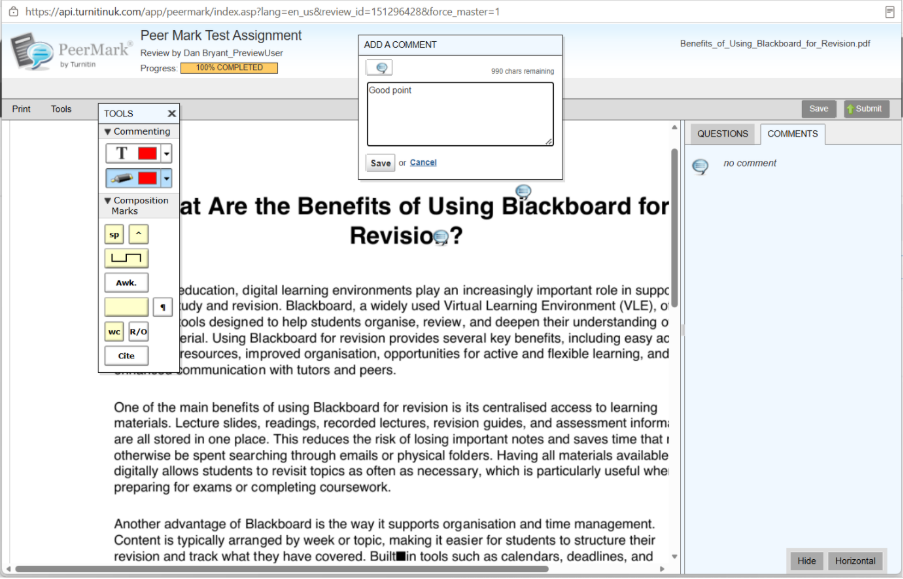
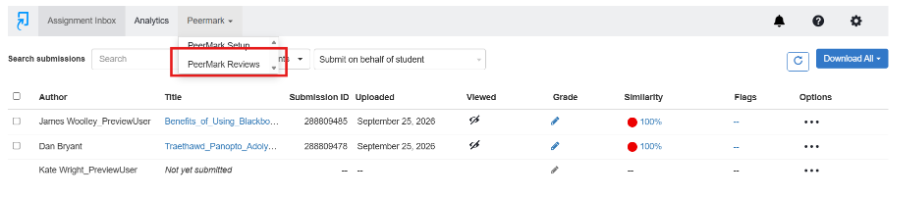
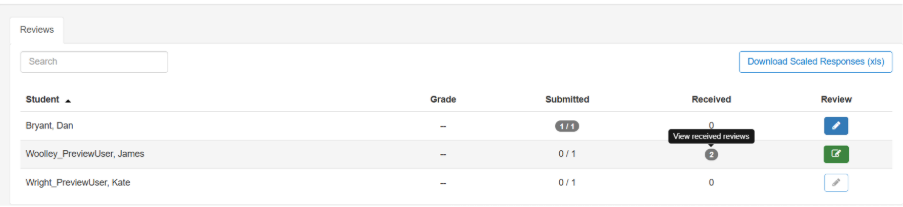
Turnitin PeerMark

Workflow

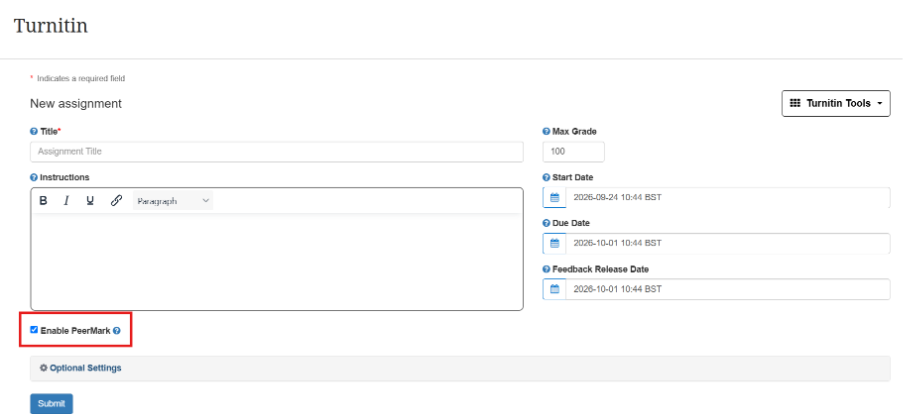
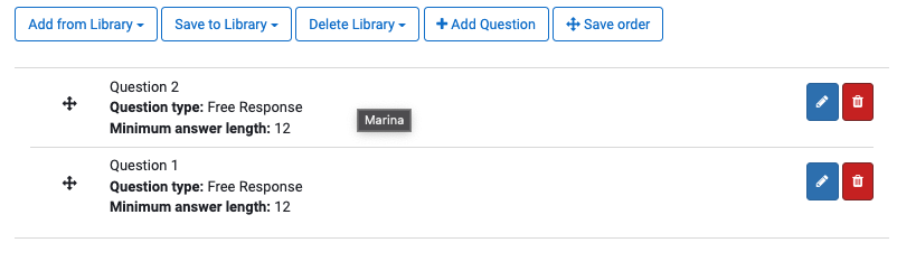
  1. Create a Turnitin Assignment and enable PeerMark
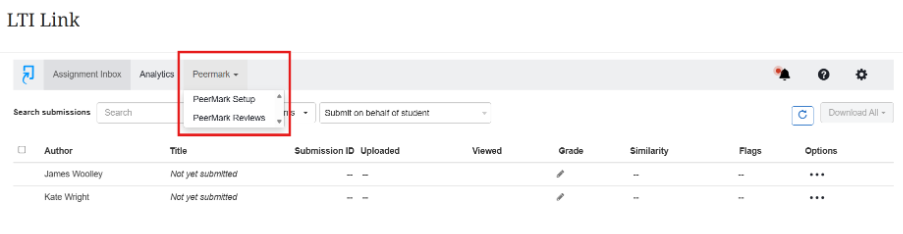
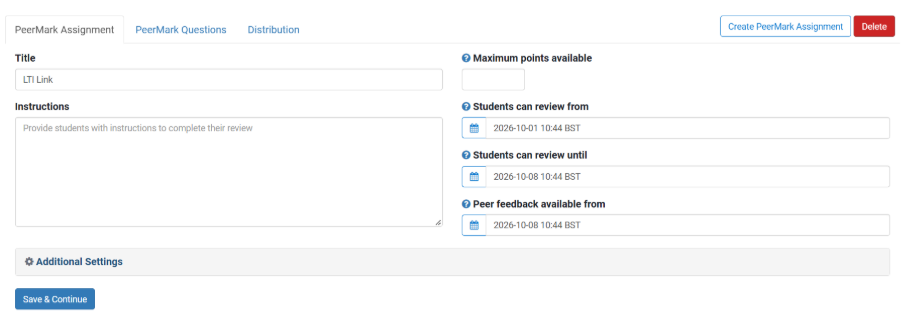
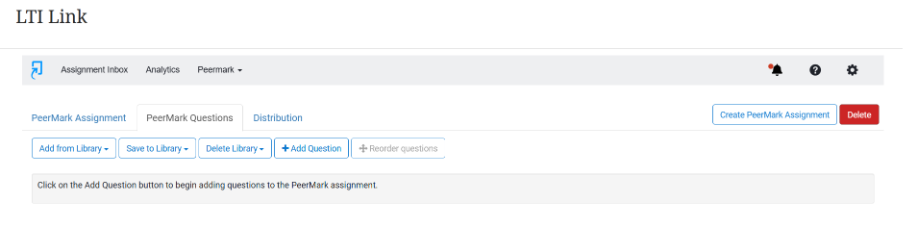
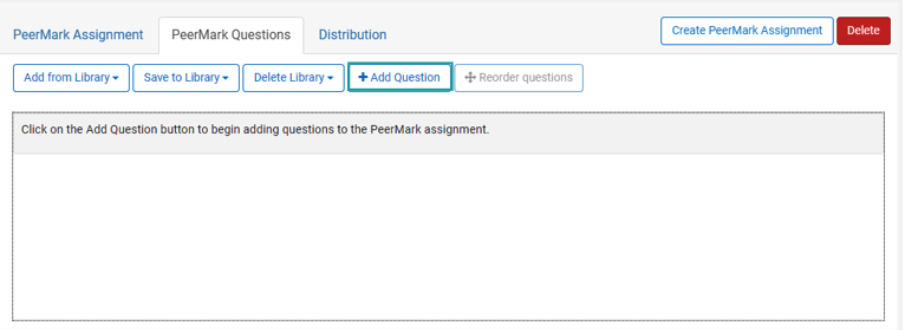
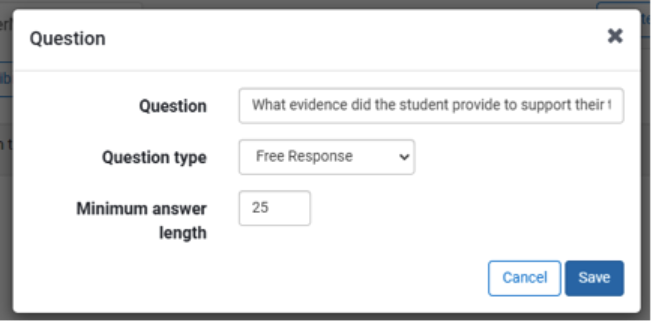
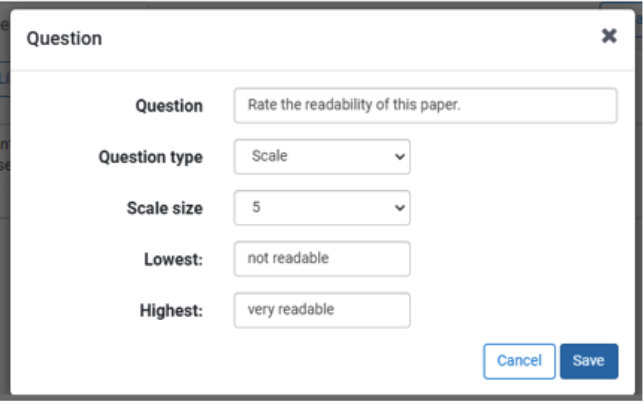
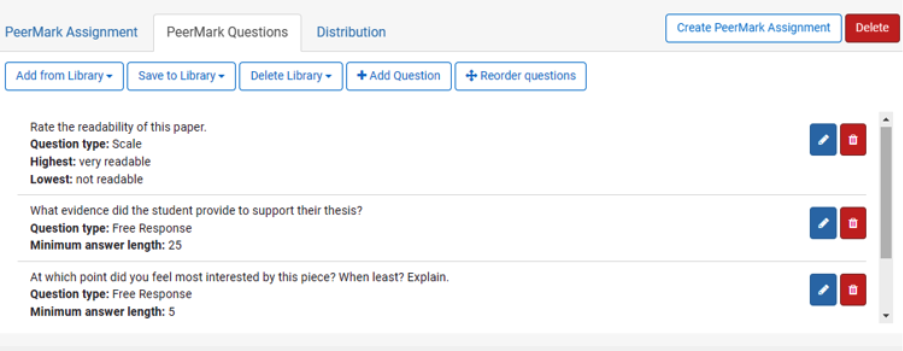
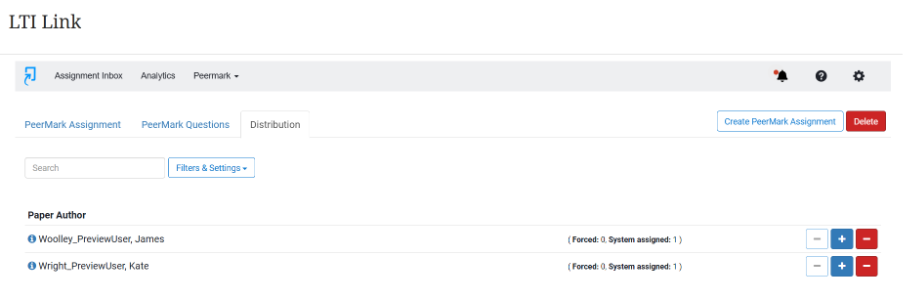
  2. Go back into Turnitin Assignment to set up Peer Mark Settings
  3. Students submit to Turnitin submission point
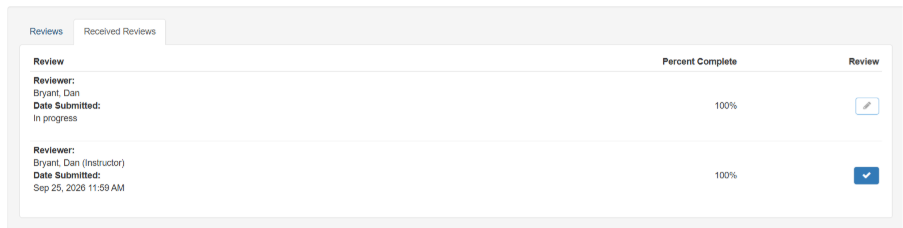
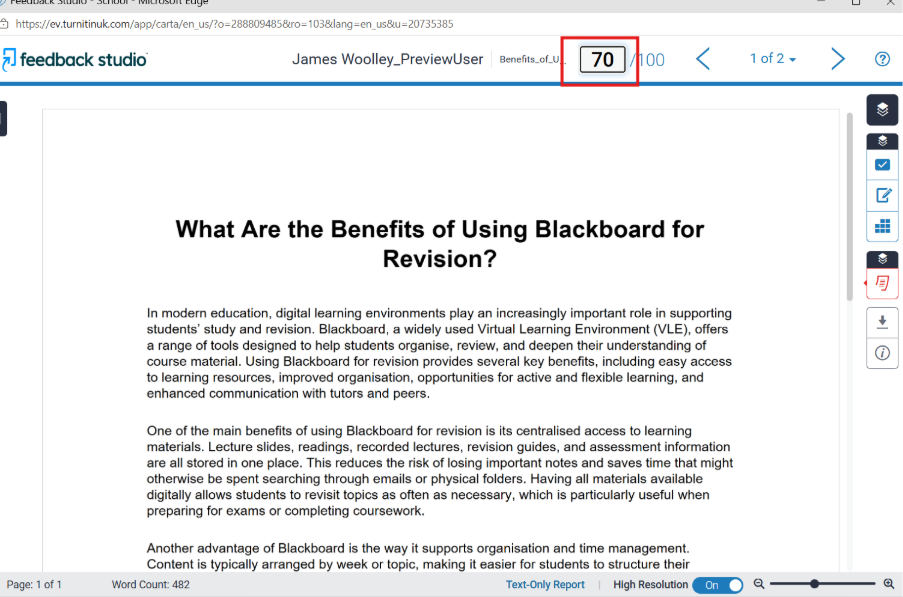
  4. After PeerMark start date, students are able to view another student’s assignment and leave feedback / scores to questions
  5. PeerMark feedback is visible to students immediately
  6. Lecturer needs to allocate a final mark manually

Guidance:

Overview of PeerMark: https://help.turnitin.com/feedback-studio/turnitin-website/instructor/peermark/about-peermark-assignments.htm

Creating a PeerMark Assignment: https://help.turnitin.com/feedback-studio/turnitin-website/instructor/peermark/creating-a-peermark-assignment.htm

Student guidance on Using PeerMark: https://help.turnitin.com/feedback-studio/turnitin-website/student/student-category.htm#peermark

Discussions

Discussions are available in every course in Blackboard – these are a great way for students to engage asynchronously with their peers; they can post comments and respond to each others’ posts.

Workflow

  1. Instructor creates a Discussion
  2. Students contribute to the Discussion
  3. Students respond to other Discussion posts

For further advice on creating discussions, please see below for Blackboard guidance:

Journals

Workflow

  1. Instructor creates a Journal (private between instructor and student)
  2. Students reflect weekly on their contributions to project
  3. Instructor has overview and monitors
  4. Can be used for students to give an idea on group contributions throughout process of peers

Create Journals: https://help.blackboard.com/Learn/Instructor/Ultra/Interact/Journals

Guidelines for students

https://journals.sagepub.com/doi/full/10.1177/1469787416654794 – contains guidance for students. Suggests providing a session for students on how to write feedback.

https://www.tandfonline.com/doi/full/10.1080/02602938.2019.1697424

“For peer review in the classroom to be effective, there is clear evidence that the process needs structure, clear and accessible assessment criteria and appropriate scaffolding sessions for students (Mangelsdorf Citation1992).”

https://www.ctl.ox.ac.uk/peer-feedback – includes some useful questions and prompts that could be used to structure feedback.

Peer feedback has been used widely within group assessment work, for example, when it comes to ascertaining student participation, and factoring in group contributions. For an example of a group peer marksheet, see this sample template from Carnegie Mellon University.

Our Academy Forum handout on Peer Assessment provides further information and Aberystwyth University Case Studies.

Turnitin App Retirement

Turnitin has announced the retirement of their Turnitin app at the end of the year, December 2025.

The Feedback Studio iPad app will be retired and no longer available. Instructors can continue to access Feedback Studio as usual through Blackboard. This includes mobile devices and tablets.

Turnitin are working on developing a New Standard Assignment, so instructors can review and provide feedback on student work from tablets without needing a separate app. We will release comms regarding this new service in due course.

If you have any questions or concerns about this, please don’t hesitate to contact us (elearning@aber.ac.uk).

E-learning Training Series: Semester 1, 2025-26

We are delighted to announce our training series for the forthcoming semester.

All training can be booked online using your Aberystwyth username and password. Our training booking system is now automated, so you will receive your calendar invitation within an hour into your calendar. Please join these sessions from your Outlook calendar.

If you have any questions, please contact us: elearning@aber.ac.uk.

As usual, our training sessions are grouped into 3 series:

  • E-learning Essentials: designed for colleagues new to the university, teaching, or who would like to get a refresher. The aim of these sessions is to ensure that colleagues can meet the university’s digital learning and teaching policies.
  • E-learning Enhanced: designed to build on the skills gained in our e-learning essentials series, colleagues will create an activity or assessment unique to their learning and teaching contexts.
  • E-learning Excellence: designed to offer colleagues the opportunity to create exemplary learning and teaching opportunities – often unique and sector leading.

In addition to the usual offerings, we also wanted to highlight the new sessions that we have introduced for 2025-26:

New sessions for 2025

E-learning Essentials

Using Microsoft Co-pilot for Learning and Teaching Activities

This session will introduce colleagues to Generative AI and offer the opportunity to think about ways in which you can incorporate Generative AI into your learning and teaching practice.

You can book your place on all the other sessions in this E-learning Essentials series via this link.

A reminder that all Essentials sessions are strongly recommended for any new members of staff in your department.

E-learning Enhanced

Become a Blackboard Document Pro

Blackboard Documents have had a complete overhaul in Ultra. This 30-minute pro session gives an overview of the new features and allows you to give it a go in your course.  

Blackboard Interactive Tools

We’ve combined our Discussions and Journals session into one. We’ll go through activity design for our interactive tools to help maximise student engagement.

Measuring and Increasing student engagement using Blackboard Tools

We will look at the analytical tools available in your Blackboard course to help monitor student engagement. We’ll use this to tailor messaging as well as creating other activities such as knowledge checks and learning module progression to help keep your students engaged with their learning.

Peer Assessment with Turnitin

One of the features of Turnitin is PeerMark which allows you to create peer assessment opportunities for your students. This is great to allow students to provide formative feedback on each other’s work.

Using the advanced features of Panopto

Want to spruce up your recordings? This session will showcase different ways in which you can use Panopto: from inserting quizzes mid recording, to give students the opportunity to get creative and use Panopto themselves. This session is great for those adopting a flipped classroom approach or who want to make use of Panopto beyond Lecture Capture.

Other sessions include the Blackboard AI Design Assistant and Advanced Vevox polling software design.

You can book your place on all the other sessions in this E-learning Enhanced series via this link.

E-learning Excellence

We’ve designed 4 new workshops for colleagues based on the 4 areas of the Exemplary Course Award. Looking at each aspect, colleagues will reflect on how their own courses can be developed.

The 4 sessions are:

Exemplary Course Design

Exemplary Assessment Design

Exemplary Interaction and Collaboration

Exemplary Learner Support

You can book your place on all the other sessions in this E-learning Excellence series via this link. Other sessions include Submitting an Exemplary Course Award.

If there are any other training topics that you’d like us to consider for Semester 2, please contact us.