
As we approach the end of the year and wrap up the first term of teaching, we have some ideas to share with you about how you can use Vevox to create engaging and interactive end-of-year activities for your students.
Month: November 2026
Generative AI Good Practice Event – Registration Still Open
Registration is still open for the Generative AI Good Practice Event which will be held between 13:00-17:00 on Wednesday November 25 in Tŷ Trafod. The event will bring together staff from across academic and professional services to explore some the innovative practices and trends around generative AI and assessment in the university. You can register for the event through the university’s Events and Training page.
The core themes of the event will be to consider how assessments in the university have adapted to:
- Incorporate the use of Generative AI or
- Prevent the use of Generative AI and enhance assessment validity
An array of interesting and useful presentations have been selected around these topics. These presentations will be delivered by staff from departments across the university, so the programme promises to offer something for everyone. A full version of the event timetable is available here: Generative AI Good Practice Event – November 2026.
Don’t miss out on the chance to hear more about the ways that the university is responding to generative AI and to consider how we can use this best practice to improve our own learning and teaching.
Our most frequently asked questions from October 2026:

Our most frequently asked questions from October 2026:
– Panopto offline uploads and other general Panopto advice
– Adding / removing Staff from modules
– Generative AI assessment good practice event information
Fix Your Content Day – Thank You!
A huge thank you to all the staff who took part in this year’s Fix Your Content Day!
What’s new in Blackboard November 2026
In the November update, we want to draw your attention to the following Blackboard enhancements:
- Expand group management search capabilities
- November improvements to the beta Content Editor in Blackboard Documents
- Print and download rubrics
Expand group management search capabilities
Managing large group sets in Blackboard is now much easier. Instructors can search for students whether they have already been assigned to a group or are still unassigned. Previously, once everyone had been allocated, the search feature became far less useful, making it difficult to locate individual students in large classes.
The updated search now looks across both students and groups. Instructors can quickly find a student, see whether they are assigned to a group, and move them if required. Students who are not yet assigned can also be located and added to a group directly from the search results.
Image 1: Instructors can now search for assigned students as well as unassigned students.
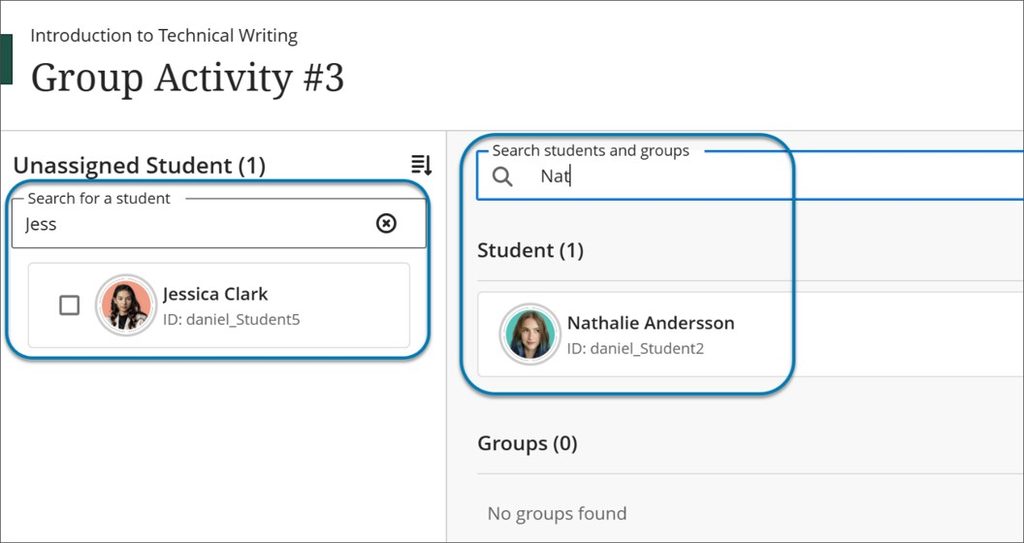
Image 2: Searches can return both students and groups.
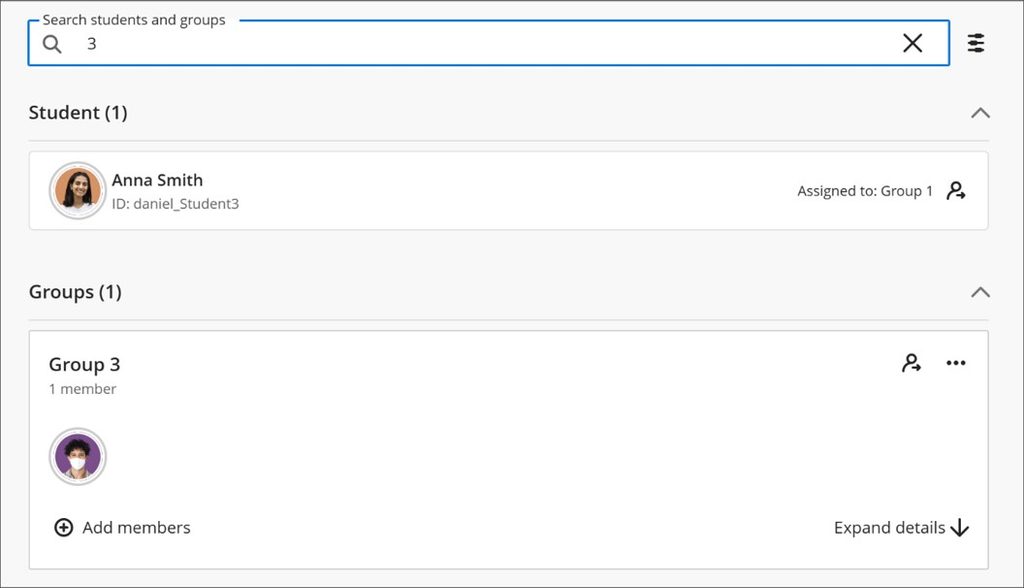
Image 3: Filters allow results to be narrowed to students or groups.
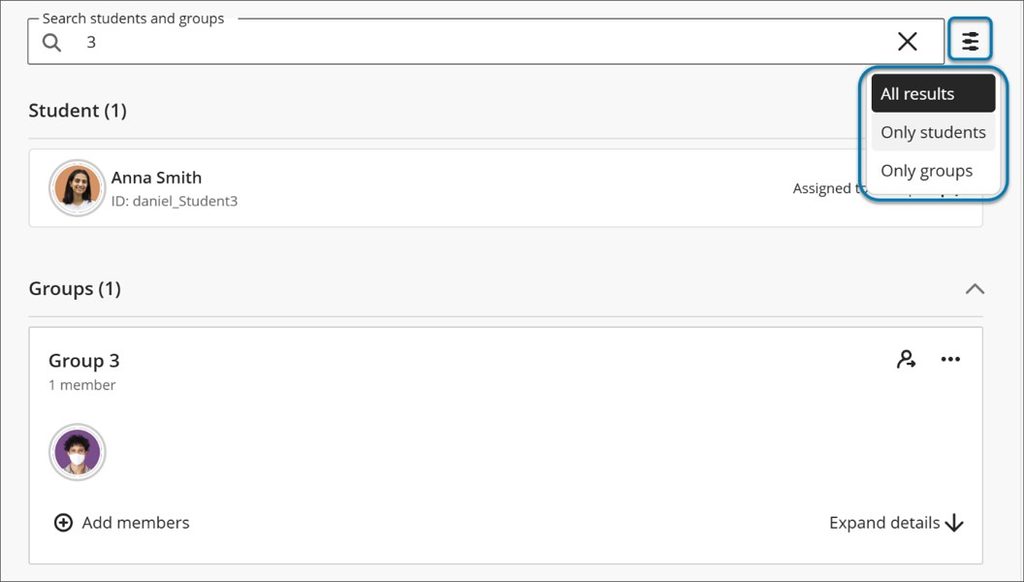
Searches continue to match against first name, last name and student ID. Overall, the enhancement makes it much faster to organise, review and reassign students, particularly in large modules with many groups and participants.
November improvements to the beta Content Editor in Blackboard Documents
The beta Content Editor has received a range of updates focused on accessibility, consistency and ease of use. The goal is to make creating and editing content more intuitive while giving instructors quicker access to the tools they use most often.
Accessibility
Accessibility improvements include a new skip-navigation link for keyboard users and improved contrast for disabled toolbar buttons, helping users identify available actions more easily.
Toolbar and Menu Updates
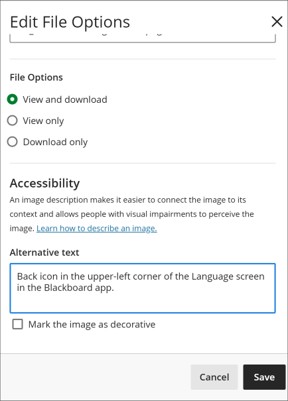
Several toolbar enhancements have also been introduced. When uploading an image, instructors can now review file properties immediately, including alternative text and display settings, before inserting the image. Files stored in the Blackboard Content Collection can also be accessed directly from within the editor, reducing the need to switch between screens.
Image 1: File properties are now available during image uploads.
Maths Authoring
Maths authoring has also been improved with support for LaTeX begin/end environments. This builds on earlier MathJax and LaTeX rendering features and provides more flexibility when creating mathematical content.
Print and download rubrics
Note: This section relates to rubrics for Blackboard assignments and tests, not Turnitin.
Instructors can now print both blank and completed rubrics or save them as PDFs using their browser print options. This supports offline marking, sharing feedback and maintaining records for quality assurance, accreditation and course review activities.
Blank rubrics can be printed directly from the Course Rubrics page using the Print option or the print icon within a rubric. The resulting version displays criteria and performance levels without scores and can be printed or saved as a PDF.
Image 1: The Print option is available from the rubric menu.
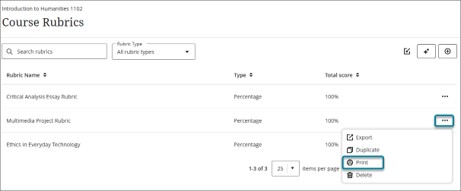
Image 2: Scored rubrics for assignments and tests can be printed.
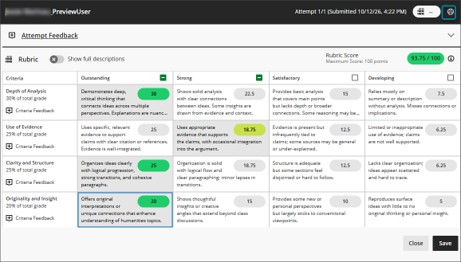
Image 3: Journals and discussions also support printing graded rubrics.
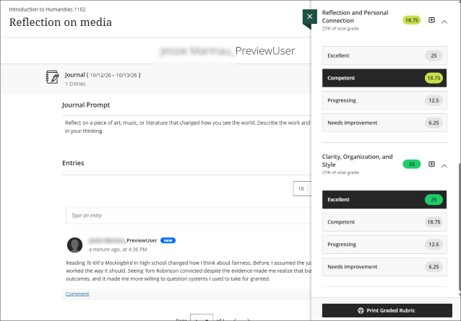
For assignments and tests, the print option becomes available after at least one rubric criterion has been scored. The same approach is used for journals and discussions, where a Print Graded Rubric button appears once marking has started. In all cases, instructors can produce a hard copy or save a PDF version for future reference.
Why take part in Fix Your Content Day?
Wondering why you should take part in Fix Your Content Day? On November 10, Aberystwyth University will be joining institutions worldwide to fix as many accessibility issues as possible using Anthology Ally, and you can help! Read on for a few reasons why you should get involved, and join us in B23 Llandinam for a drop-in session where tea, biscuits, and support for using Ally will be available.
Generative AI Assessment Good Practice Event: Programme Announcement
We are delighted to confirm our programme for the Generative AI Assessment Good Practice Event that will be taking place on Wednesday 25 November.
The event will be held between 13:15 and 17:00 in the Visualisation Centre building on the Penglais campus – with presentations taking place in Tŷ Trafod, as well as VC rooms 0.03 and VC 0.06.
An exciting line up of presenters from across the university will be joining us for the event. In the first round of presentations, we will be hearing from:
- Daniel Bryant from the Digital Education Team within Library, Academic and Digital Services.
- Bernie Tiddeman and Christine Zarges from the Department of Computer Science.
- Rhys Dafydd Jones, Emma Butler-Way, Tom Holt from the Department of Geography and Earth Sciences.
Academics from across the university will then present more areas of good practice relating to generative AI and assessments. The other speakers that we have lined up are:
- Miguel Hernandez from the Department of History & Welsh History.
- Louise Chennel from the School of Art.
- Lauren Harvey from Department of Law & Criminology.
- Cennydd Jones and Hazel Davey from the Department of Life Sciences.
- Daniel Peck from the Department of Mathematics.
- Jamie Harris from the Department of English & Creative Writing.
- Steve Atherton from the School of Education.
- Alex Mangold from the Department of Modern Languages.
The full programme and abstracts will be announced on the university webpage soon. In the meantime, you can book your place clicking on this link.