The Learned Society of Wales (LSW) annually awards medals to researchers who excel in their field. The medal categories celebrate excellence in several areas of achievements, with further information on each medal at –
If you would like to nominate a colleague or an Early Career Researcher (ECR) please see the guidelines and nomination forms on the LSW web page.
To be eligible for any of the medals, nominees must be resident in Wales, born in Wales, or otherwise particularly connected with Wales.
The deadline for 2024 medal nominations is 5.00pm on 30 June 2024. Each medal has a dedicated committee to assess the nominations and decide who should receive the award.
Winners will be announced in October 2024 and will receive a specially struck medal and a cash prize of £500.
Please read the guidelines before you complete the medal nomination form. If you have any questions, please contact the LSW Fellowship Officer, Fiona Gaskell – fgaskell@lsw.wales.ac.uk. For further information about the LSW Medals, including past winners, visit www.learnedsociety.wales/medals or you can have an informal conversation with Annette Edwards, LTEU aee@aber.ac.uk
The April update to Blackboard Learn Ultra includes a much-requested feature; Anonymous posts for discussions. Additionally, there are improvements to feedback and Gradebook calculations.
Anonymous posts for Discussions
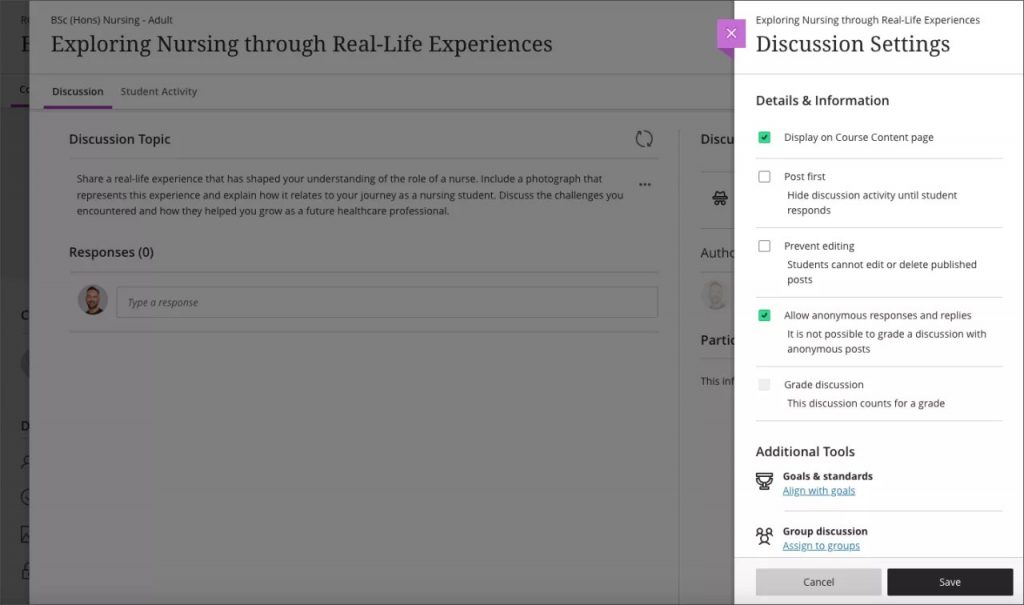
Discussions play a pivotal role in nurturing peer-to-peer interaction and critical thinking. Students need to feel free to express their ideas and opinions without fear of judgement. To support this, Blackboard have added an option for instructors to allow anonymous posts in ungraded discussions. This feature provides flexibility for instructors. They can toggle anonymity on or off as the discussion progresses. Any existing anonymous posts keep their anonymity.
Image below: Setting to turn on anonymous posts
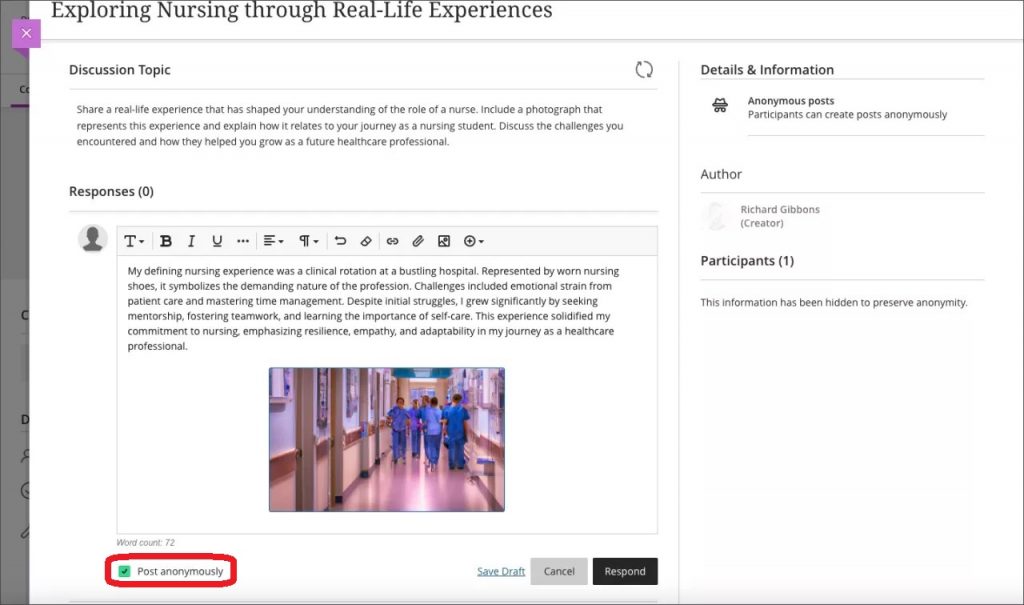
Note: When intending to post anonymously a student must tick Post anonymously.
Image below: A student making an anonymous post with Post anonymously ticked (highlighted)
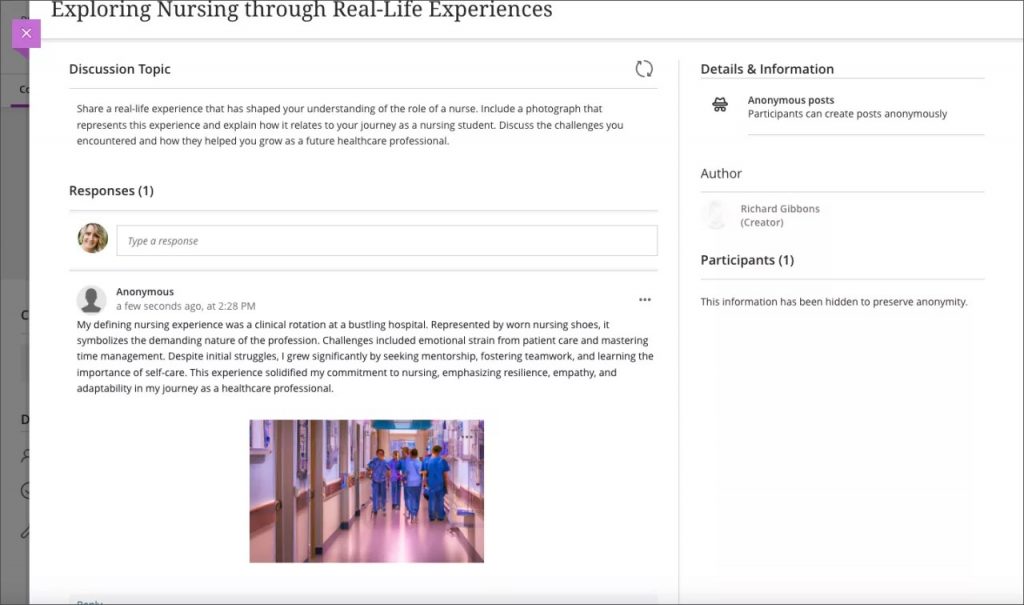
Image below: An anonymous post in a discussion
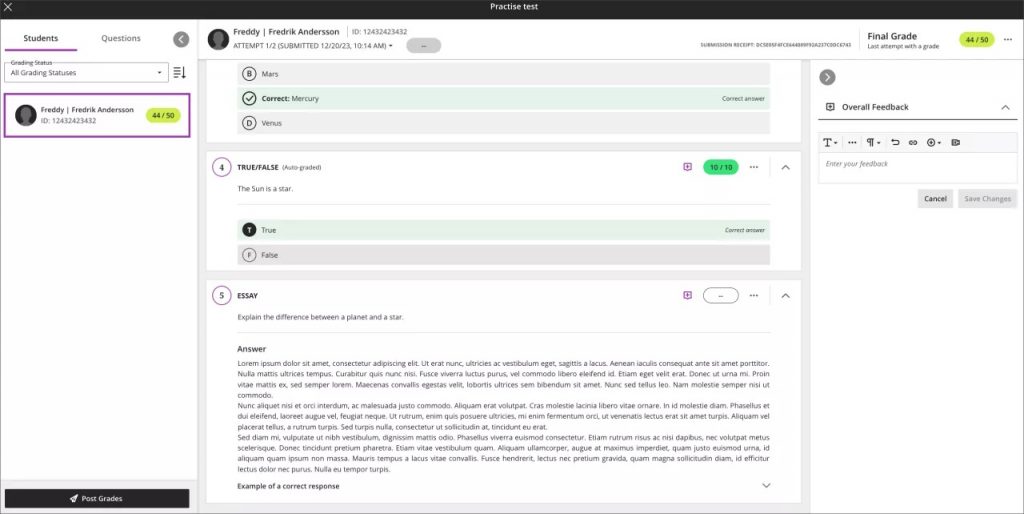
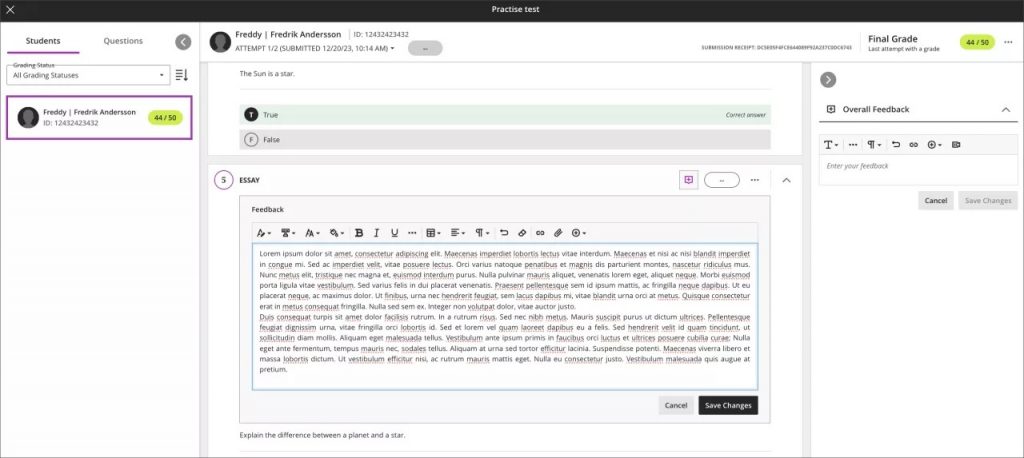
Add question feedback when grading by student
Instructors can now provide contextual feedback by student on all question types. Question level feedback promotes deeper understanding and personal growth among students. Question level feedback complements the existing capabilities of overall submission feedback and automated feedback for auto-graded questions.
Note: Blackboard are targeting the May release for per-question feedback when grading tests by questions rather than by student.
Image below: Instructor view of adding per question feedback
Image below: Instructor view of question with saved feedback
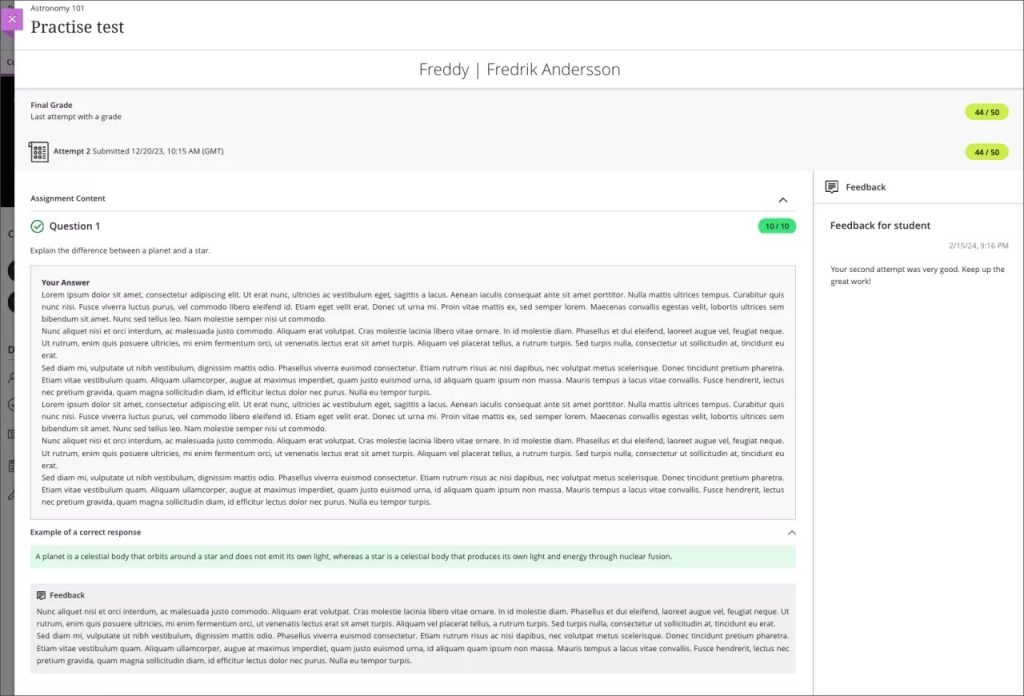
Once students have submitted their tests and scores are posted, students can access the feedback. Students can access both overall feedback and question-specific feedback.
Image below: Student view of feedback added to an essay question
Student feedback remains visible to students regardless of release condition settings
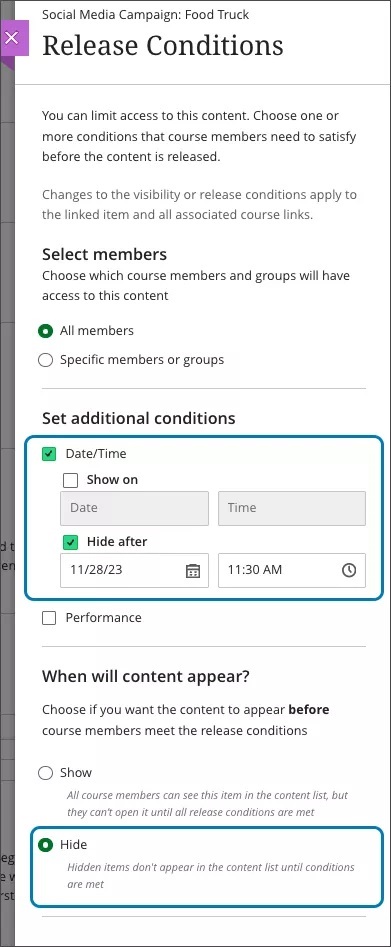
Instructors may want to control access to course content using release conditions. This is helpful for providing custom learning paths through course content. The release conditions include an option to show or hide content to/from students before they meet release conditions. Blackboard have modified how these settings impact the students’ view of feedback from instructors. Now instructors can set release conditions without any impact to feedback to students.
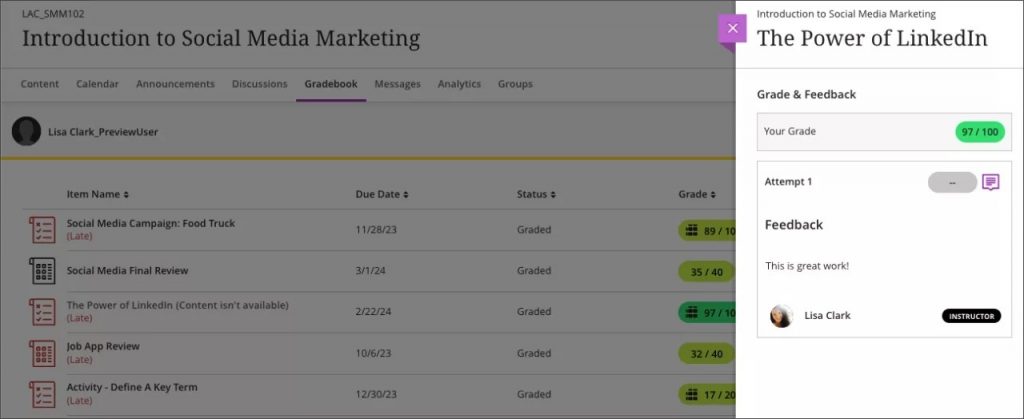
In the past, when an instructor selected the option to hide content, students could view associated grades but not the feedback. Blackboard have corrected this to ensure that students can always review feedback.
Image below: Instructor view of release conditions settings with date/time release condition set in combination with Hide state in “When will content appear?”
Image below: Student gradebook view with display of student’s feedback and grade regardless of the release condition setting in the above image.
Persistent navigation for Learning Modules
To improve students’ navigation in a learning module, Blackboard have updated the navigation bar. Now the navigation bar is sticky and remains visible as students vertically scroll through content. Students no longer need to scroll back up to the top of content to access the navigation tools.
Image below: The navigation bar is always visible
Calculations changed from using BigDecimal to BigFraction
Instructors need a gradebook that supports diverse grading scenarios. Blackboard are changing the software library used to perform calculations in calculated columns and the overall course grade.
Example: A course contains 3 assignments worth 22 points each. The student scores 13/22 on the first assignment, 14/22 on the second assignment, and 15/22 on the third assignment. An instructor creates a calculated column to calculate the average of these assignments.
Using the new software library, BigFraction, the average will calculate as 14/22.
With the former software library, BigDecimal, the average would incorrectly calculate to 13.99/22. The new software library ensures calculations compute as expected.
Aberystwyth University will be running a two-day Digwyddiad Rhannu Arfer Da – Rhagoriaeth Academaidd on the 2nd (face to face) and 3rd (on-line) July 2024. The event will be held through the medium of Welsh only. This event has been made possible due to the Small Grant Project money from the Coleg Cymraeg Cenedlaethol.
The aim of the two-day event is to present papers under the theme of Teaching Excellence – for example:
Learning and Teaching
Dysgu trwy gyfrwng y Gymraeg
Student Support
Supervision
Personal Tutoring
The academic papers will be an opportunity for staff across Wales to present their research, under the theme of academic practice – through papers, posters, panels etc. Presentations at the event are welcome from anyone teaching from staff to PhD students.
The Call for Proposals, at the following link Galwad am Bapurau – Digwyddiad Rhannu Arfer Da (jisc.ac.uk) asks for submissions of no more than 500 words, through the medium of Welsh. We welcome contributions to the event in the form of:
20 minutes presentations
45 minutes presentations
An individual or a group presentation
Posters from individuals or groups
Sharing good practice Panels
The deadline for these proposals is midday on Wednesday 27 March 2024.
I would be grateful if you could share this more widely with colleagues who maybe in interested in attending this event.
If you would like to discuss anything further, please do not hesitate to contact me.
The Learned Society of Wales would like to invite you and a guest to join us at a drop in ‘meet and greet’ session being held at Aberystwyth University on Tuesday 13th February 2024.
Tea, coffee and light refreshments will be served and you are welcome to join us for as long as you wish between 12.30 and 1.30pm.
You will be able to meet and talk to staff from the Learned Society including Olivia Harrison (CEO) and Helen Willson (Strategic Engagement Manager) as well as our University Representatives at Aberystwyth University – Emeritus Professor Eleri Pryse and Professor Iwan Morus. We will also be joined by the President of the Learned Society of Wales – Professor Hywel Thomas.
It will be an opportunity for Fellows of the Learned Society to come together and for all those who attend to meet others who are interested in research and its impact in Wales as well as network and find out more about the Learned Society of Wales including its work with Early Career Researchers.
Who is this event for?
Current Fellows of the LSW
Anyone interested in research in or about Wales and its impact on policy
People interested in learning more about becoming a Fellow of the LSW
Early Career Researchers who would find benefit from joining an interdisciplinary network to engage with and learn from
You can find out more about the LSW and our work here. This is a drop-in session and there is no obligation to sign up or formally accept this invitation. However, we would appreciate an indication of numbers so If you know you’ll be coming along or if you would like further information please email us on lsw@wales.ac.uk
As leader of our PGCTHE programme, I keep an eye out for resources to help staff teach effectively. These include webinars, podcasts, online toolkits, publications and more. Topics include active learning, online/blended teaching, accessibility/inclusion, and effective learning design based on cognitive science. Below I’ve listed items that came to my attention in the past week. In the interest of clarity, our policy is to show the titles and descriptions in the language of delivery.
Online events and webinars
January
25/1/2024 Future Trends Forum, Higher Education for Good with Bryan Alexander, Laura Czerniewicz & Catherine Cronin
11-15/3/2023 Active Learning Network, Global Festival of Active Learning: Back to the future – looking ahead for active learning (Call for proposals open until 26/1/2024)
12-13/3/2024 Jisc, Digifest 2024: Imagining the future of education and research (hybrid in-person in Birmingham and online)
London School of Economics (2023), Practice and perspectives from LSE (video playlist featuring example of AI use for university teaching), Eden Centre, LSE
Monthly series European Network for Academic Integrity, ENAI monthly webinarsfree open webinars on various topics related to academic integrity.
Subscribe to SEDA’s mailing list for email discussions about educational development and emerging teaching practices. This is one of the sources I use when identifying useful material for the Roundup.
Follow University of Birmingham’s Higher Education Futures institute HEFi on Twitter for daily posts with links to pedagogical literature and more. This is one of the sources I use when identifying useful material for the Roundup.
Join the #LTHEchat on Twitter Wednesday nights for one hour of lively discussion about learning and teaching in HE. I often find out about good resources for the Roundup from the chat.
Please see the Staff Training booking page for training offered by the LTEU and other Aberystwyth University staff. I hope you find this weekly resource roundup useful. If you have questions or suggestions, please contact our team at lteu@aber.ac.uk. You may also wish to follow my Twitter feed, Mary Jacob L&T.
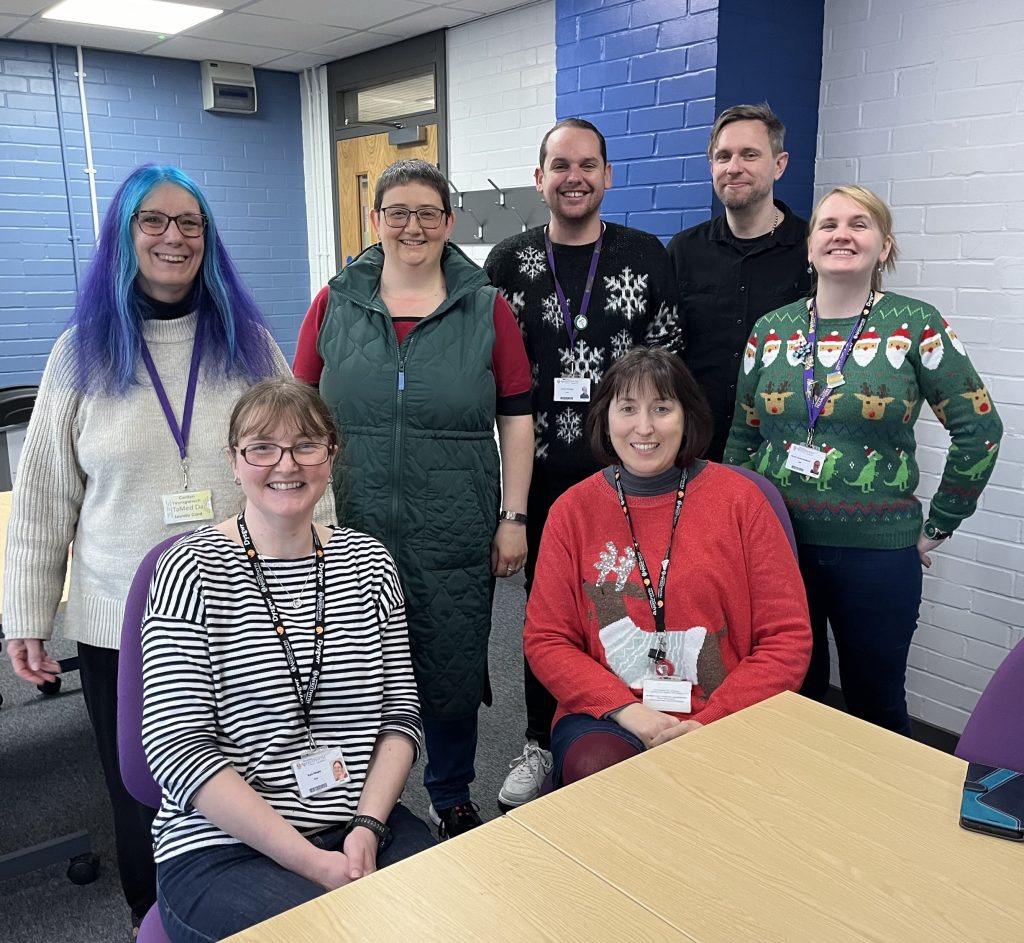
Season’s greetings from all of us at the Learning and Teaching Enhancement Unit.
A big congratulations to those of you who completed the Teaching for Postgraduate at AU qualification. Congratulations to PGCTHE participants who attended Graduation back in July as well as those who submitted their final coursework this month. Also, congratulations to those who achieved the Associate, Fellow or Senior Fellowship status through the ARCHE scheme, as well as our Exemplary Course Award Winners.
This year, we’ve really enjoyed working with you on topics such as artificial intelligence (AI), the Supervisory Framework, active learning and other aspects of learning design, and of course, Blackboard Learn Ultra.
Thank you to our external speakers who have joined us over the year, and all of the speakers at this year’s Annual Learning and Teaching Conference in July, which was our biggest one yet. Thanks as well to colleagues from other departments who have run sessions for us and to all of you who have attended.
We hope you have a restful break, and we look forward to seeing you in 2024 – a Happy New Year to you all!
This month there are three improvements in Blackboard Learn Ultra that the Learning and Teaching Enhancement Unit would like to highlight for Instructors.
Additional image insertion options
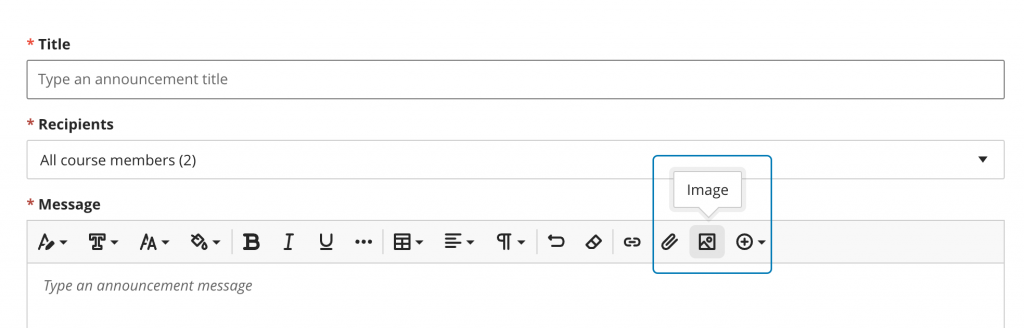
Images enhance comprehension of and engagement with course content. Instructors and students want to use high-quality images in content and submissions. To help with this, a new image button has been added in the content editor in the following places:
Announcements
Assessment Questions
Student answers on questions (local file upload only)
Submission feedback (standard view)
Journal entries and comments
Image below: Instructor view – image button on content editor for Announcements.
Flexible grading – sorting control on students tab
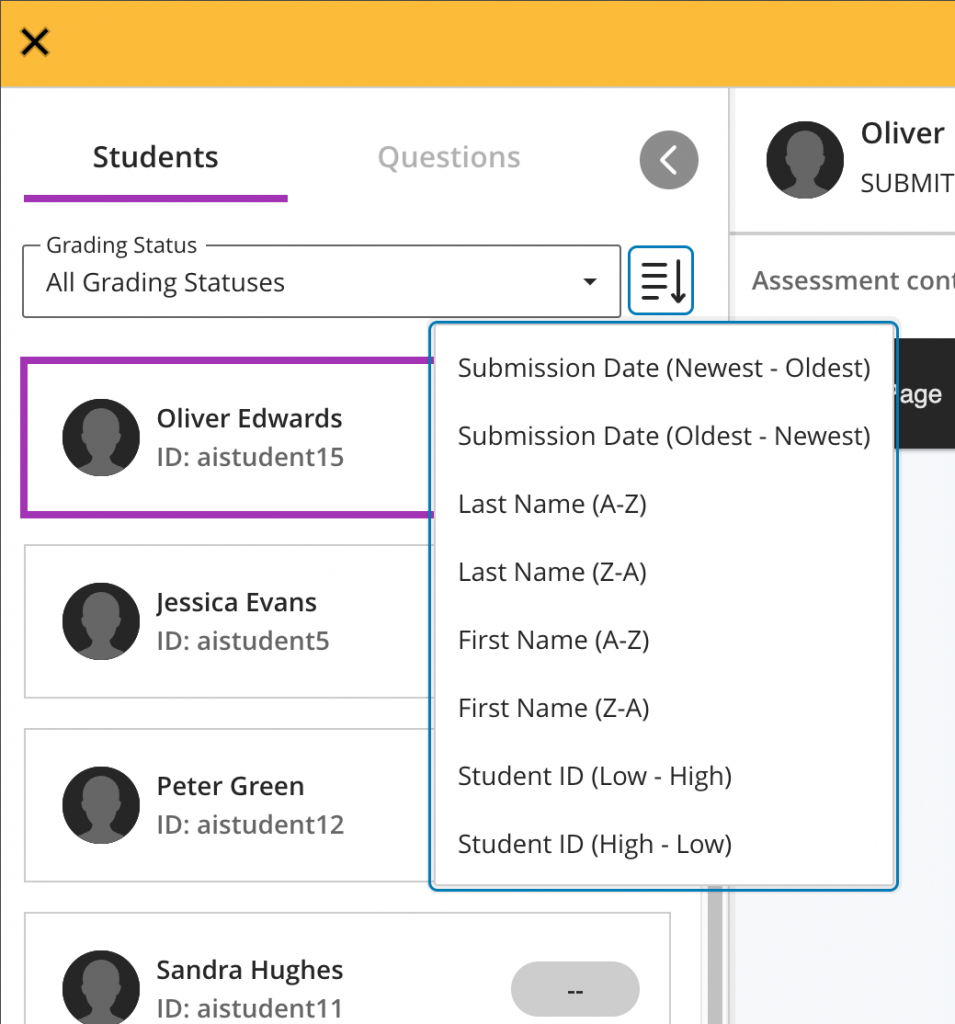
Grading large numbers of submissions without a way to organize them can be tedious. Now, instructors can apply various sorting options in flexible grading:
Submission date (oldest – newest) of latest attempt
Submission date (newest – oldest) of latest attempt
Last Name (A – Z)
Last Name (Z – A)
First Name (A – Z)
First Name (Z-A)
Student ID (ascending)
Student ID (descending)
The grading interface stores the most recently used sorting option. If an instructor stops grading an assessment and resumes grading later, the last sorting option is applied.
Also, if sorting the submissions by last name or grading status, the chosen sorting option carries over into the grading interface.
Image below: Sorting options as shown from Students tab in flexible grading.
Group assessment due date exceptions
Instructors may want to set different due dates for each group working on a group assessment.
In the past, there was no way to assign varying due dates for each group working on a group assessment. Now, instructors can assign a unique due date to each group using the exceptions workflow.
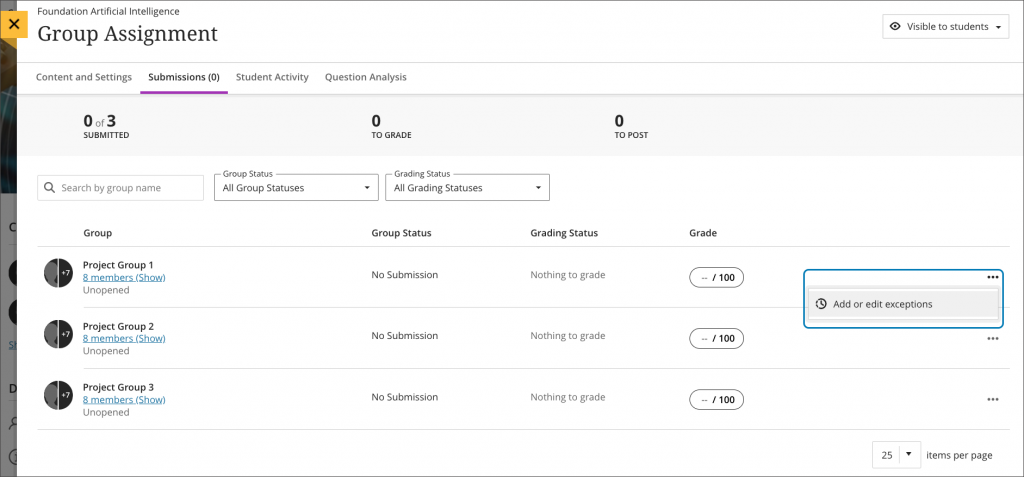
On the group assessment Submissions page, the instructor may add or edit exceptions for a group.
Image below: Instructor view – add or edit exceptions option on the group assessment Submissions page.
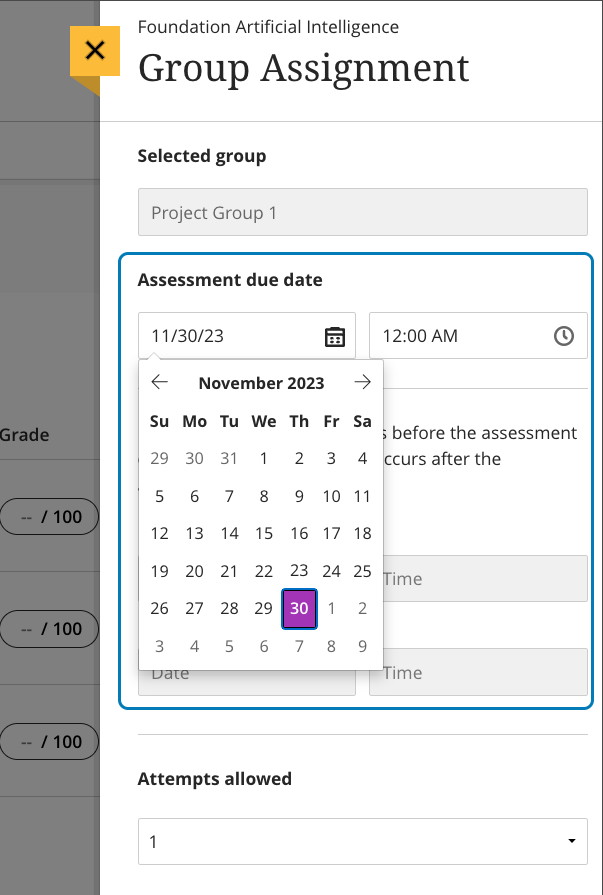
The Exceptions panel displays relevant information such as the assignment name and selected group name. This helps ensure the accuracy of an exception. Instructors can select a due date for the group using the date and time picker.
Image below: Instructor view – exceptions panel.
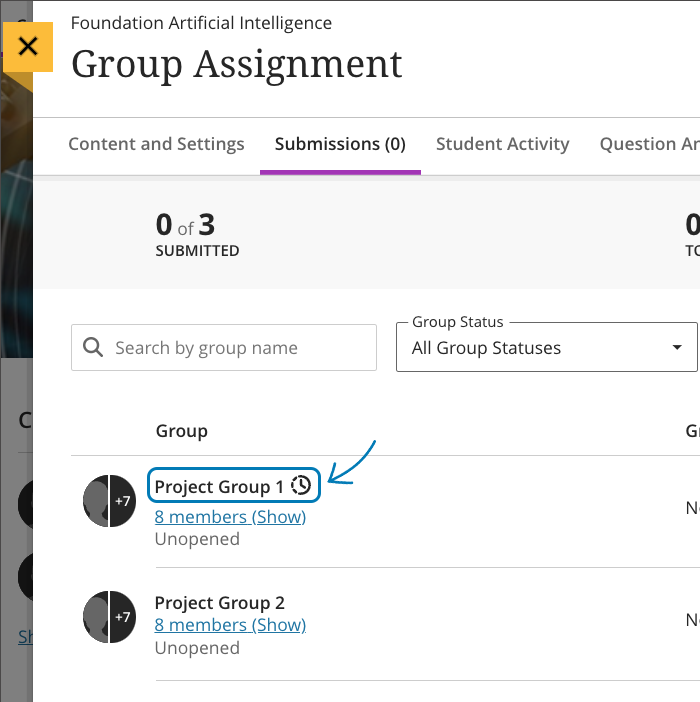
Image below: Instructor view – group assessment Submissions page displays the exceptions indicator for Project Group 1.
Sara Childs will be delivering two workshops over the coming weeks based on the findings of ongoing research on trauma-informed communication. Aberystwyth University is committed to becoming one of Wales’s only two trauma-informed universities along with Wrexham university. We are currently in the self-assessment phase of a two-year project, of which the next phase will identify individual projects for enhancing our trauma-informed approach. In parallel, sessions are being offered to the community which raise awareness of trauma-informed approaches.
The upcoming workshops will provide an opportunity for those engaged in teaching, or roles that involve direct contact with students, to develop their practice to incorporate this ground-breaking research.
Test settings have changed in Blackboard Ultra and the arrangements for conducting an exam have also been updatedthis year.
These are the main changes:
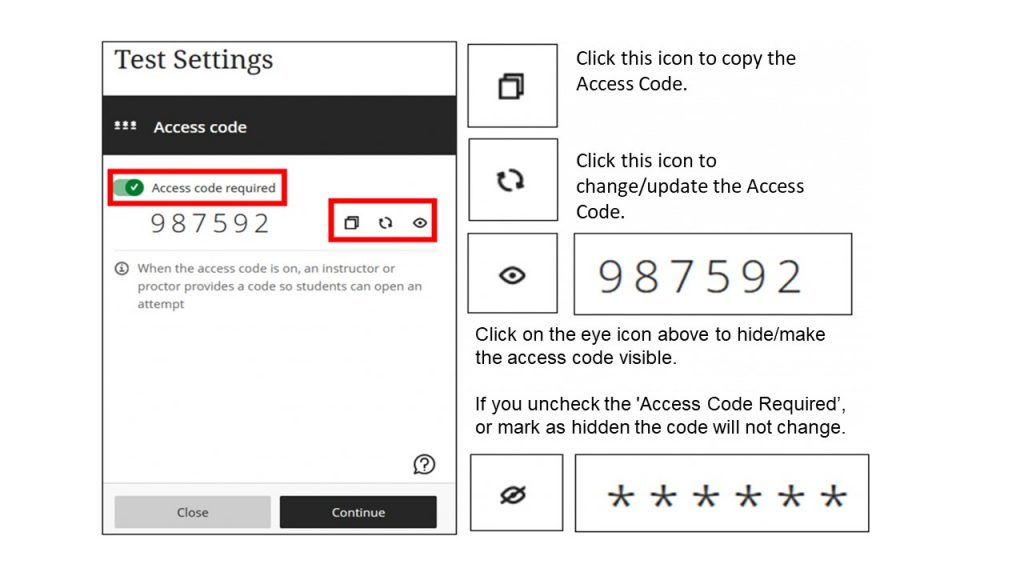
Only one random access code may be generated prior to the test. This code is automatically generated in the form of a 6-digit numerical code when you check the ‘Access code required’ option, which will be the case for ALL online in-person Exams using BB tests.
Module coordinators will attend the face-to-face examination for their module (for the first 30 minutes). If it is not possible to attend, arrange a substitute. Being physically present for the examination enables the Module coordinators to generate a second access code 30 minutes after the exams starts and to circulate this code with the exam team.
Module coordinators can liaise with the exams office via eosstaff@aber.ac.uk prior to exam day to discover which invigilating staff will be in attendance during their exam and collate their names and usernames.
We have prepared new guidance which explains these changes fully: Blackboard Tests for In-person Exams Guide. It’s an idea to set aside enough time to prepare the test and read the new guidance.
Due to these changes, the E-learning team will be offering additional training sessions on ‘Preparing for Online Exams’ on 5 and 11 December. Register for the training on: CPD Staff Training.
There is also an updated FAQ on Blackboard with more information on creating Blackboard tests for online exams. If you require further assistance with your test, the E-learning team are available on Teams Sessions. Contact to elearning@aber.ac.uk to arrange a session.
The E-learning team will be available to check yout test settings before the exam period between 4-20 December 2023. Remember,we are unable to check your test settings without a confirmed date or time.
Contact us if you have any queries regarding Blackboard tests on elearning@aber.ac.uk.
As leader of our PGCTHE programme, I keep an eye out for resources to help staff teach effectively. These include webinars, podcasts, online toolkits, publications and more. Topics include active learning, online/blended teaching, accessibility/inclusion, and effective learning design based on cognitive science. Below I’ve listed items that came to my attention in the past week. In the interest of clarity, our policy is to show the titles and descriptions in the language of delivery.
Online events and webinars
November
Ongoing through 12/2023 Teaching, Learning and Employability Exchange, AI Conversations Exchange (weekly series of webinars)
29/11/2023 University of East London, Learning and Teaching Webinar Series, Un-ticking the box of peer observations (Mo Jafar, Dr Richard Buscombe and Hayley Nova, UEL)
Monthly series European Network for Academic Integrity, ENAI monthly webinarsfree open webinars on various topics related to academic integrity.
Subscribe to SEDA’s mailing list for email discussions about educational development and emerging teaching practices. This is one of the sources I use when identifying useful material for the Roundup.
Follow University of Birmingham’s Higher Education Futures institute HEFi on Twitter for daily posts with links to pedagogical literature and more. This is one of the sources I use when identifying useful material for the Roundup.
Join the #LTHEchat on Twitter Wednesday nights for one hour of lively discussion about learning and teaching in HE. I often find out about good resources for the Roundup from the chat.
Please see the Staff Training booking page for training offered by the LTEU and other Aberystwyth University staff. I hope you find this weekly resource roundup useful. If you have questions or suggestions, please contact our team at lteu@aber.ac.uk. You may also wish to follow my Twitter feed, Mary Jacob L&T.