Drop in sessions: E-learning tools

We would like to offer staff members at the University the opportunity to join us for our drop-in sessions on using e-learning tools (Blackboard, Panopto, Turnitin and MS Teams) for learning and teaching activities. These will offer an informal opportunity to speak with our Online Learning Specialists and to address any problems or queries you may have.

All drop-in sessions will be held via MS Teams and there is no need to book, just click on the links below. *Please note that sessions with an asterisk (*) will be bilingual sessions, and all sessions without an asterisk will run as English-medium sessions.  

These drop-in sessions will take place on:
19.01.2021 (10:00-11:00): Join Microsoft Teams Meeting*
21.01.2021 (14:00-15:00): Join Microsoft Teams Meeting
26.01.2021 (10:00-11:00): Join Microsoft Teams Meeting*
28.01.2021 (14:00-15:00): Join Microsoft Teams Meeting
02.02.2021 (10:00-11:00): Join Microsoft Teams Meeting*
04.02.2021 (14:00-15:00): Join Microsoft Teams Meeting

We hope that these sessions will provide you with an opportunity to clarify any questions about your teaching needs.

If you have any questions, please email lteu@aber.ac.uk.

Advice on managing face-to-face and HyFlex teaching successfully

Advice on managing face-to-face teaching successfully:
All staff should strive to maximise the amount of time that students are working back to back or side to side, wherever possible. However, where this is not possible, students may turn to one another, for example for seminar discussion, provided other mitigating practices remain in place (ventilation, masks, social distancing).

A short (10 minute) discussion among students can then be opened up by using interactive technologies such as polling software to allow students to pool their knowledge and begin a plenary discussion, for which all students will face forward again. The majority of in-person sessions should take place with students positioned back to back or side to side.

Please note:
• Any activities in which students face each other should be in very small groups (pairs or groups of three) to minimise the overall volume and ensure everyone can contribute.
• Reminding students of good conversational etiquette, in which people take turns to speak, is essential to minimising the volume of conversations, and thus the projection of aerosol droplets.
• In rooms with fixed and/or tiered seating, such discussion may prove difficult, as students are not permitted to change seats.
• In rooms with mobile seating, the layout of the room must not be changed, and staff must ensure that students maintain social distancing at all times when turning to others.

Advice on managing HyFlex teaching successfully:
• Set expectations clearly: what can student joining remotely expect? Will they be in an observer role? Will they be active participants? What are the limits of remote participation?
• Enable interactive tasks that bring remote and in situ students together, e.g. interactive polls that all can access synchronously
• If numbers are very uneven and the majority of students is present in one mode (e.g. only one student is joining remotely from quarantine), invite in situ students to the online session using their own devices, to enable peer discussion

Content Organisation in Blackboard

Distance Learner BannerAs we are using more and more functionality in Blackboard modules, how they are organised has become increasingly important. We receive quite a number of queries from students struggling to locate various items or submission points in Blackboard.

To assist with navigation, we’ve pulled together our top tips on content organisation.

If you’ve got any questions about this or want to request a module MOT, please email elearning@aber.ac.uk.

Tips for Organising Blackboard Content

Before you start creating content on your Blackboard modules, think about how it can best be arranged so that students can easily access it and that learning resources and activities are in a logical place.  

Read More

Kate Exley Workshop: Taking your (PowerPoint) Lectures Online

The Learning and Teaching Enhancement Unit is pleased to announce a special online workshop run by Dr Kate Exley on Wednesday 17th February.

The workshop will be useful for colleagues who are modifying and transferring their traditionally delivered lectures for on-line learning.

Please book your place online [link].

So that as many colleagues as possible can attend, we are running the workshop twice (11am-12pm and 1pm-2pm). Please select which session you want to attend when booking.

Places are limited so please book as soon as possible.

Session Overview:

Many colleagues have been involved in providing blended or on-line learning for many years but the Covid pandemic has meant that we have all needed to quickly provide much of our teaching and learning at a distance. This has involved moving our lectures, previously delivered in large lecture theatres and classrooms, to online platforms. The speed at which this huge change has happened has in itself caused significant challenges for staff and students alike.  This blended workshop aims to provide some guidance, examples and a forum for colleagues to share their experiences and ideas for enhancing this provision.

This workshop is presented in two parts:

  • A set of 3 short videos will be made available on or before the 5th February 2021 and should be viewed independently before joining discussion forum – approximately 45 minutes independent study.
  • A discussion forum hosted via Teams on the 17th February, in which participants will have the opportunity to ask questions, share experiences and discuss the topic – lasting 1 hour.

Read More

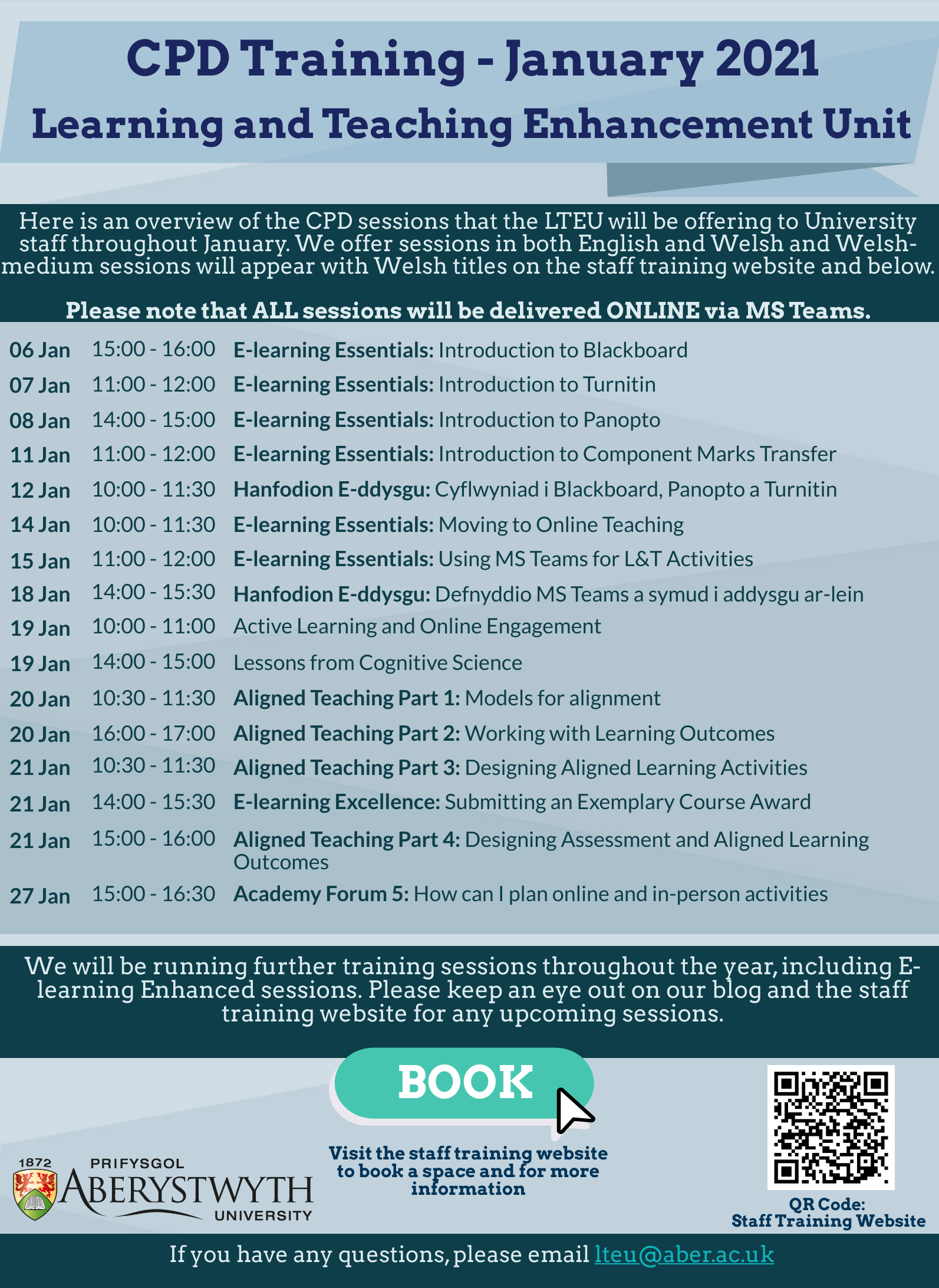
Continued Professional Development: E-learning Essentials sessions in January 2021 – What’s on?

Here is an overview of the E-learning Essentials sessions that the Learning and Teaching Enhancement Unit will be offering to University staff throughout January. We offer sessions in both English and Welsh and Welsh-medium sessions will appear with Welsh titles on the staff training website and on the table below.

DateTitleTimeDetails
06-01-2021E-learning Essentials: Introduction to Blackboard (L & T: Online)15:00 - 16:00Details
07-01-2021E-learning Essentials: Introduction to Turnitin (L & T: Online)11:00 - 12:00Details
08-01-2021E-learning Essentials: Introduction to Panopto (L & T: Online)14:00 - 15:00Details
11-01-2021E-learning Essentials: Introduction to Component Marks Transfer (L & T: Online)11:00 - 12:00Details
12-01-2021Hanfodion E-ddysgu: Cyflwyniad i Blackboard, Panopto a Turnitin (D & A: Ar-lein)10:00 - 11:30Details
14-01-2021E-learning Essentials: Moving to Online Teaching (L & T: Online)10:00 - 11:30Details
15-01-2021E-learning Essentials: Using MS Teams for Learning and Teaching Activities (L & T: Online)11:00 - 12:00Details
18-01-2021Hanfodion E-ddysgu: Defnyddio MS Teams a symud i Addysgu Ar-lein (D & A: Ar-lein)14:00 - 15:30Details

For a full list of all sessions throughout the next semester and to book a place on any course, please visit the staff training website. We will also be running a series of E-learning Enhanced session next semester and we will publish further information on this in the new year.

If you have any questions about any of the sessions, please email lteu@aber.ac.uk.

From everyone at the Learning and Teaching Enhancement Unit, thank you for supporting our work throughout the year and we would like to wish you all a very Merry Christmas and a Happy New Year!

UKGCE Good Supervisory Practice Framework – launched bilingually in the University

Aberystwyth University is launching the bilingual internal process for the UK Council for Graduate Education’s Good Supervisory Practice Framework. The English and Welsh version of the framework can be found here.

“The Good Supervisory Practice Framework acknowledges, at a national level, the wide-ranging, highly complex and demanding set of roles involved in modern research supervision” UK Council for Graduate Education webpage.

Statement from Professor Colin McInnes, Pro Vice-Chancellor (Research, Knowledge Exchange and Innovation)

    “Supervising research students can be amongst the most rewarding things we do as an academic community, but also amongst the most challenging. These challenges affect all of us from time to time, and continue to evolve as research practice, methods and epistemologies develop. This Framework will provide us as a research community at Aberystwyth with the tools and confidence to continue our excellent supervisory practices and support our research students.”

Annette Edwards, Learning and Teaching Enhancement Unit and Reyer Zwiggelaar, Head of the Graduate School, are collaborating, on behalf of the University, to market and develop an understanding of this framework. There will be an internal process available for all those who are interested in applying for this accreditation. Please visit this webpage for further information and to express an interest in applying via the online form.

Motivation strategies for online engagement – reflections from the last Academy Forum in Semester One

For the last Academy Forum in Semester One we chose one of the most common topics raised by teaching staff; how to motivate students, particularly when it comes to online learning?

decorative image

The first part of the session was a general discussion which started from reflection on when we feel most motivated and it revealed factors such as:

  • When there is external pressure (deadline) 
  • When it is enjoyable
  • When it involves other people 
  • When the tasks are not that difficult, important or multifaceted
  • When you receive positive feedback

Attendees also shared their strategies for keeping themselves motivated:

  • Switching between tasks
  • Breaking big projects into smaller tasks
  • Asking yourself why do you need to do it?
  • Completing a smaller, manageable task and using the ‘success high’ and motivation that comes with it to work on something else
  • Complaining less about having to do it and just getting on with it
  • Using lists and being able to cross things off
  • Setting realistic targets 
  • Looking after yourself (trying to see work in perspective)

Read More

NEW feature – Breakout Rooms in MS Teams

One of the most anticipated features in MS Teams has finally arrived…. Breakout Rooms! Breakout rooms allow meeting organisers to create and name up to 50 separate rooms within scheduled and ‘meet now’ meetings. Organisers can then assign attendees to those rooms either automatically or manually.

We will be releasing guidance on how to create and manage breakout rooms (for staff) and how to participate in breakout rooms (for students) next week. For the time being, here is a guide from Microsoft on how to create and manage breakout rooms in Teams.

What does the icon for breakout rooms look like?
The icon for breakout rooms is displayed as two boxes (as is highlighted below by the blue box). This should appear on your control bar.

Breakout Room Icon

Why can’t I see this icon?
If you are not able to see this icon, there are two likely reasons:

    • 1. Only meeting organisers can create and manage breakout rooms. If you are not the meeting organiser, then you will not be able to create and manage breakout rooms in Teams and you won’t see the icon during that meeting.


    2. MS Teams might not have automatically updated. To do this yourself, click on your image from the top-right hand corner of the screen (see yellow box on image below) and then select ‘Check for updates’ (see orange box).
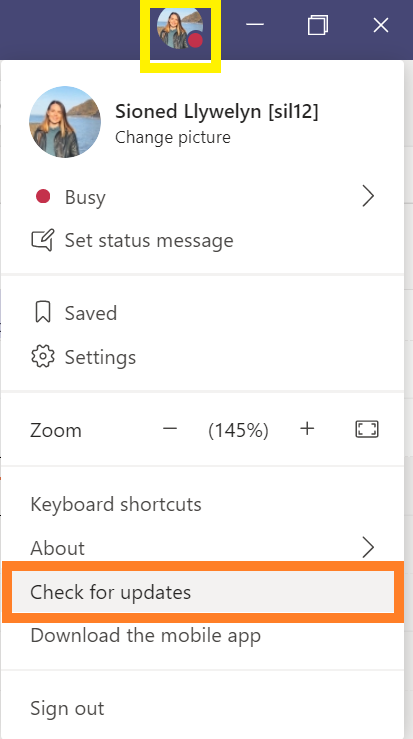
Settings bar in Teams
If you have any questions about using Teams, please contact Information Services (is@aber.ac.uk). [:cy]Mae un o’r nodweddion mwyaf disgwyliedig MS Teams wedi cyrraedd o’r diwedd…. Ystafelloedd Trafod (Breakout Rooms)! Mae ystafelloedd trafod yn caniatáu i drefnwyr cyfarfodydd greu ac enwi hyd at 50 o ystafelloedd ar wahân, mewn cyfarfodydd sydd wedi’u hamserlennu ac o fewn cyfarfodydd ‘meet now’. Gall trefnwyr yna benodi mynychwyr i’r ystafelloedd hynny naill ai’n awtomatig neu â llaw.

Byddwn yn rhyddhau canllawiau ar sut i greu a rheoli ystafelloedd trafod (i staff) a sut i gymryd rhan o fewn ystafelloedd trafod (i fyfyrwyr) yr wythnos nesaf. Am y tro, dyma ganllaw gan Microsoft ar sut i greu a rheoli ystafelloedd trafod o fewn Teams.

Sut mae’r eicon ar gyfer ystafelloedd trafod yn edrych?
Mae’r eicon ar gyfer ystafelloedd trafod wedi’i arddangos fel dau flwch (fel y nodir isod o fewn y blwch glas). Dylai hyn ymddangos ar eich bar rheoli.
Breakout Room Icon
Pam na allaf weld yr eicon hwn?
Os na allwch weld yr eicon hwn, mae dau reswm tebygol:

    • 1. Dim ond trefnwyr cyfarfodydd all greu a rheoli ystafelloedd trafod. Os nad chi yw trefnydd y cyfarfod, yna ni fyddwch yn gallu creu a rheoli ystafelloedd trafod o fewn Teams ac ni fyddwch chwaith yn gallu gweld yr eicon yn ystod y cyfarfod hwnnw.


    • 2. Efallai fod MS Teams heb ddiweddaru’n awtomatig. I wneud hyn eich hun, cliciwch ar eich delwedd yng nghornel dde uchaf y sgrin (gweler y blwch melyn ar y ddelwedd isod) ac yna dewiswch ‘

Check for Updates

    ‘ (gweler y blwch oren).

Settings bar in Teams
Os oes gennych chi unrhyw gwestiynau am sut i ddefnyddio Teams, cysylltwch â Gwasanaethau Gwybodaeth (gg@aber.ac.uk).

[:]