Interactive Blackboard Tools Case Studies – Tests

The second case study on using interactive Blackboard tools showcases effective use of tests for summative and formative assessment by Dr Ruth Wonfor from IBERS.

  • What tool do you use and how?

I use Blackboard tests for either formative or summative tests in most of my modules.

  • Why did you choose this tool?

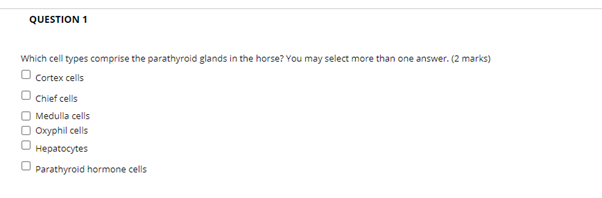
I’ve chosen to use Blackboard tests for a variety of reasons. For summative tests, I have used these in a first year module on anatomy and physiology. This module provides a lot of foundation knowledge on basic biology that is used by students in future modules, therefore I wanted to design an assessment that would enable me to test a wide variety of topics across the module that meets quite a broad learning outcome. The use of multiple choice tests has worked really well for this and it fits really nicely with the work I do in this module to try to get students to use flashcards in their learning. Students can really see the benefit of the flashcards through this test.

For the formative assessments, I have chosen to use Blackboard tests for quite a range of reasons. I have previously tended to use them to allow students to test their knowledge at the end of a topic. However, whilst we have been teaching online I have started to use them to ask questions that I would have asked in the lecture to check understanding. This has been great to help me to structure the learning and ensure that students aren’t rushing onto new sections without fully understanding what they needed to in the previous section.

  • How did you design the activity using this tool?

How I design the Blackboard tests very much depends on what I am using them for. The summative tests are quite rigid with only multiple-choice questions. I tend to use standard question formats, such as choose the correct answer to a question, choose the correct statement or what structure is the arrow pointing to on an image. Whilst students have been able to take this test at home during Covid-19, I have also introduced some short answer questions into the multiple-choice test. These have worked really well to prevent students just looking up every multiple-choice answer and giving a good marks distribution.  

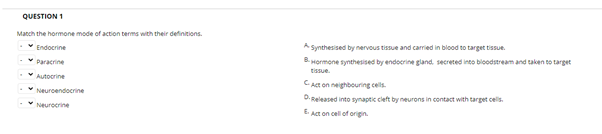
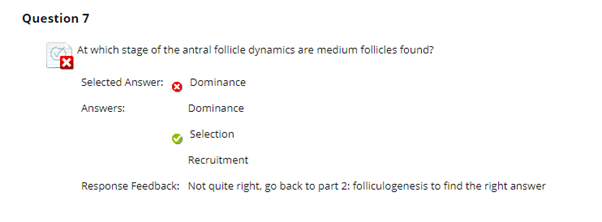
For the formative tests I use a wider range of options in the questions to fit what I want the students to learn.  For example, I’ve used the matching questions after going through terminology, so that student have to match the terms with the correct description. I also try to use the feedback in these formative tests to get the students to direct their learning. So instead of telling students that they have answered a question incorrectly and what the correct answer should have been, I instead use the feedback to direct the students to the slide or section of the lecture where they can find the answer, hopefully encouraging students to structure their learning and revision further.

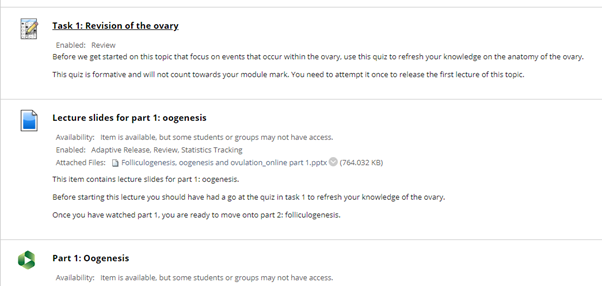
Finally, whilst we have been teaching online I have found adaptive release combined with the BB tests really useful for structuring topics. I often start some lectures with a bit of revision of information that they should have covered in previous modules that is the basis of the topic we are covering in that session. Therefore, I’ve used BB tests to cover this revision. I use the feedback to direct the students to further information if they need to brush up their knowledge and then use adaptive release to only release the topic to them once they have attempted the revision quiz. The students get clear instructions that they need to have a go at the quiz and then they will get access to the lecture topic. This seemed to work well and so it is something that I hope to keep in place for future years so that I can remove the revision from the lectures, allowing more time for application of the knowledge gained in the lectures.

  • What do your students think of this tool?

I’ve had pretty good feedback from students about the use of the BB tests, a lot have said that they have found them really useful to help them revise and go over topics to understand where they need to put more effort into their further study. I’ve also helped to reduce student anxiety about the final summative test by using formative tests throughout the module. As the summative test I use is on a first-year module in semester 1, students are often quite anxious about what to expect at university level. I can therefore direct them towards the formative tests as examples of the level of questions that they will be expected to answer in the exam.

  • Do you have any tips for people who want to use this tool?

My main tip would be to allow yourself a fair bit of time to construct the tests. The initial start up to write good questions and feedback for the students takes a while. However, once you have spent that time, you have the tests ready to roll out each year. It is well worth the time spent to help the students and get an idea of their understanding and where you may need to clarify topics again. Also make sure that you take the tests yourself! I’ve noticed a few mistakes or questions that need further clarification when taking the test myself and it’s really useful to see how the student will see the final question formatting in their view.

We would like to thank Dr Ruth Wonfor for sharing her experiences of using Blackboard tests.

If you like to learn more about tests please take a look at the Blackboard Tests – Creating Online Assessment Activities for your Students post and the FAQs.

If you are planning to use Blackboard tests for online examination, please get in touch with us at elearning@aber.ac.uk.

Exemplary Course Award Winners at the Annual Learning and Teaching Conference

Exemplary Course Award image

It was great to see so many faces at this year’s virtual Annual Learning and Teaching Conference. One of the highlights for me was to be able to celebrate our 5 Exemplary Course Award Winners. Since the start of the pandemic we haven’t been able to acknowledge our winners at graduation like we have done in previous years, so the ECA winners session is a way to share the fantastic and innovative practices taking place.

We’re about to start our course creation process for the academic year 2021-22. So, if you want some inspiration, take a look at the module tours linked from the text below.

Winner:

Dr Hanna Binks, Department of Psychology: PS11320: Introduction to Research Methods

This core, first year module equips students with the skills that they need for their duration of the degree in Psychology. The innovative assessment design, bilingual content, consistent organisation, and clear communications with students saw Hanna win this year’s competition. If you want inspiration on how to tie together learning outcomes, assessment, and content then take a look at this module.

Take a look at the PS11320 module tour.

Read More

Students as digital producers

Professor Rafe Hallett from Keele University has recently delivered a fascinating keynote talk exploring the idea of students as digital producers.

The presentation encouraged educators to explore which modes of co-creation are already inhabited by their students and enable them to work collaboratively in the production of knowledge. As pointed out by Professor Hallett, this constructionist approach leads to a more meaningful experience. Students produce outputs which are available externally to university systems and can be showcased and shared as ‘theirs’. This contributes to the feeling that their work ‘matters’, in contrast to submitting assessment in a standard format which is read, marked and archived.

Enabling students to be digital producers requires them to build on skills they already have, but also to develop digital criticality to choose the right digital resources for what they are trying to do. It is one way of facilitating more authentic assessments, a concept explored by Kay Sambell and Sally Brown our recent mini-fest.

Annual Learning & Teaching Conference 2021 recordings and resources now available!

That’s a wrap! with over three and half days of back-to-back presentations given by over 40 presenters and over 150 delegates in attendance. We at the LTEU want to say a big thank you to everyone who got involved and attended our biggest annual learning and teaching conference to date.

If you didn’t manage to attend not to worry, we are pleased to announce that all of the recordings are now live on the Annual Learning and Teaching Conference programme page.

If you attended this year’s conference, we would love to hear your feedback, please fill in our Annual Learning & Teaching Conference 2021 Survey. We are beginning our preparations for our 10th Annual Learning & Teaching Conference and your feedback will help us make it the best one yet!

This week, I will be writing a couple of blogs about the conference, so if you haven’t yet, take a look at our blog and sign up for updates from the LTEU team. Finally, I want to take this opportunity to thank all of the presenters and delegates, we couldn’t do it without you!

Weekly Resource Roundup – 7/7/2021

As leader of our PGCTHE programme, I keep an eye out for resources to help staff teach effectively. These include webinars, podcasts, online toolkits, publications and more. Topics include active learning, online/blended teaching, accessibility/inclusion, and effective learning design based on cognitive science. Below I’ve listed items that came to my attention in the past week. In the interest of clarity, our policy is to show the titles and descriptions in the language of delivery.   

Online events and webinars

Resources and publications

Please see the Staff Training booking page for training offered by the LTEU and other Aberystwyth University staff. I hope you find this weekly resource roundup useful. If you have questions or suggestions, please contact our team at lteu@aber.ac.uk. You may also wish to follow my Twitter feed, Mary Jacob L&T.  

Updates to Vevox

Distance Learner Banner

One of the benefits to having a subscription to a dedicated Polling Tool is receiving regular updates. Vevox is the University’s dedicated Polling Tool. You can use it to add interactivity to your teaching sessions as well as your meetings.

Our resources for Vevox are available on our webpages.

Enhancements that have come this month are summarised below:

  • Use of LaTeX to create questions in Polls means that colleagues in disciplines such as Mathematics, Physics, and Computer Science can make use of formulae in the creation of their polls. Take a look at Vevox’s LaTeX helpsheet to help you set up your polls.  
  • Ability to Share moderation responsibilities for Q and As with another presenter. See their how to share the Q&A board with a colleague or moderator for further information.
  • Correct answer explanations allow you to provide additional feedback to students when they get a question correct. This can help you save time when running your quiz. For a video summary, check out Vevox’s guidance on Running a Quiz.
  • Filter our responses on word clouds before you present them back to the class to ensure that there’s nothing that you don’t want them to see. Take a look at their instructional video on how to create word clouds.
  • Results from polls can now be displayed as numbers as well as percentages meaning that participants can get an idea how many of their colleagues have responded to the questions. Not used polling in Vevox before? Check out their guidance on how to create a basic poll.

Vevox fully integrates with Teams meaning that you can run the sessions in your online teaching meetings and participants can respond via the Teams app without having to enter a 9 digit code. Find out more on our How do I use Vevox with Microsoft Teams FAQ.  

We’re always on the lookout for case studies so if you’re using Vevox polling in your teaching session drop us an email on lteu@aber.ac.uk and let us know how you’re using it.

View all of these updates on Vevox’s June blogpost.

My placement with the LTEU as a Conference Support and Impact Officer

Hi all, I’m Hector, a first-year undergraduate student at Aberystwyth University studying International Politics and Climate Change. I’m excited to be joining the LTEU team for the next three-weeks for the Annual Teaching Conference 2021.

Prior to beginning my degree in Aberystwyth, I worked as a Support Worker for the charity Leonard Cheshire. My key areas of interest lie within sustainable development, climate change politics and charity work. I have volunteered three times with the youth-led sustainable development charity Raleigh International in Nepal and Costa Rica, as part of Expedition programmes and the Government backed International Citizen Service. I’m a keen advocate of the UN Sustainable Development Goals 2030 and am always looking for new ways to engage with and support them. As an Aberystwyth University student, I am an active member of AberHike and will be undertaking my Mountain Leader training over the summer to enable me to lead future hikes for the society.

I have recently worked as a Zoom Steward for the Annual Conference for the Association for Science Education. I really enjoyed this role so when I saw the opportunity to gain more experience in a similar position with the LTEU, I applied. I’m undertaking this placement as part of the AberForward 2021 programme. My role as the Conference Support and Impact Officer will be to offer a student perspective on the various talks given throughout the conference. By undertaking my placement with the LTEU, I am hoping to further develop my organisational and analytical skills. I also want to continue to gain practical and relevant work experience, which this placement helps me with.

I feel as a student we never really get to fully appreciate the amount of effort and thought which goes into every aspect of our learning experience, this has been abundantly demonstrated by the brilliant work which I have seen from my time so far with the LTEU. We have a fantastic and broad range of talks lined up for this year’s conference. If you are yet to book your place, you still have time! Hope to see you there!

What we need to consider when planning for 2021/22 teaching?

The time to get ready for 2021/22 teaching is fast-approaching. Although there is still much uncertainty about what we will be able to provide, we would like to share with you a few points worth considering when planning for next year. These points derive from our reflections and experiences of supporting staff and students over the past academic year, as well as considerations from colleagues across the sector.

How will we measure student engagement?

What we mean by student engagement and how we measure it has changed over the past year. Previously we might have gauged student engagement in the classroom by simply observing their participation during the face-to-face sessions or monitoring their attendance. Since teaching online, we perhaps paid more attention to Panopto statistics, participation in interactive activities on Blackboard and chat in Teams. Making it clear what you mean by engagement and how you are going to measure it, in what is likely to be a new delivery format for you and your students, can help you evaluate your methods and help students understand what is expected of them (Love & El Hakim, 2020).

What will our students need?

We know that during the pandemic many students suffered from isolation, studied in various home conditions and struggled with anxiety and motivation. Going forward we will need to take this into account and balance the increased need for contact hours and socialisation with best pedagogical practices. Although we won’t be able to approach this upcoming year with certainty, it is essential to provide students with a sense of structure wherever possible. One of best practice emphasised during past months is creating ‘roadmaps’ which tell students what they need to do and by when. Another recurring theme across the sector is building a community of learners to address isolation.

How will we manage student expectations?

Managing student expectations is never easy and may be even more challenging this upcoming year. One way of managing expectations effectively is by engaging in a continuous conversation with students and being able to adapt wherever possible. Treating students as partners in their learning design also requires  explaining why we educate them the way we do, even if it is not what they expected. Finally, scaffolding their learning regardless of the form it takes is likely to increase their satisfaction.

How our roles as educators and education professionals will change?

The flipped-classroom approach which our institution promoted this academic year changes the power dynamic in the classroom. It allows students to have more choice over how they learn and when. It also places more emphasis on tutors being mentors and facilitators rather than lecturers. Going forward, the relationships between students and staff is likely to be transformed further. As mentioned earlier, it may be an opportunity to work in partnership with our students, enabling them to be the agents of their learning experience. 

Weekly Resource Roundup – 27/6/2021

As leader of our PGCTHE programme, I keep an eye out for resources to help staff teach effectively. These include webinars, podcasts, online toolkits, publications and more. Topics include active learning, online/blended teaching, accessibility/inclusion, and effective learning design based on cognitive science. Below I’ve listed items that came to my attention in the past week. In the interest of clarity, our policy is to show the titles and descriptions in the language of delivery.   

Online events and webinars

Resources and publications

Other

Please see the Staff Training booking page for training offered by the LTEU and other Aberystwyth University staff. I hope you find this weekly resource roundup useful. If you have questions or suggestions, please contact our team at lteu@aber.ac.uk. You may also wish to follow my Twitter feed, Mary Jacob L&T.  

Interactive Blackboard Tools Case Studies – Discussion Boards

We are pleased to present the first case study on using interactive Blackboard tools featuring the use of discussion boards by Dr Martine Garland from Aberystwyth Business School.

Discussion boards were thus a way of recreating the discussion we may have had in class, this led to over 900 posts during the semester.’

What tool do you use and how?

I use discussion boards on a core 1st year marketing module with 97 students. They are used in a very structured way to provide students with an opportunity to apply a theory, model or framework they have just learnt about. I found that with the blended approach adopted in response to Covid-19, students were studying recorded asynchronous content out of synch with the week in which it was intended they should study the topic. This meant that in live MS Teams sessions it was difficult to use that time to do topic specific exercises and create debate as many students had not yet covered the topic. Discussion boards were thus a way of recreating the discussion we may have had in class, this led to over 900 posts during the semester.

Why did you choose this tool?

I chose this tool as it was very straightforward to embed into the asynchronous learning structure and to signpost students to it at the relevant moment in their studies. Each recorded lecture had three ‘discussion points’ that were designed to meet learning outcomes related to application of learning. Having worked through online learning content on a topic, the discussion point asked them to share their experience or a relevant example, and to enter into deeper conversation about the real-world application of a theoretical construct.

How did you design the activity using this tool?

In the PowerPoint of the recorded lecture, I used a consistent icon to indicate discussion, then included directions that they should pause the video, make some notes, then when they have finished the lecture, go to the ‘discussion space’ and share their thinking.

I also used the discussion board functionality to set and receive ‘collaborative task’ activities. They could read the brief at the top of the thread, and they then posted their groups outputs in the thread. It was termed the ‘Collaboration site’ but was just using the discussion board tool.

What do your students think of this tool?

I think it was mixed, some students didn’t engage at all, although the majority did (bear in mind they were awarded marks for participation and engagement). Several students cited the discussion boards in their MEQ feedback:

“I absolutely loved this module. the teacher was exemplary, and she was very focused throughout the module. The discussion board was the best part of module as it gave us the space to apply the theories. overall, one of the best modules in my first year.”

“With everything going on, this module has been run very well this semester. Lots of online content to do and discussion forums for students to discuss the topics covered has made it a very engaging module.”

Do you have any tips for people who want to use this tool?

Make it very clear what you are asking them to do and where they can find it. Encourage students to upload an avatar so the discussion is not so faceless. Certainly for year 1 modules, consider awarding marks for participation an engagement in things like discussion boards, wikis etc. Blackboard reports provide you with a quick and easy way of seeing who is doing what, where and when.

A huge thank you to Dr Martine Garland for sharing this case study. If you like to learn more about discussion board please take a look at the Blackboard Tools for Group Work (Blogpost 4): Discussions post and the discussion boards FAQs.