MS Teams: 10 Common Questions

Following training sessions that we have conducted over the past few weeks on using MS Teams for learning and teaching activities, here are answers to 10 common questions. Further information on using MS Teams can be found in our Microsoft Teams FAQs, and please do not hesitate getting in touch with us if you have any further queries (lteu@aber.ac.uk).

Q1: If I am sharing my screen can I still see the chat function?
A1: Unfortunately, unless you have two screens then this will not be possible. You could either ask a student to monitor the chat for you or you could stop sharing your screen from time to time to check what has been posted in the chat. There are some advanced share screen options that may enable you to see the chat in some instances, and we’re happy to discuss these with you further.

Q2: I would like to add an external individual from outside Aberystwyth University to one of my ‘teams’ within MS Teams, is this possible?
A2: It is possible to add external individuals who have an Office 365 account with an ac.uk domain, but any external individual who has an email account that is not an ac.uk address will need to complete a request form to have their domain added to AU Teams access. Alternatively, you could set up meetings with external individuals through MS Teams without having to request access.

Q3: After recording a meeting, how would I access the recording and how long is it available for?
A3: After ending a meeting the recording will appear in the meeting’s chat and this will be available to download for 22 days. Please familiarise yourself with the University’s Lecture Capture Policy for details on what type of sessions are appropriate to record.

Read More

6 October 2020: ‘Introduction to Research’ with Dr Elin Royles (Welsh-medium session)


Join Dr Elin Royles on 6 October 2020 between 11:00 and 12:30, where she will give an introduction to postgraduate research. This will be an online live session and you can register through the following link. Please note that this is a Welsh-medium session.

This workshop forms a part of the Coleg Cymraeg Cenedlaethol’s Research Skills Programme, and here is a copy of the full programme for 2020/21.

Coleg Cymraeg Cenedlaethol Staff Development Programme


This year’s Coleg Cymraeg Cenedlaethol Staff Development programme (2020/21) will be delivered online, with the majority of the workshops being pre-recorded and placed on the Resources Portal (Porth Adnoddau), so that staff can follow them when it is most convenient for them. Some of the workshops are already on the Resources Portal, and more will be added over the coming weeks.

In addition to pre-recorded workshops, some will also be held live. Here is a snapshot of some of the live sessions (please note that all sessions are in the medium of Welsh):

October 2020
• Tuesday (October 6), 09:30-10:00
– Cyfres Iechyd a Lles: chi fel staff a’ch myfyrwyr (1/3)
• Tuesday (October 13), 09:30-10:00 – Cyfres Iechyd a Lles: chi fel staff a’ch myfyrwyr (2/3)
• Tuesday (October 20), 09:30-10:00 – Cyfres Iechyd a Lles: chi fel staff a’ch myfyrwyr (3/3)

January 2021
• Wednesday (27 January), 15:00-16:30
– Gweminar dysgu ac addysgu (rhannu arfer dda o ddysgu cyfunol)

June 2021
• Wednesday (June 23), 15:00-16:30 –
Gweminar dysgu ac addysgu (rhannu arfer dda o ddysgu cyfunol)
• Tuesday (June 29) – Welsh-medium Research Conference (form and location TBC)

Take a look at the full programme for 2020/21 and follow this link to register.

Changes to Teaching Rooms

Practice Modules

This blogpost is intended to take you through various scenarios that you may wish to use in Teaching Rooms. If you have any questions, please email is@aber.ac.uk.

The following changes have been made to teaching rooms:

  • There are now two screens in the teaching room. Screen 1 (the one with the web camera on) is the main screen. Screen 2 is directly linked to the projector. Use Screen 2 to display materials to your class and to share with participants via Teams.
  • Microsoft Teams has been installed and a shortcut is on all desktops.
  • New desktop microphones have been installed and lapel mics removed.

If you are in a teaching room and require technical assistance, pick up the phone and wait. It will automatically dial through to Technical Support.

Before the session we advise you to:

  1. Set up a Teams meeting for participants who are unable to join the session face to face (How do I do that?)
  2. Have the teaching materials easily available to you – we recommend you use OneDrive and copy your materials to the desktop before beginning the session. Avoid bringing USBs etc. into the teaching room. (How do I use OneDrive?)
  3. Communicate with any students joining via Teams how they will be participating in the session and how you will handle questions from them.

Read More

Useful Information: Online Teaching

Distance Learner BannerSetting up sessions through MS Teams:

  • Unless otherwise agreed, Microsoft Teams should be used to run all online teaching sessions.
  • Details of online teaching sessions should be posted in Blackboard (see our FAQ how to set up a Teams meeting in Blackboard?).
  • Please note that for any sessions set up through Blackboard, students will be able to use the link to join the session 15 minutes before the chosen start time. Any time prior to this, students have the option to add the session to their Office365 calendars (see our student FAQ).

Keeping students informed:

  1. Use the announcements feature in Blackboard to communicate with your students. (See our FAQ How do I add an announcement to my Blackboard module?)
  2. Ensure that your Blackboard contacts page has your contact information and clear instructions on how and when students should contact you.

Delivering online sessions from the University:

  • If required, you may come into the University to deliver your online session from the teaching rooms in the allotted timetabled slots. Please ensure you are using the correct room and time allocated to your activity. 

CPD sessions:

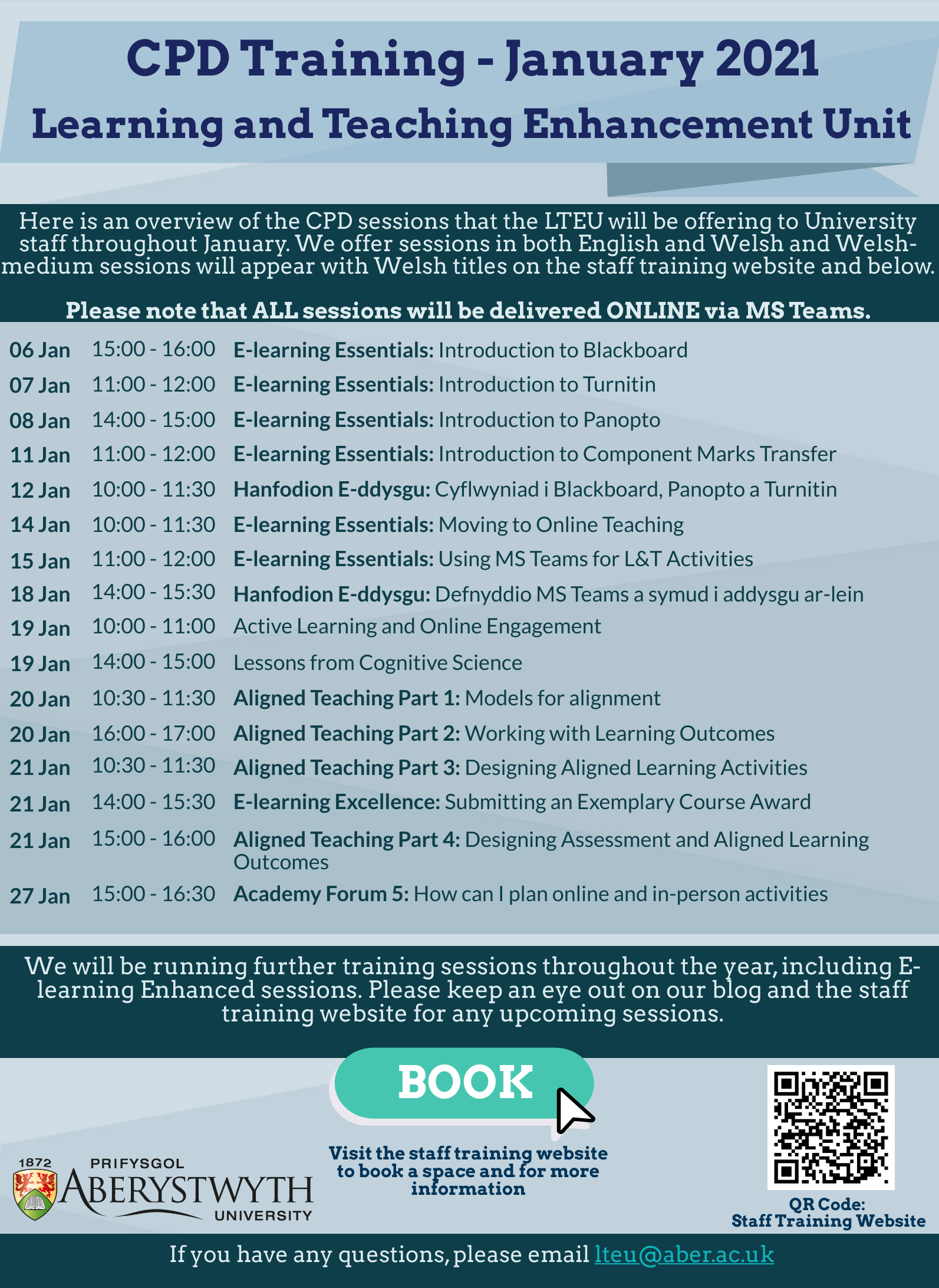
  • The Learning and Teaching Enhancement Unit will be running a number of CPD sessions for staff members over the coming weeks, focusing specifically on online learning and teaching and associated E-learning tools.

For any technical assistance with using MS Teams or any of the E-learning tools, please email elearning@aber.ac.uk. If you wish to discuss any aspect of learning and teaching, please email lteu@aber.ac.uk.

Learning and Teaching Updates – September 2020

Distance Learner Banner

We would like to provide you with an overview of recent developments and support materials that we have worked on for the past few months.

This information is also available at:  https://www.aber.ac.uk/en/is/it-services/elearning/continuity/

Scheduling MS Teams meeting from Blackboard

All teaching sessions held in MS Teams should be scheduled in Blackboard. This includes timetabled online activities.

Setting up a meeting: https://faqs.aber.ac.uk/3067

Information for students: https://faqs.aber.ac.uk/3061

Recording seminars and Teams activities

There are privacy concerns which need to be considered when recording a meeting in MS Teams.

Further information: Guidance on recording seminars and Teams activities

Using teaching rooms

Information about using teaching rooms this academic year, including how to use MS Teams in an in-person teaching session is available at Teaching Room Guide 2020-21

Support materials for students

Supporting your Learning resources for students are now available at https://www.aber.ac.uk/en/important-info/living-and-learning-in-aberystwyth-2020-21/students/supporting-your-learning/. We will add to this page during the semester as things change or we approach key points for students.

Two guides: a Video Recording Checklist and Video Recording Tips

As more and more materials are made available online, including pre-recorded lectures, it is easy to become overwhelmed: in addition to adapting teaching materials for this different type of delivery and streamlining information into shorter instalments, the practical aspects of recording videos for teaching can be daunting. But fear not! The Learning and Teaching Enhancement Unit has created two guides, a Video Recording Checklist and Video Recording Tips.
It is important to remember that no one expects a perfect greenscreen or Minority Report– style, interactive multi-stream extravaganza. If you follow the checklist, you will ensure your videos will be of a consistently solid standard, without much hassle. The tips offer you extra help with improving your video recording skills.
If you have any further questions, want additional guidance, or seek clarifications, remember that the LTEU is only an email away, at lteu@aber.ac.uk and elearning@aber.ac.uk.

Hello from one of your newly appointed Online Learning Specialists

Hello, I’m Sioned, one of three newly appointed Online Learning Specialists who have recently joined the Learning & Teaching Enhancement Unit (LTEU).
Sioned stood at Aberystwyth seafront
Having been born and raised in Aberystwyth, I am very excited to return to the University, having completed my BSc, MSc and PhD at the Department of Geography and Earth Sciences (DGES). Whilst completing my PhD, I was very fortunate to have the opportunity to teach at DGES on a variety of Welsh- and English-medium modules and I became a Fellow of the Higher Education Academy in 2019. Since July 2019 I have been employed at Menter a Busnes, in the first instance undertaking research into measuring greenhouse gas emissions on Welsh farms and then as Development and Mentoring Manager, providing guidance to facilitators running face-to-face and online discussion groups with Welsh farmers.

I look forward to drawing on my past experiences, learning from other colleagues in LTEU and from staff members more generally across the University, to share best practices on delivering high-quality teaching to Aberystwyth University students through virtual channels. As a first-language Welsh speaker, I am also very excited to be given the opportunity to help develop the provision of Welsh-medium online teaching training courses to university staff.

If you’d like to discuss anything related to online learning, please feel free to contact me in Welsh or English on sil12@aber.ac.uk.

Changes to Turnitin

From September 2020, two new settings should be used on all Turnitin submission points. This is so that students can view their Similarity Report (as agreed by Academic Board).

Both these settings are under the Optional Settings section when you create a Turnitin Submission Point:

1. Generate Similarity Reports for Students – Immediately (can overwrite until Due Date)
2. Allow Students to See Similarity Reports – Yes

If you have any questions, please contact the Learning and Teaching Enhancement Unit at elearning@aber.ac.uk.

Hello from your other new Online Learning Specialist.

Sut mae, pawb!
I am Lara, a new member of the Learning and Teaching Enhancement Unit (LTEU) for the next six months. I’ve been offered this opportunity to introduce myself.
I am originally from Germany, Bavaria to be precise. I grew up in the Alps, and I still miss the mountains from time to time. But the sea, and the hills of Wales are very good substitutes.

Dramatic mountain range in Upper Bavaria. © Lara Kipp
Mountains in Upper Bavaria. © Lara Kipp

Aberystwyth sunset, showing the silhouette of Aberystwyth Pier. © Lara Kipp
Aberystwyth Sunset. © Lara Kipp

I came to Aberystwyth in 2009 to study Joint Honours Scenography & Theatre Design and Drama & Theatre Studies. I fell in love with Aberystwyth, the place, and the people. As my undergraduate studies drew to a close, one of my tutors recommended I apply for the Access to Masters programme, so I did. This brilliant EU initiative sadly no longer exists. As part of this programme, I studied on the MA Practising Theatre & Performance, and was partnered with the Magic of Life Butterfly House in Cwm Rheidol. I applied for a PhD at Aberystwyth University, as my MA supervisor encouraged me, and helped me develop a proposal. I was offered the Doctoral Career Development Scholarship. One week after my viva voce – the final examination for a PhD – I was offered a full-time lecturing post at the University of Derby in the midlands.
Even though they say that if you stay more than five years in Aberystwyth, you’ll never leave, after seven years I packed my bag and moved from the sea to the place furthest from the sea on the UK mainland…but, as you can guess from my writing this, the mysterious gravity of Aber soon pulled me back. I returned to my alma mater for sessional and part-time teaching, while offering freelance workshops, and tutoring privately alongside. I started learning Welsh, which has been great fun and something I recommend to everyone, especially those usually in a teaching position. It’s extremely useful to put ourselves into learners’ shoes from time to time.
I have always enjoyed learning, and was very fortunate that I had exceptional teachers all throughout my education, not least at Aberystwyth University. Now I am on the other side, I continually strive to become that kind of educator: one that learners trust, and feel encouraged by to do their best. Joining the Learning and Teaching Enhancement Unit is the next step for me, developing ways to support staff with all their teaching and learning needs. Now more than ever, this is essential work, as we all learn to deal with the unprecedented crisis of a global pandemic, and strive to minimise its impact on our students.
If you’re interested in my creative practice, research, or publications, I point you towards my personal website.