
As we begin another academic year, we’d like to highlight the features of Vevox, the university’s polling software, and how they can be used in student induction activities.

As we begin another academic year, we’d like to highlight the features of Vevox, the university’s polling software, and how they can be used in student induction activities.
In the June update, we want to draw your attention to the following Blackboard enhancements:
To improve rubric usability, instructors can now edit the rubric grade directly. Changes to the rubric component grades will also update the overall grade immediately.
Image 1: Improved rubric usability when adding or adjusting grades.
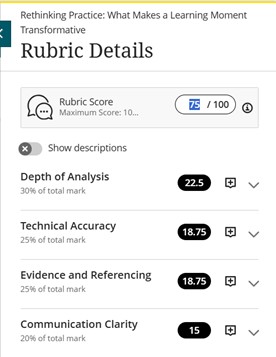
In the past, instructors would have been blocked from changing the overall grade via the rubric. Now, the locking mechanism that previously prevented instructors from using the rubric to override a grade has been removed. Otherwise, grades entered into the rubric grade components will update the overall grade immediately.
The update also includes some changes in wording, such as updating the rubric score box label from “Submission” to “Rubric Score”, in order to improve consistency with the Flexible Grading page.
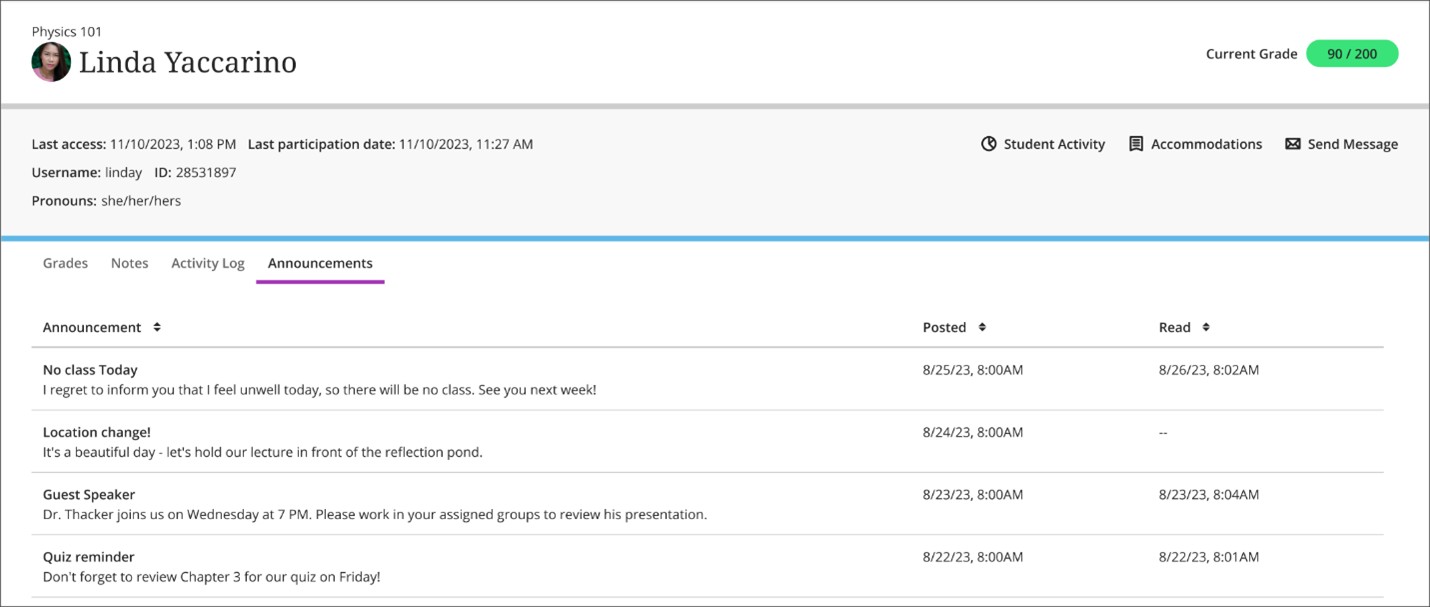
Instructors can now check which announcements a student has read or not read on the new ‘Announcements’ tab of the Student Overview page.
To access this feature, instructors should go to the ‘Class register’ under the ‘Details & Actions’ items on the right-hand side of a course landing page. After selecting a student, a log of whether or not a student has accessed an announcement will be visible for instructors under the new ‘Announcements’ tab of the Student Overview page.
Image 2: The Announcements tab on the Student Overview page shows when an Announcement was posted and when it was read.
If you have any enhancements to request from Blackboard, please get in touch with us via elearning@aber.ac.uk.

We recently ran our E-learning Enhanced: Using Turnitin for Peer Assessment training session and wanted to highlight the different tools that are available for Peer Assessment across our Digital Education Platform.
Peer Assessment activities have several benefits to students:
For Liu & Carless (2006), “peer assessment and peer feedback … enables students to take an active role in the management of their own learning” (280).
If you are interested in exploring this topic further, we recommend:
Liu, N.-F. & Carless, D. (2006) Peer feedback: the learning element of peer assessment. Teaching in higher education. [Online] 11 (3), 279–290.
Lynch, R., Mannix McNamara, P. & Seery, N. (2012) Promoting deep learning in a teacher education programme through self- and peer-assessment and feedback, European Journal of Teacher Education, 35:2, 179-197, DOI: 10.1080/02619768.2011.643396
Zhu, Q. & Carless, D. (2018) Dialogue within peer feedback processes: clarification and negotiation of meaning. Higher education research and development. [Online] 37 (4), 883–897.
We have several peer assessment tools that are available:
You can add a Rubric to the assignment – student will see this as part of their submission.
Note that:
Overview of PeerMark: https://help.turnitin.com/feedback-studio/turnitin-website/instructor/peermark/about-peermark-assignments.htm
Creating a PeerMark Assignment: https://help.turnitin.com/feedback-studio/turnitin-website/instructor/peermark/creating-a-peermark-assignment.htm
Student guidance on Using PeerMark: https://help.turnitin.com/feedback-studio/turnitin-website/student/student-category.htm#peermark
Discussions are available in every course in Blackboard – these are a great way for students to engage asynchronously with their peers; they can post comments and respond to each others’ posts.
For further advice on creating discussions, please see below for Blackboard guidance:
Create Journals: https://help.blackboard.com/Learn/Instructor/Ultra/Interact/Journals
https://journals.sagepub.com/doi/full/10.1177/1469787416654794 – contains guidance for students. Suggests providing a session for students on how to write feedback.
https://www.tandfonline.com/doi/full/10.1080/02602938.2019.1697424
“For peer review in the classroom to be effective, there is clear evidence that the process needs structure, clear and accessible assessment criteria and appropriate scaffolding sessions for students (Mangelsdorf Citation1992).”
https://www.ctl.ox.ac.uk/peer-feedback – includes some useful questions and prompts that could be used to structure feedback.
Peer feedback has been used widely within group assessment work, for example, when it comes to ascertaining student participation, and factoring in group contributions. For an example of a group peer marksheet, see this sample template from Carnegie Mellon University.
Our Academy Forum handout on Peer Assessment provides further information and Aberystwyth University Case Studies.
Assessment Criteria serve a number of functions: to render the marking process transparent; to provide clarity about what is being assessed how; to ensure fairness across all submissions; and to provide quality assurance in terms of the subject benchmark statements. While all these reasons are valid and honourable, there are a number of issues at play:
This blog post will not pretend to solve all the issues surrounding assessment criteria but will offer a number of potential strategies staff and departments more widely may employ to demystify assessment criteria, and marking processes, for students. Thus, students become involved in a community of practice, rather than being treated as consumers (cf. Worth, 2014; Molesworth, Scullion & Nixon, 2011). Such activities can roughly be grouped chronologically in terms of happening before, during, or after an assessment.
Before
During
After
Simply providing students with access to assessment criteria is not enough. It is essential that staff identify and clarify the distinction between criteria and standards and demystify the language of assessment criteria by examining tacit subject knowledge staff possess by virtue of experience. Using exemplars and group discussion of these in concretising how criteria and standards translate into a submission will provide students with insights into the marking process that enables them to better understand what they are being asked to do. Lastly, staff should repeatedly encourage students to make use of the availability of assessment criteria while they work on their assessments, which should enable students to feel better prepared and more focussed in their responses.
References:
Molesworth, M., Scullion, R., and Nixon, E. (eds.) (2011) The Marketisation of Higher Education and the Student as Consumer, London: Routledge
Worth, N. (2014) ‘Student-focused Assessment Criteria: Thinking Through Best Practice’, Journal of Geography in Higher Education, 38:3, pp. 361-372; DOI: 10.1080/03098265.2014.919441
In the past month, the university has rolled out Vevox and begun training staff in its use. Vevox combines polls, surveys and Q&As in one interactive software and has integrations with Microsoft Teams and PowerPoint. We are glad to see that staff are already adopting this new software in their teaching and want to encourage students to do the same.
Aberystwyth University’s subscription to Vevox comes with Single Sign-On, meaning students can securely log in with their Aber Uni ID and password. Just as there are multiple ways that staff may use Vevox, so students might find it a useful tool.
For example, students could use Vevox polls and the Q&A function when presenting in seminars or workshops, especially in assessments that feature audience engagement as a criterion. Equally, Vevox offers great opportunities for student research, both in terms of analysing and interrogating survey design (e.g. by using Vevox’s existing sample surveys), and for creating and running their own surveys. Further, Vevox might be used in group work, offering students the opportunity to gather ideas and encourage diverse input from more quiet group members. This is especially useful at the moment, where student groups may include members from different households.
These are just a few examples of how students might use Vevox in their learning and we encourage staff to alert students to the fact that they, too, can access this software for free. Our Vevox guides are here (English and Cymraeg) and How-To videos are here (English and Cymraeg). The Learning and Teaching Unit is at hand alongside the Vevox Team to support any technical queries that may arise, providing student with support that is not available when using free alternatives.
Pre-recorded asynchronous content has become a key factor in delivering courses and enabling the best learning experience for students at Aberystwyth University. There are several strategies that lecturers can use to make these recordings both engaging and interactive.
The benefits of asynchronous pre-recorded lectures are manifold, and most students – as the so-called YouTube generation – know this mode of learning extremely well (Scagnoli, Choo & Tian, 2019). Benefits include that students control their engagement with the content and value the convenience and flexibility that asynchronous recordings provide them with, in particular regarding the pace of their learning, and the repeatability of their engagement (Dale & Pymm, 2009; Ramlogan et al., 2014; Scagnoli, Choo & Tian, 2019). It is therefore essential that staff outline what is expected of students in terms of engaging with learning materials, both in pre-recorded videos and in-person sessions.
Advice on managing face-to-face teaching successfully:
All staff should strive to maximise the amount of time that students are working back to back or side to side, wherever possible. However, where this is not possible, students may turn to one another, for example for seminar discussion, provided other mitigating practices remain in place (ventilation, masks, social distancing).
A short (10 minute) discussion among students can then be opened up by using interactive technologies such as polling software to allow students to pool their knowledge and begin a plenary discussion, for which all students will face forward again. The majority of in-person sessions should take place with students positioned back to back or side to side.
Please note:
• Any activities in which students face each other should be in very small groups (pairs or groups of three) to minimise the overall volume and ensure everyone can contribute.
• Reminding students of good conversational etiquette, in which people take turns to speak, is essential to minimising the volume of conversations, and thus the projection of aerosol droplets.
• In rooms with fixed and/or tiered seating, such discussion may prove difficult, as students are not permitted to change seats.
• In rooms with mobile seating, the layout of the room must not be changed, and staff must ensure that students maintain social distancing at all times when turning to others.
Advice on managing HyFlex teaching successfully:
• Set expectations clearly: what can student joining remotely expect? Will they be in an observer role? Will they be active participants? What are the limits of remote participation?
• Enable interactive tasks that bring remote and in situ students together, e.g. interactive polls that all can access synchronously
• If numbers are very uneven and the majority of students is present in one mode (e.g. only one student is joining remotely from quarantine), invite in situ students to the online session using their own devices, to enable peer discussion
In Digital Insights 2018/19 survey, we asked students to give an example of a digital tool or app they find really useful for learning. We thought we will share some of the examples on our blog.

Access AU core e-learning services
Research
Organize & monitor your progress
Taking notes
Study better
Last year Aberystwyth University took part in the pilot of JISC Student Digital Experience Tracker – an online survey designed by JISC to collect information about students’ expectations and experiences of technology. The 2017/18 pilot has led to a new Jisc service now called Digital Experience Insights.
Digital Insights survey for students run at AU in January 2019. We were very excited about running this survey for the second time, as it enabled us to compare the findings with last year’s result and track our progress on digital provisions.
Below you will see a short summary of some of the key findings. If you wish to discuss them further or get more information on the project, please contact us at elearning@aber.ac.uk.
As you may be aware the Digital Experience Insights survey comes with a benchmarking data from other Higher Education institutions in our sector. The benchmarking data has been now made available and we will share it with you in the next Digital Insights post.
If you wish to read about AU experience of running Digital Insights in academic year 2017/18, take a look at the article published on Jisc website or browse through our previous posts:
WiFi
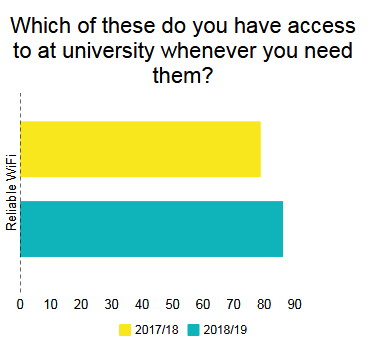
Students’ satisfaction with WiFi increased by 7.3% in comparison to last year’s survey. Although WiFi is still the most common theme in students comment, the number of comments regarding WiFi decreased from 66 last year to 38 this year.
E-books & E-journals
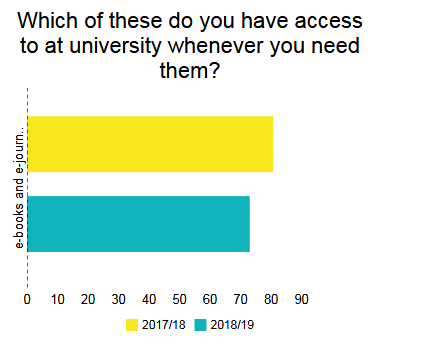
7.7% less students responded that they have access to e-books and journals whenever they need them, this issue has been also mentioned in 19 of students’ comments.
Blackboard
The issue regarding a navigation in Blackboard seemed to improve. There were only 3 comments about this issue in comparison to 20 last year and 8.2% increase in the question on Blackboard navigation.
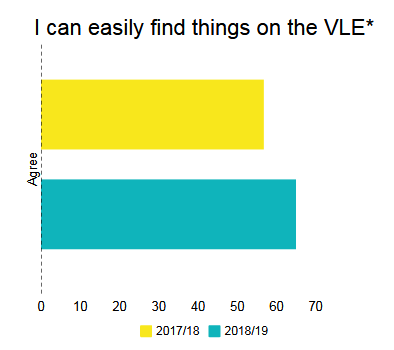
*The question wording has changed since the 2017/18 survey which could have impacted the ratings.
Security
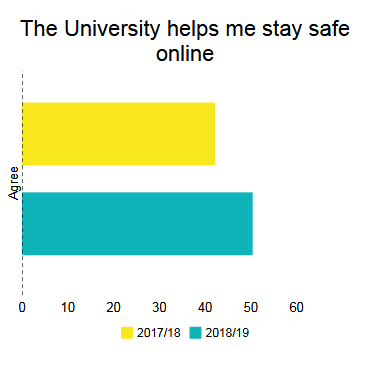
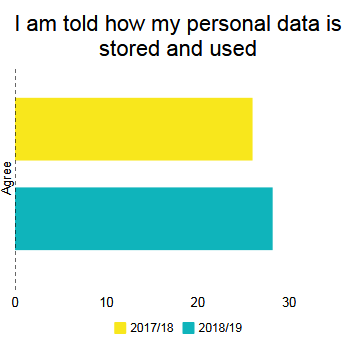
Students are more satisfied with the provisions regarding security issues.
Mobile devices
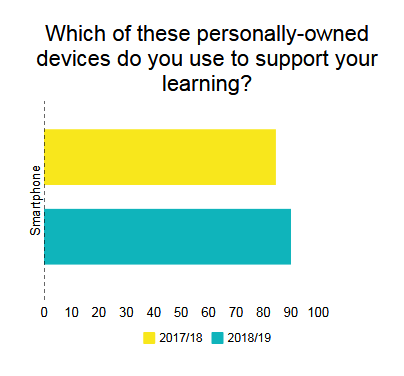
The use of smartphone to support learning increased slightly. In the comments, students talked about the need of core services such as Panopto and Blackboard being mobile friendly and about usefulness of apps helping them with their studies. Interestingly, when asked whether they would prefer to be allowed to use their own mobile devices in class only 49% answered ‘At any time’, 45.4% answered ‘Only to carry out class activities’ and 5.6% ‘None of the time’.
Use of technology
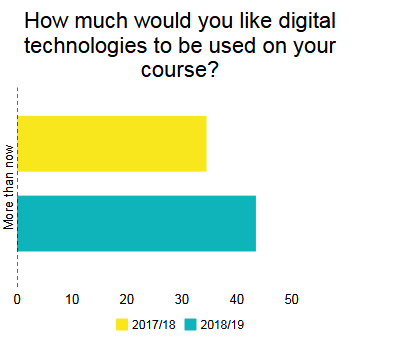
There is a shift towards using more technology, there were quite a few comments about staff needing more training on the use of technology and there was an increase of nearly 10% of students wanting more technology to be used on their course.

In-class polling or voting is great way to increase student engagement and interactivity in the classroom (for example see: Shaw et al, 2015; Boyle and Nicol 2003; Habel and Stubbs, 2014; Stratling, 2015). It is used widely in both higher and further education, and number of staff at AU make use of in-class polling on a regular basis. In addition to physical Qwizdom handsets available in loan stock, staff are more and more using online polling services such as Poll Everywhere, Socrative and Mentimeter (amongst others). These services allow students to use their own devices (such as mobile phones, tablets and laptops) to take part in polls, give feedback, and ask questions.
The E-learning Group can provide a wide range of information and support for anyone interested in using polling in their teaching. This ranges from advice on how to embed polling into your teaching practice successfully, to practical help on creating and using polls in the classroom.
At present AU doesn’t offer a centrally supported online polling tool for mobile devices. However, there are a wide range of services available, many with free or trial versions. This blog post is designed to help you assess which tool suits you and your students’ best.
The E-learning Group has produced some information on some services which you may want to look at.
Once you have decided on which service you are using, here’s some of our top tips on successfully using voting in the classroom
There are a whole range of opportunities for using polling – from collecting information on how much the students know at the start of a module, to finding out what topics you need to cover in a revision session. You can also collect opinions, gain feedback on how the lecture is going, or collect anonymous questions. If you’re using polling in your teaching get in touch and tell us more – we may even feature your work on the blog!