Turnitin will be unavailable between 00:00 and 08:00 on Saturday 9 July 2022 for scheduled maintenance.
During this time, you will be unable to submit or grade any assessments.
We apologise for any inconvenience caused.

Turnitin will be unavailable between 00:00 and 08:00 on Saturday 9 July 2022 for scheduled maintenance.
During this time, you will be unable to submit or grade any assessments.
We apologise for any inconvenience caused.

Towards the end of July we will start to create Blackboard modules for 2022-23.
Unlike previous years, there will be no existing courses created blank. This decision was made at the recent Academic Board.
Course content and files will be copied over from the version of the module in the previous academic year. Turnitin submission points, Panopto recordings, and interactive Blackboard activities are not included in the copy; these will need to be rebuilt. We’ve got lots of FAQs to assist staff with this.
If you are running a new module then these will be created using your pre-agreed Departmental Templates. Similarly, if you are running a module that hasn’t run in the past couple of years then these will also be created blank.
If you have any questions about this process, please contact us (elearning@aber.ac.uk). Once the modules have been created, we will let you know.

For the academic year 2022/23 we will be using a new version of Turnitin.
On Tuesday 5 July Information Services will be enabling the new Turnitin on Blackboard.
Whilst most of Turnitin’s current functionality will remain the same, there will be some changes.
To help students with this change, we have arranged the following FAQs:
Our webpages and help guidance will be updated to reflect these changes.
If you have any questions, please do not hesitate to contact the Learning and Teaching Enhancement Unit (elearning@aber.ac.uk).

For the academic year 2022/23 we will be using a new version of Turnitin.
On Tuesday 5 July 2022 Information Services will be enabling the new version of Turnitin on Blackboard.
Whilst most of Turnitin’s current functionality will remain the same, there will be some changes.
To help staff with this change, we have arranged the following FAQs:
Further information can be found in our Turnitin LTI FAQs.
Our webpages and help guidance will be updated to reflect these changes. If you have any questions, please do not hesitate to contact the Learning and Teaching Enhancement Unit (elearning@aber.ac.uk).

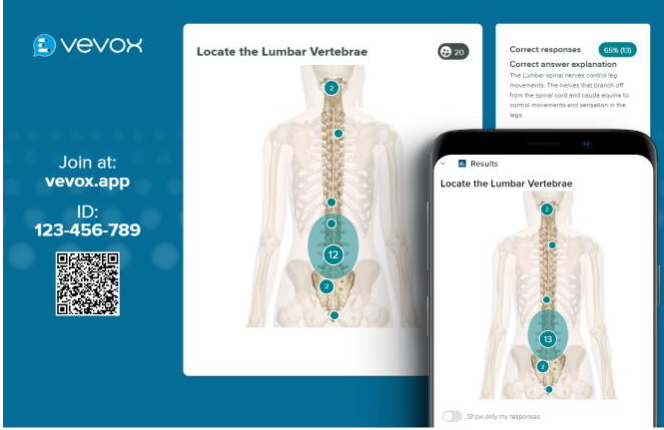
On 21 March Vevox, the University’s polling software, will be having an update with some additional functionality.
We’re really pleased to be able to see some of the developments as they are requests that we have placed to Vevox on behalf of you.
Firstly, for distance learning practitioners and those who want students to undertake self-paced polling, there’s the introduction of self-paced quizzes to the survey tool.
You’ll just need to create a survey and then add a correct answer. Students can do this anonymously or you can choose to identify them.
The Q and A boards are still underused a little here at AU, but there will be the option to tag questions and comments. Will be useful for those of you who are co-delivering a presentation and want to allocate specific questions to a presenter.
Further information on new Vevox functionality can be found on their update blogpost.
We have regular contact with our Vevox account managers. They’ve already assisted in creating bilingual aspects and have reached out to us for further discussion on how this could be developed further. Also, some enhancement requests that we’ve asked for include:
A reminder to the mathematicians amongst us that LaTex is available in your question types.
Vevox is not limited to learning and teaching activities. All members of the University can log in and use Vevox. If you’re running a meeting and want to poll attendees, then Vevox could be for you. Check out their recent case studies on how to make meetings interactive with Vevox.
If Vevox is new to you, then we’ve got guidance on our webpages. Vevox runs 15 minute training sessions – sign up online. We’re always up to hear about anything innovative you’re doing with Vevox so drop us a line if you’re doing something exciting.


One of the advantages to having an institution subscription is that we can benefit from enhancements and updates.
One of the recent enhancements was to the word cloud style question. Previously only one word was able to be submitted to the word cloud style question, but now participants can provide multi-word submissions as well as single words. Word clouds also accept non-English characters and emojis. Vevox has also been working on the accessibility of the word cloud question and the colour scheme has been enhanced to improve its display.
We’re really pleased at how colleagues are making use of Vevox. If you’re after some ideas on how you can use it in your teaching, then Kate and myself recently presented a webinar on Vevox’s behalf. As well as giving an overview of our rollout of Vevox since we procured it in March, we also outlined some exemplary practices taking place by colleagues:
Thank you for the colleagues above for sharing their practices and experiences with us. A recording of the webinar is available on YouTube.
We’ve also got our Mini Conference on Thursday looking at how polling software can be used to enhance learning and teaching activities. There’s still time to book onto that. We’re grateful to be joined by Joe and Izzy from Vevox, as well as our external speaker, Dr Christina Stanley from the University of Chester.
Vevox guidance is available on our webpages. If you’ve not used Vevox before then sign up for the Zero to Hero sessions which are run every Tuesday at 3pm. We’re also re-running our training session Designing Teaching Activities using Vevox on 16 March 2022 at 10am. You can sign up via our Course Booking page.
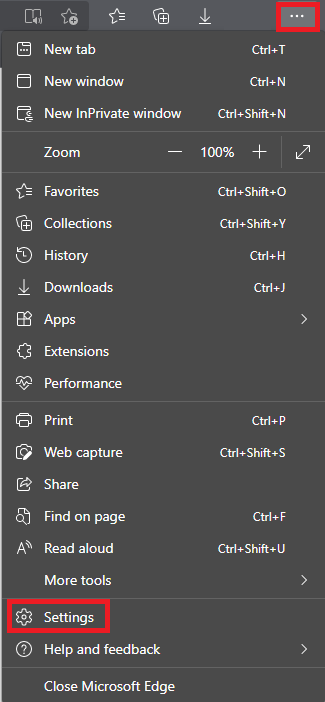
The Microsoft Edge browser attempts to open Microsoft Office files directly in the browser. When accessing files in Blackboard this is causing an error with the message; “404 – File or directory not found.”

A suggested workaround for this is to use either the Google Chrome or Firefox browsers.
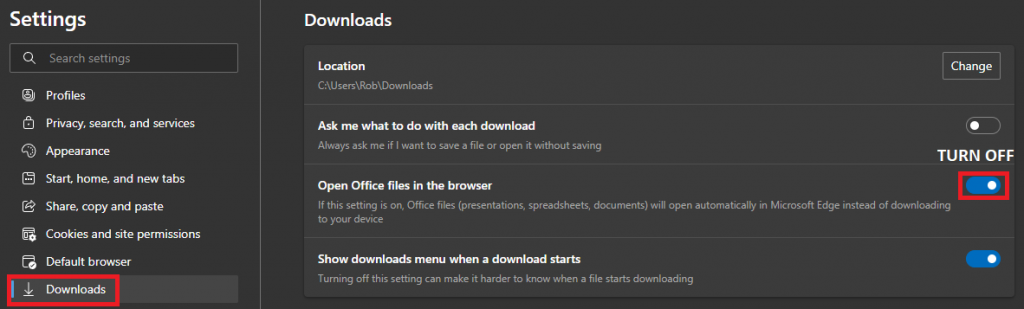
Alternatively you can change the following setting in Microsoft Edge:
Open the Edge menu by clicking the three dots and click Settings

Click Downloads
Turn off the setting Open Office files in the browser

If you require further assistance please contact elearning@aber.ac.uk

One of the benefits to having a subscription to a dedicated Polling Tool is receiving regular updates. Vevox is the University’s dedicated Polling Tool. You can use it to add interactivity to your teaching sessions as well as your meetings.
Our resources for Vevox are available on our webpages.
Enhancements that have come this month are summarised below:
Vevox fully integrates with Teams meaning that you can run the sessions in your online teaching meetings and participants can respond via the Teams app without having to enter a 9 digit code. Find out more on our How do I use Vevox with Microsoft Teams FAQ.
We’re always on the lookout for case studies so if you’re using Vevox polling in your teaching session drop us an email on lteu@aber.ac.uk and let us know how you’re using it.
View all of these updates on Vevox’s June blogpost.
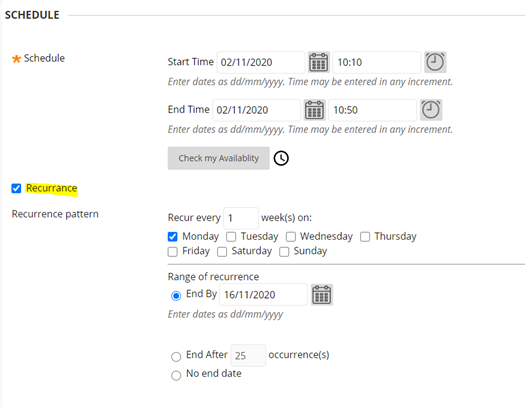
Today, a new feature has been made available in Blackboard which allows you to create recurring MS Teams meetings.
This new feature works very similarly to the recurring options available in Outlook. As can be seen in the image below, you can now arrange MS Teams meetings through Blackboard based on how often you want them to recur; on what days you want them to recur; and when you would like this recurrence to end.
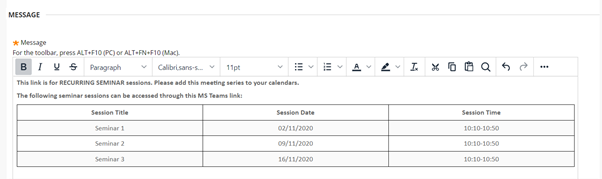
Students should be encouraged to add this link to their calendars as this will automatically add the whole series to their calendars.

When setting up your recurring meeting, please ensure that you include clear information which demonstrates which sessions should be accessed through the link that you have just created.

For further details on how to use this new feature, please visit our FAQ.

You may notice some changes to Blackboard labels whilst we update our language pack tomorrow morning (Tuesday 10.11.2020).
This will affect menu items and My Modules. Blackboard functionality and access will remain during this time and you will still be able to create content, access materials, and submit assignments. This work is scheduled to take place as part of Information Services’ Tuesday morning maintenance: https://faqs.aber.ac.uk/94.