We’ve got topics on neurodiversity and ai, neurodiversity and employability, and improving teaching for neurodiverse students amongst many other topics.
In the afternoon, we are running a series of workshops which delegates can sign up to attend.
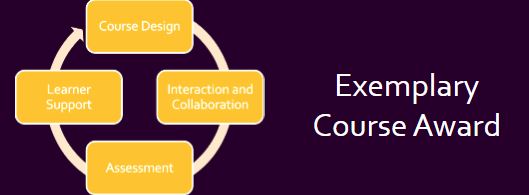
We are delighted to announce the winner of this year’s annual Exemplary Course Award.
Congratulations to our joint winners:
Dr Christopher Phillips from International Politis for the award-winning course: IP25320: Warfare after Waterloo: Military History 1815-1918
Dr Catrin Wyn-Edwards from International Politics for the award-winning course: IPM3120: Race, (Im)mobility, and Incarceration.
The panel noted exemplary practices in the following areas:
Community ethos and student co-creation activities
Seminar packs with clear guidance and additional materials to expand on the main topic
Ethos of the module as part of the welcome and orientation
Clear and accessible module structures
Variety of source types
A range of assessment and feedback opportunities
Optional exercises for developing essay writing and critical thinking skills
Reading list organised into different sections
Embedding learning outcomes throughout the course
Many congratulations to our highly commended and commended recipients:
Department of Geography and Earth Sciences’ Dr Tristram Irvine-Fynn and Dr Hywel Griffiths for the course GS25520: Glacial and Fluvial Processes and Theatre Film and Television Studies’ Dr Lara Kipp for the course FM22120: Production Design Skills.
These 2 courses demonstrated some excellent practices, including innovative virtual field trip activities, anonymous student feedback mechanisms, authentic assessment design, and clarity on generative AI usage. The award is assessed based on a rubric across four areas:
Course Design
Interaction and Collaboration
Assessment
Learner Support
The courses were of such a high standard, and we look forward to sharing their practices with you in due course.
Many congratulations to this year’s well-deserved recipients.
Please complete this form no later than 22 May 2026.
The theme for this year’s conference is:
Co‑Creating Inclusive Futures: Flexible, Diverse, and Competency‑Driven Learning
The main strands of this year’s conference are:
Diversifying the Curriculum for Equity and Belonging
Building inclusive, decolonised curricula that reflect diverse identities and experiences, advancing the Race Equality Charter.
Flexible Learning for a Changing Landscape
Hybrid, blended, and accessible learning designs that support varied learner needs through thoughtful pacing, structure, and technology.
Competency‑Driven Learning
Clear, meaningful integration of skills, graduate attributes, and real‑world application of competencies.
Students as Co‑Creators and Collaborators
Authentic student–staff collaboration in curriculum design, assessment, research, and decision‑making.
Staff and students are welcome to propose sessions on any topic relating to learning and teaching, especially those that focus on the incorporation and use of technology. Even if your suggestion doesn’t fit into a particular strand, other topics are welcome.
We seek to encourage presenters to consider using alternative formats that reflect and suit the content of their sessions. As such, we are not specifying a standardised presentation format.
Happy New Year! In the January update, we want to draw your attention to the following Blackboard enhancements:
Minor Update to the Blackboard Interface
Improvements to Document’s layouts
More options for true and false questions
Changes to multiple choice and multiple answer workflows
Minor Update to the Blackboard Interface
There is no downtime associated with this update, and Blackboard will continue to function normally during this period.
These changes include:
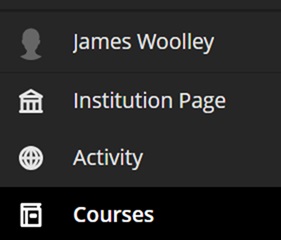
Change in order of menu items on the main navigation menu:
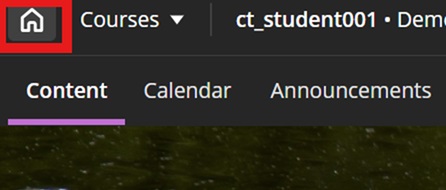
A new home button in a course to take you back to the landing page:
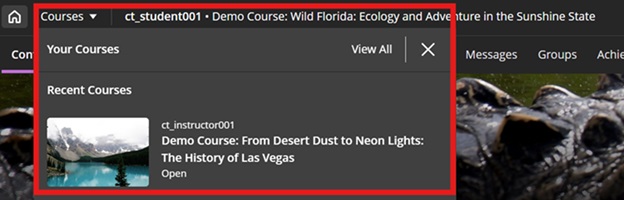
A quick link to navigate to your recently accessed courses
In addition to this, to maximise screen space, Blackboard will remove the nested folder view.
Improvements to Document’s layouts
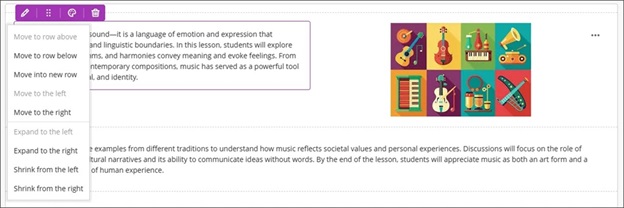
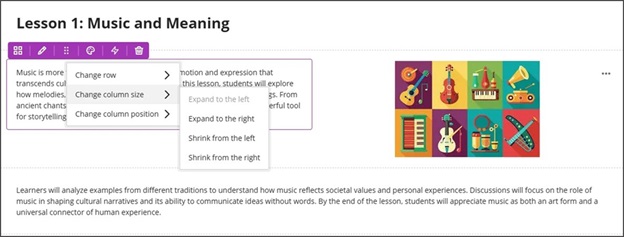
To improve usability and accessibility, we restructured the menu for document block layout. Previously, all options for changing the row, size, or position of a block were in a single dropdown list. Now, these options are organized by type of change (row, size, and position).
Selecting the edit icon for a block prompts a menu with three options: Change row, Change [block/column] size, and Change [block/column] position. Each of these options have a sub-menu, with the related actions.
Change row
Move to row above
Move to row below
New row above
Change [block/column] size
Expand to the left
Expand to the right
Shrink from the left
Shrink from the right
Change [block/column] position
Move to the left
Move to the right
Image 1: How document block styling options displayed before
Image 2: How document block styling options display now
More options for true and false questions
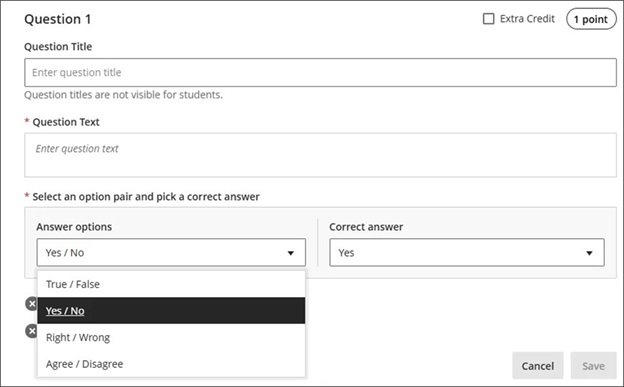
We expanded the display options for true/false questions to include:
True/False
Yes/No
Right/Wrong
Agree/Disagree
These additional answer options display when:
Instructors create or edit this question type when building a test or in a question bank
Students answer the question
Instructors grade the question
Students review their submission or graded question
Image 1: True/false questions now include additional options.
Changes to multiple choice and multiple answer workflows
ow students interact with questions. These changes support greater flexibility in assessment design and an improved experience for students.
Instructors
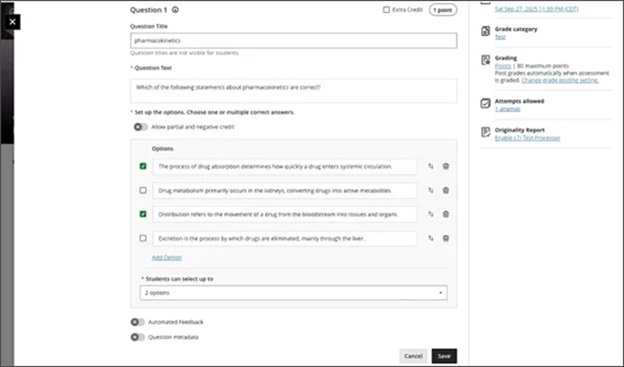
To reduce setup time when creating a multiple choice question, we changed the default number of answer options from three to four. Instructors can add or remove answer options.
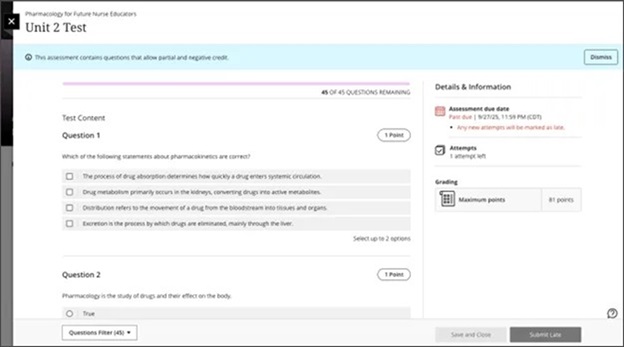
Instructors can now define the number of answer selections that a student can make for each multiple choice question. When the student takes the assessment, the system enforces the instructor’s selection limit.
The default is:
4 answer options
partial/negative credit is off (no additional changes made to partial/negative credit for this release)
students can select up to 4 answers
if additional answers are added, selection limit remains at 4
if answers are removed, instructor must select the selection limit
Image 1: Instructors can define the number of answer selections for each multiple choice question.
Students
For questions where students can select only one answer, the selection mechanism is radio buttons. For questions where students can select more than one answer, the selection mechanism is checkboxes.
Image 2: The student’s selection mechanism of checkbox or radio button is determined by how many answers they can select.
If you have any enhancements to request from Blackboard, please get in touch with us via elearning@aber.ac.uk.
On November 18, Aberystwyth University will join institutions worldwide for Fix Your Content Day 2025, hosted by Anthology. If you are wondering about what this means, or whether to take part, then here are a few reasons to get involved.
Every change – big or small – makes a difference to our students. Making Blackboard content as accessible as possible benefits all our students. Having materials in a format that students can use easily means that they can focus on their learning rather than struggling with inaccessible formats. The choices that staff make to design accessible materials, as well as the Ally Alternative Format tools, help us to make sure that all students can engage with their studies.
It’s particularly important here at AU, as the latest HERA data show that over 28% of our students have a declared disability (compared to 16.7% nationally).
Drop-in session open to all. Although our e-learning staff are always willing to help you with accessibility, we’ll have dedicated support available in B23 Llandinam during the afternoon of 18th. Come along and we can show you how to use Ally or discuss any particular issues you have with your course materials. And tea and biscuits will be available!
And finally, taking part in Fix Your Content Day is part of our ongoing commitment to ensuring that all students can engage with learning materials.
There are some new features available in the latest Vevox (Polling Tool) update that we wanted to draw your attention to.
For those unfamiliar with Vevox, the polling software can be used to ask students questions and for them to respond live using their mobile devices. For information on how to use Vevox, see our webpage.
The update includes:
Scheduled Surveys and Quizzes. You can make surveys and quizzes available outside of lecture rooms with automatic start and end times (note that the session needs to be started in Vevox for this to work).
AI Question Helper. The AI tools will now suggest answer options based on your questions as well as creating a wider range of questions.
Spin the wheel. A fun way of selecting a random option from a list, for example a list of revision topics, or group names for delivering presentations. Note that the person running the poll controls the wheel (not participants).
Over 180 colleagues across the University made use of Vevox, our polling tool, last year.
Close to 4000 polls were created across nearly 1000 sessions, with over 27,000 participants.
Vevox allows your participants to use their mobile devices to respond to a series of questions.
You can use this for many activities in the classroom:
Q and A
Knowledge checks
Quizzes
Opinion gathering
Decision making
Team games
Revision activities
Mind mapping
Resource creating
And so much more…
With our institutional licence, all members of the community can make use of Vevox. Students can use it in their presentations; colleagues can use it in their meetings. Last year, we were really pleased that Vevox was used in the University welcome talks which will continue again this year.
We’ll also be running our enhanced training session on designing learning activities using polling software in November. See this and our other enhanced sessions and book online.
This year’s conference boasts a number of external speakers.
Keynote speaker:
Dr Neil Currant will be offering a keynote presentation on Compassionate Assessment. There will also be a masterclass workshop with colleagues being able to apply these principles to their own scenarios. See our blog update for further information.
External speakers:
We’ve got three other external speakers lined up. For further information, click the links below:
In the April update, we are particularly excited about a new feature called the Learning Object Repository. There is now the ability to print Blackboard Documents, and updates to the grading and feedback workflow for staff and students.
New: Learning Object Repository
The new Learning Object Repository is an institutional repository designed to centralise resources across courses and organisations.
We can upload items to the Learning Object Repository for instructors to copy into their courses. Note that items copied into courses cannot be edited.
This feature is available for Blackboard Documents at this stage but there are plans to develop options to include files in the future. We have also requested a folder level structure be developed so that we can organise content items for instructors to find.
Over the next couple of months, we will be working on developing the process for colleagues to request for items to be added to the Learning Object Repository. We aim to have this in place ready for your 2025-26 courses.
Some initial ideas from us include links to generic skills resources, generative AI policies, and optional health and safety statements.
If you have any ideas about how we might use the Learning Object Repository, please contact elearning@aber.ac.uk.
Content Designer: Print Document
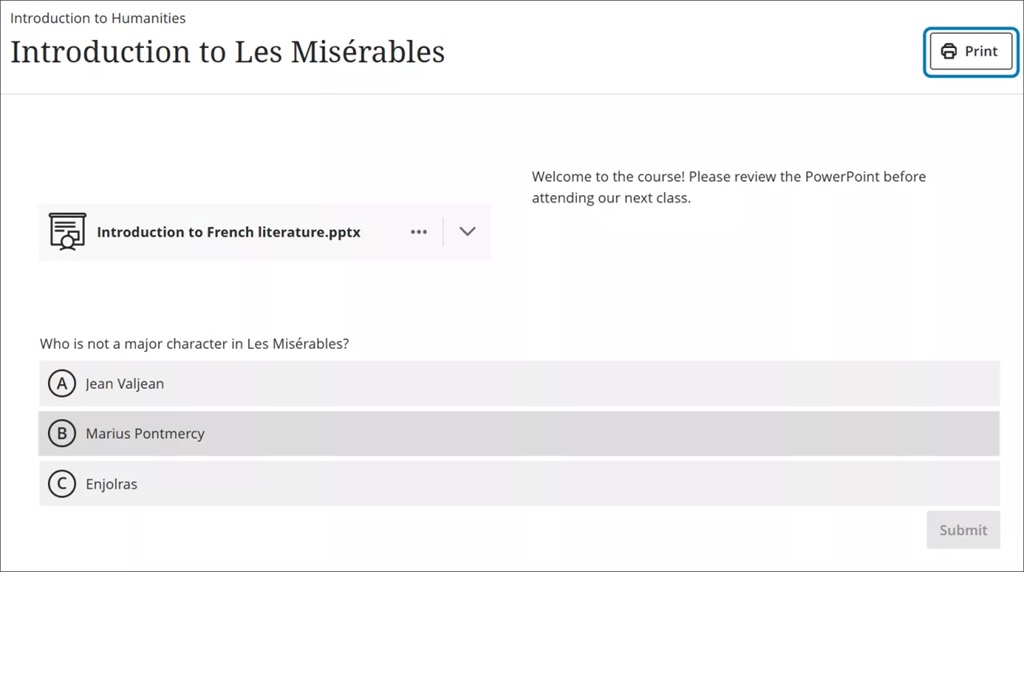
We have seen some significant changes to the Documents feature in Blackboard over the past 6 months. Now colleagues and students can print these Documents or save to PDF so that they can review content offline.
The print function retains the Document layout. Note that for instructors, knowledge check blocks print with all the question and answer options. All other blocks print as displayed outside of editing mode.
Image 1. The new Print button for Documents is now available for students.
Grading and Feedback
There are some minor enhancements to Grading and Feedback this month.
Indicator to see if a student has reviewed their feedback
In the Gradebook, instructors now have enhanced ability to monitor student engagement with assessment feedback. An indicator on the individual student’s Overview page now displays whether a student has reviewed the feedback for a given assessment.
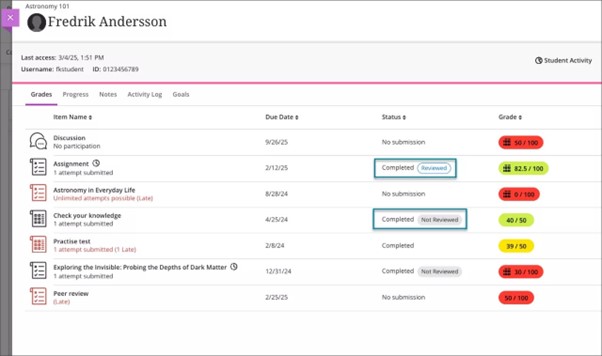
When a grade is posted, the indicator includes a label of Not reviewed with the existing Completed label in the Status column. When the student reviews the feedback, the status updates to Reviewed with a review timestamp.
If the new grade indicator is reset for the assessment, such as when a grade is updated or if the assessment has multiple attempts, the timestamp updates when the student reviews the feedback again. If all attempts are deleted, the Not reviewed or Reviewed label is removed.
Image 1: Instructor Gradebook view has Reviewed and Not Reviewed labels in the Status column.
To see whether a student has viewed their feedback:
Navigate to the Course
Select View everyone on your course and search for the individual student
Under the Mark screen you will see whether the student has reviewed their feedback
Enhanced grading experience for group submissions
Blackboard Assignment can manage group submissions where a student in a group submits a file, and marks and feedback can be allocated for all students.
In this month’s update the grading interface for group submissions has been updated to match that of individual submissions.
Replace Feedback column with actionable Results column in student Gradebook
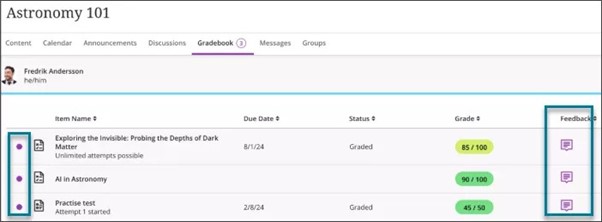
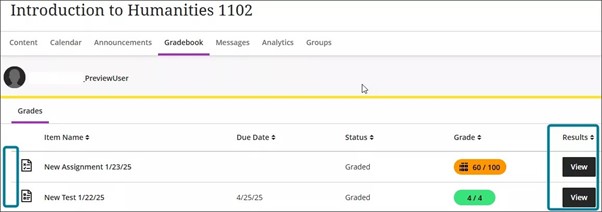
The students’ Gradebook has changed to include:
A new Results column replaces the Feedback column
A View button in the new Results column replaces the Feedback column’s purple feedback icon
When a grade is posted and the new grade indicator (purple circle) is turned on, the View button displays for the assessment.
When students select the View button, the new grade indicator turns off, and students are redirected to their submission. If no submission is made, the side panels with feedback opens. The View button remains unless the instructor deletes the graded submission and all attempts.
Image 1: Previous view of the student Gradebook included Feedback column with feedback icon and new grade indicator when feedback is available for review.
Image 2: New view of the student Gradebook includes an actionable Results column, with the new grade indicator turning off after the student views the feedback.
Ideas Exchange:
This section aims to keep you updated on progress of enhancements requested on the Blackboard Ideas Exchange.
We are pleased to see the Feedback Indicator included in this month’s release. This is a feature that we requested and was important in our recent SafeAssign Pilot survey.
Greek has also been added as an output language for the AI Design Assistant. This was requested by a colleague in Lifelong Learning.
If you have any enhancements to request from Blackboard, please get in touch with us via elearning@aber.ac.uk.
We are pleased to announce the programme for our forthcoming online Mini Conference: Employability and the Inclusive Curriculum.
Taking place between 09:15 and 13:00 on 8 April, in collaboration with colleagues in the Careers Service, places can be booked online.
We will start the conference with a welcome from Professor Anwen Jones at 09:15 before moving onto Dr Aranee Manoharan’s keynote. Dr Manoharan is joining us from King’s College, London. You can read further information on Dr Manoharan’s pioneering work on our blog.
Psychology’s Dr Saffron Passam will be leading an interactive workshop on Future-Proofing Graduates: Embedding Equality, Diversity, and Inclusion as a Core Employability Skill between 10:20 and 10:50.
Theatre, Film and Television Studies’ Dr Louise Ritchie will be leading a session on Staging Success: Integrating Employability in the Drama and Theatre Curriculum (Part 2) between 10:50 and 11:20.
Following a break, School of Education’s Annabel Latham will be joining us for their session Professional Partnerships in HE: a discussion around the co-creation of assessment to embed employability in the curriculum between 11:35 and 12:05.
The event will close with Careers’ Service’s Bev Herring and Jo Hiatt, who will showcase collaborative efforts and plans to enhance employability integration at Aberystwyth University.
We hope that you can make this special event.
Full programme and session abstracts are available on the webpage.