The Blackboard Learn Ultra August update included enhancements to the creating and editing functionality of Blackboard Learn Ultra Documents.
For those unfamiliar with Documents, they are an easy way to create content in Ultra, ensuring compatibility with mobile devices and Blackboard Ally. As this update to Documents is a significant change to content organisation, we are producing this separate blogpost. You can read about other enhancements in the August update blogpost.
The latest update gives instructors more power and control over how content appears. It functions as a webpage, with a variety of block types that can be used to create and organise content. These blocks can be moved around to give instructors more options over the layout of their content.
In summary:
- Images can be brought in-line with text
- Bilingual content can be arranged more easily
- Headings can be used to aid with navigation
- Files can be uploaded and converted into an Ultra Document, retaining the original formatting
An example of a Document created using the new content editor can be seen below:
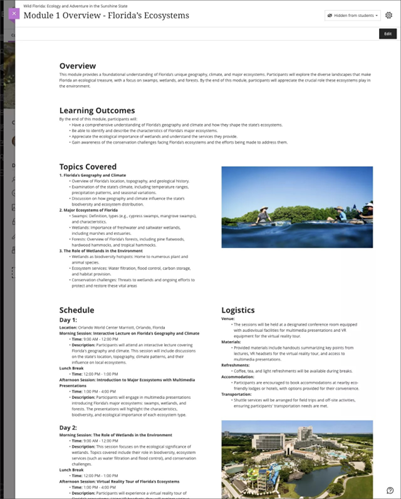
For all instructors, the biggest change is that the content creator appears at the top of the page. You can still use the + icon to create content which will then give you the menu that you see below:

The convert a file option is new functionality that allows you to upload a file. This will convert it into an Ultra Document retaining the formatting of the original file.
Selecting Content will take you to the usual content editor.
This allows you to add content and resize.
You can easily move content around bringing images in line with text.
As you work with re-organising and re-arranging content, we recommend that you save your work as you go to ensure that changes remain.
For further information on creating and using documents, see Blackboard Help Guidance.