Weekly Resource Roundup – 15/1/2024

As leader of our PGCTHE programme, I keep an eye out for resources to help staff teach effectively. These include webinars, podcasts, online toolkits, publications and more. Topics include active learning, online/blended teaching, accessibility/inclusion, and effective learning design based on cognitive science. Below I’ve listed items that came to my attention in the past week. In the interest of clarity, our policy is to show the titles and descriptions in the language of delivery. 

Online events and webinars

January

February

March

  • 11-15/3/2023 Active Learning Network, Global Festival of Active Learning: Back to the future – looking ahead for active learning (Call for proposals open until 26/1/2024)
  • 12-13/3/2024 Jisc, Digifest 2024: Imagining the future of education and research (hybrid in-person in Birmingham and online)

Resources and publications

Resources on Artificial Intelligence

Other resources

Other

  • Monthly series European Network for Academic Integrity, ENAI monthly webinars free open webinars on various topics related to academic integrity.
  • Subscribe to SEDA’s mailing list for email discussions about educational development and emerging teaching practices. This is one of the sources I use when identifying useful material for the Roundup.
  • Follow University of Birmingham’s Higher Education Futures institute HEFi on Twitter for daily posts with links to pedagogical literature and more. This is one of the sources I use when identifying useful material for the Roundup.
  • Join the #LTHEchat on Twitter Wednesday nights for one hour of lively discussion about learning and teaching in HE. I often find out about good resources for the Roundup from the chat.

Please see the Staff Training booking page for training offered by the LTEU and other Aberystwyth University staff. I hope you find this weekly resource roundup useful. If you have questions or suggestions, please contact our team at lteu@aber.ac.uk. You may also wish to follow my Twitter feed, Mary Jacob L&T.


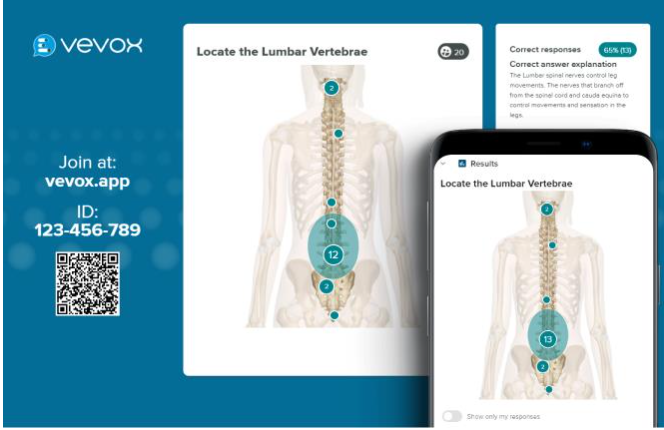
Vevox: University Polling Software

The University has a Vevox licence for all staff and students to use.

Vevox is Polling Software that allows participants to use their mobile devices to respond to questions.

In Semester 1, over 300 Vevox sessions ran, with over 10,000 participants and 1,500 polls.

In learning and teaching contexts, you can use Vevox to make your teaching more interactive, giving students the opportunity to reflect on their learning, respond to questions, provide ideas, and consolidate their understanding.

Vevox is not limited to learning and teaching activities. You can also use Vevox in meetings and outreach activities to canvas opinion, help with decision making, and give colleagues the opportunity to feedback.  

There are variety of question types available:

  • Multiple choice
  • Word cloud
  • Text Ranking
  • Numeric
  • Rating
  • XY Plot
  • Pin on image

You can also run surveys.

The Q and A feature gives colleagues the opportunity for their attendees to ask questions and for you to respond to them live in the session.

This feature is useful for classroom assessment techniques, such as muddiest point and revising key concepts.

With the Q and A function, participants can also upvote comments so you can address questions. This useful feature can also be used for external presenters and conference activities.

You can run analyses on your polls to see participant response.

As an institution, we have several case studies. See our previous blogpost on Vevox case studies.

If Vevox is new to you, then we have a training session on 26 January at 11:00 online via Teams. You can book your place via our CPD booking page.  

We’ve also got a webpage dedicated to Vevox.

All our previous Vevox updates are available on the LTEU blog.

If you’ve got any questions, then contact the Learning and Teaching Enhancement Unit (elearning@aber.ac.uk).

Making your Blackboard Content Accessible

Screenshot of the Blackboard Ally tool showing 4 dials: Needs help! A little better. Almost there. Perfect!]

  • Have you ever wondered what the dials next to your content mean in Blackboard?
  • Have you seen the Ally Accessibility Report in your Blackboard course but weren’t sure what to do with it?
  • Do you want to make your Blackboard content more accessible, but aren’t sure where to start?

If the answer to any of these questions is Yes, then our new Introduction to Ally course is one for you.

And if you are wondering what Ally even is, then this course is definitely one for you.

The E-learning Essentials: Introduction to Blackboard Ally course (26 February) will take you through the basics of using Ally to check and fix accessibility issues in documents you have uploaded to Blackboard. Ally was introduced back in September (view the blog post introducing Ally) and is available in all 2023-24 Blackboard courses.

If you are interested in creating accessible documents using tools in Microsoft Office packages like Word and PowerPoint, we also have a Creating Accessible Learning Materials session running on 7th March.

All staff are welcome to attend – book your place on the training course booking page.

Blackboard Learn Ultra: Project update

As we start the new year, we are planning for the next phase of our Blackboard Learn Ultra project.

Over the next 6 months, we will be looking at:

  • Enhancements to our course creation process
  • Course templates
  • Reviewing the Required Minimum Presence

Most of the work for the first part of the year, however, will involve Organisations.

Organisations offer the same functionality as Courses but aren’t used for taught modules.

Typical Organisations include:

  • Departmental Organisations which include information for staff and students
  • Training Organisations
  • Bespoke Organisations as requested

As part of this work, we are reviewing all existing Organisations to reduce their number and ensure they are still required.

We will also be developing a policy to ensure that we have a clear way to manage requests for new Organisations.

We will be contacting owners of Organisations in due course.

If you have any questions or feedback about using Ultra, contact the Learning and Teaching Enhancement Unit (elearning@aber.ac.uk).

Weekly Resource Roundup – 5/1/2024

As leader of our PGCTHE programme, I keep an eye out for resources to help staff teach effectively. These include webinars, podcasts, online toolkits, publications and more. Topics include active learning, online/blended teaching, accessibility/inclusion, and effective learning design based on cognitive science. Below I’ve listed items that came to my attention in the past week. In the interest of clarity, our policy is to show the titles and descriptions in the language of delivery. 

Online events and webinars

January

February

March

  • 12-13/3/2024 Jisc, Digifest 2024: Imagining the future of education and research (hybrid in-person in Birmingham and online)

Resources and publications

Resources on Artificial Intelligence

Other resources

Other

  • Monthly series European Network for Academic Integrity, ENAI monthly webinars free open webinars on various topics related to academic integrity.
  • Subscribe to SEDA’s mailing list for email discussions about educational development and emerging teaching practices. This is one of the sources I use when identifying useful material for the Roundup.
  • Follow University of Birmingham’s Higher Education Futures institute HEFi on Twitter for daily posts with links to pedagogical literature and more. This is one of the sources I use when identifying useful material for the Roundup.
  • Join the #LTHEchat on Twitter Wednesday nights for one hour of lively discussion about learning and teaching in HE. I often find out about good resources for the Roundup from the chat.

Please see the Staff Training booking page for training offered by the LTEU and other Aberystwyth University staff. I hope you find this weekly resource roundup useful. If you have questions or suggestions, please contact our team at lteu@aber.ac.uk. You may also wish to follow my Twitter feed, Mary Jacob L&T.

Weekly Resource Roundup – 18/12/2023

As leader of our PGCTHE programme, I keep an eye out for resources to help staff teach effectively. These include webinars, podcasts, online toolkits, publications and more. Topics include active learning, online/blended teaching, accessibility/inclusion, and effective learning design based on cognitive science. Below I’ve listed items that came to my attention in the past week. In the interest of clarity, our policy is to show the titles and descriptions in the language of delivery. 

Online events and webinars

January

February

March

12-13/3/2024 Jisc, Digifest 2024: Imagining the future of education and research (hybrid in-person in Birmingham and online)

Resources and publications

Resources on Artificial Intelligence

Other resources

Other

  • Monthly series European Network for Academic Integrity, ENAI monthly webinars free open webinars on various topics related to academic integrity.
  • Subscribe to SEDA’s mailing list for email discussions about educational development and emerging teaching practices. This is one of the sources I use when identifying useful material for the Roundup.
  • Follow University of Birmingham’s Higher Education Futures institute HEFi on Twitter for daily posts with links to pedagogical literature and more. This is one of the sources I use when identifying useful material for the Roundup.
  • Join the #LTHEchat on Twitter Wednesday nights for one hour of lively discussion about learning and teaching in HE. I often find out about good resources for the Roundup from the chat.

Please see the Staff Training booking page for training offered by the LTEU and other Aberystwyth University staff. I hope you find this weekly resource roundup useful. If you have questions or suggestions, please contact our team at lteu@aber.ac.uk. You may also wish to follow my Twitter feed, Mary Jacob L&T.
Season’s Greetings and a Happy New Year from the Learning and Teaching Enhancement Unit

Season’s greetings from all of us at the Learning and Teaching Enhancement Unit.

A big congratulations to those of you who completed the Teaching for Postgraduate at AU qualification. Congratulations to PGCTHE participants who attended Graduation back in July as well as those who submitted their final coursework this month. Also, congratulations to those who achieved the Associate, Fellow or Senior Fellowship status through the ARCHE scheme, as well as our Exemplary Course Award Winners.

This year, we’ve really enjoyed working with you on topics such as artificial intelligence (AI), the Supervisory Framework, active learning and other aspects of learning design, and of course, Blackboard Learn Ultra.

Thank you to our external speakers who have joined us over the year, and all of the speakers at this year’s Annual Learning and Teaching Conference in July, which was our biggest one yet. Thanks as well to colleagues from other departments who have run sessions for us and to all of you who have attended.

We hope you have a restful break, and we look forward to seeing you in 2024 – a Happy New Year to you all!

Blackboard Learn Ultra Support Materials and Training

For colleagues who might be new to the University, colleagues who are returning from research leave and other periods of absence, and those who want a refresher, we are running our E-learning Essentials: Introduction to Blackboard Learn Ultra in January.

You can book your place online.

Unable to make our training sessions?

We’ve got our Blackboard Learn Ultra guide for staff on our webpages as well as a playlist to talk you through setting up your Blackboard Learn Ultra Module.

December 2023 Blackboard Learn Ultra Update

This month there are three improvements in Blackboard Learn Ultra that the Learning and Teaching Enhancement Unit would like to highlight for Instructors.

Additional image insertion options

Images enhance comprehension of and engagement with course content. Instructors and students want to use high-quality images in content and submissions. To help with this, a new image button has been added in the content editor in the following places:

  • Announcements
  • Assessment Questions
  • Student answers on questions (local file upload only)
  • Submission feedback (standard view)
  • Journal entries and comments

Image below: Instructor view – image button on content editor for Announcements.

Flexible grading – sorting control on students tab

Grading large numbers of submissions without a way to organize them can be tedious. Now, instructors can apply various sorting options in flexible grading:

  • Submission date (oldest – newest) of latest attempt
  • Submission date (newest – oldest) of latest attempt
  • Last Name (A – Z)
  • Last Name (Z – A)
  • First Name (A – Z)
  • First Name (Z-A)
  • Student ID (ascending)
  • Student ID (descending)

The grading interface stores the most recently used sorting option. If an instructor stops grading an assessment and resumes grading later, the last sorting option is applied.

Also, if sorting the submissions by last name or grading status, the chosen sorting option carries over into the grading interface.

Image below: Sorting options as shown from Students tab in flexible grading.

Group assessment due date exceptions

Instructors may want to set different due dates for each group working on a group assessment.

In the past, there was no way to assign varying due dates for each group working on a group assessment. Now, instructors can assign a unique due date to each group using the exceptions workflow.

On the group assessment Submissions page, the instructor may add or edit exceptions for a group.

Image below: Instructor view – add or edit exceptions option on the group assessment Submissions page.

The Exceptions panel displays relevant information such as the assignment name and selected group name. This helps ensure the accuracy of an exception. Instructors can select a due date for the group using the date and time picker.

Image below: Instructor view – exceptions panel.

Image below: Instructor view – group assessment Submissions page displays the exceptions indicator for Project Group 1.