Blackboard has some options that you can use make sure students get any individual assessment arrangements they may need.
Accommodations are applied to a student on a course level and will apply to any Blackboard Assignment or Test in the course. However, it does not apply to Turnitin assignments. Accommodations are good for students who have an ongoing arrangement that does not vary between assignments on the same course.
Students can have a Due Date accommodation or Time Limit Accommodation.
With a Dute Date Accommodation, work will never be marked as late in gradebook, although you are able to see when it was submitted. A Time Limit Accommodation gives the student extra time on any assessment with a timer.
Students with accommodations have a flag which is visible only to staff in the Grade Book, Roster, and on the Assessment. If a student with an accommodation is part of a group assignment, all students in the group will have the accommodation applied for that assignment.
Exceptions are made for students at a course level for individual assignments. Again, they do not apply to Turnitin assignments. Exceptions are good for students who may have a deadline extension for an individual piece of work. Exceptions can be used for additional attempts, rescheduled due dates, or extended access. Exceptions can only be applied to non-anonymous submissions – this means that they are useful for multiple choice tests that don’t require manual marking. They are visible only to staff through the Gradebook or Test Submission page.
All the information about Accommodations and Exceptions is available on the Blackboard Support site.
As leader of our PGCTHE programme, I keep an eye out for resources to help staff teach effectively. These include webinars, podcasts, online toolkits, publications and more. Topics include active learning, online/blended teaching, accessibility/inclusion, and effective learning design based on cognitive science. Below I’ve listed items that came to my attention in the past week. In the interest of clarity, our policy is to show the titles and descriptions in the language of delivery.
28/2/2025 EmpowerED Webinars, A Webinar Series for Embracing Innovation in Teaching and Learning “an opportunity to celebrate and share success stories, showcase good practice exemplars and discuss the adoption of innovative approaches within teaching and learning with colleagues across the wider education sector.”
6/3/2025 Centre for Innovation in Education, University of Liverpool, Pedagogical-Informed Gamification Workshop: Integrating learning aims, objectives, and assessment into game-based solutions (hybrid in-person and online event)
11-12/3/2025 Jisc, DigiFest (hybrid online and in person in Birmingham, online access free of charge)
Centre for Innovation in Teaching, University of Liverpool (ongoing), Treasure Island Pedagogies Podcast Series, “In this series, 3-4 guests share what they would take to their Treasure Islands: a lightbulb moment (when you feel your students ‘are getting it’), a teaching prop or a pedagogy, and a luxury item.”
EmpowerED: A Webinar Series for Embracing Innovation in Teaching and Learning (includes recordings of past webinars)
Harland, J. (2/12/2024), S1Ep1 with Jo Harland (1-hour audio recording), The ConnectED Podcast series, University of East Anglia, “In Series 1 we speak to educators from across the higher education sector to get their thoughts on all things connected to relational pedagogy […] Jo is a Senior Lecturer and the Deputy Director of Education at Bristol medical school. Their work focuses on co-production with students and the public, representing the voices of marginalised identities in healthcare curriculums, with a focus on LGBTQ+ identities.”
Monthly series European Network for Academic Integrity, ENAI monthly webinarsfree open webinars on various topics related to academic integrity.
Please see the Staff Training booking page for training offered by the LTEU and other Aberystwyth University staff. I hope you find this weekly resource roundup useful. If you have questions or suggestions, please contact our team at lteu@aber.ac.uk. You may also wish to follow my Twitter feed, Mary Jacob L&T.
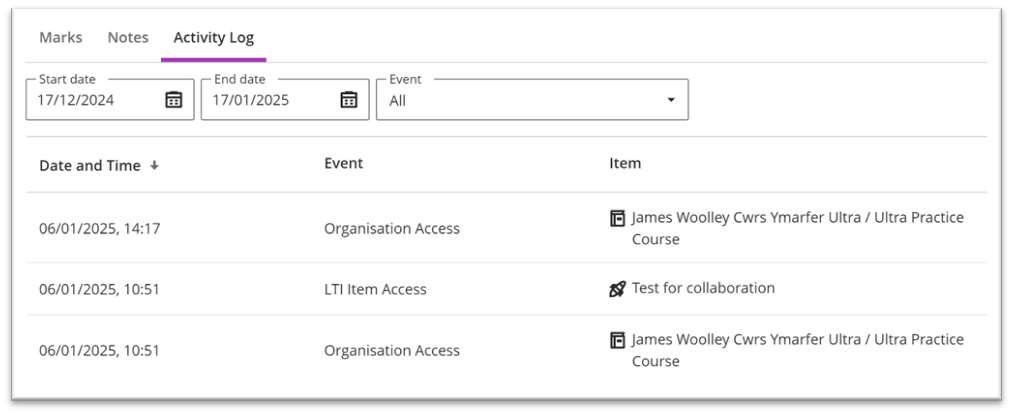
In this blogpost, we’re going to introduce the Blackboard Activity log which is available on all Blackboard Ultra Courses.
From this activity log, you can take a look at specific students and see which items they’ve engaged with on the course. The log shows all activity on the course – from learning materials, through to Turnitin submission points, and Talis Aspire Reading Lists.
This also includes the date and time that students accessed those materials.
To view the students’ activity on a course:
Go to the module in Blackboard
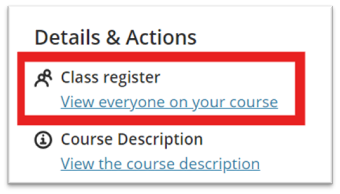
Click on the class register:
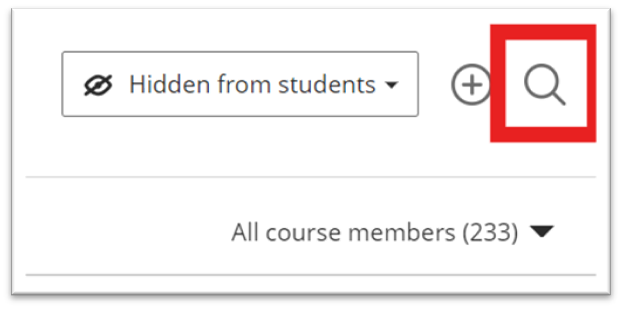
Search for the student that you need to find the information for:
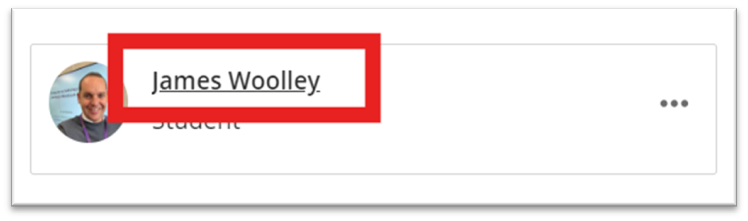
Click on the students’ name:
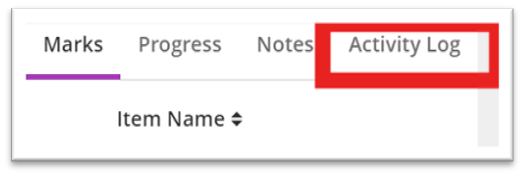
Choose the Activity Log:
You’ll then see time and the item that the student has engagement with:
You can change the date parameters at the top and choose to specify specific events. Additional tools such as Turnitin submission points, Talis Aspire Reading Lists, and Panopto recordings are referred to as LTI Items.
If you have any questions about the Activity Log or need any help with interpreting it, please contact elearning@aber.ac.uk.
As leader of our PGCTHE programme, I keep an eye out for resources to help staff teach effectively. These include webinars, podcasts, online toolkits, publications and more. Topics include active learning, online/blended teaching, accessibility/inclusion, and effective learning design based on cognitive science. Below I’ve listed items that came to my attention in the past week. In the interest of clarity, our policy is to show the titles and descriptions in the language of delivery.
Monthly series European Network for Academic Integrity, ENAI monthly webinarsfree open webinars on various topics related to academic integrity.
Subscribe to SEDA’s mailing list for email discussions about educational development and emerging teaching practices. This is one of the sources I use when identifying useful material for the Roundup.
Join the #LTHEchat on Twitter Wednesday nights for one hour of lively discussion about learning and teaching in HE. I often find out about good resources for the Roundup from the chat.
Please see the Staff Training booking page for training offered by the LTEU and other Aberystwyth University staff. I hope you find this weekly resource roundup useful. If you have questions or suggestions, please contact our team at lteu@aber.ac.uk. You may also wish to follow my Twitter feed, Mary Jacob L&T.
The Learning and Teaching Enhancement Unit are excited to announce the date for the 13th Annual Learning and Teaching Conference. The conference will be taking place between Tuesday 8 and Thursday 10 July 2025.
Look out for Calls for Proposals and the announcement of the conference theme. As usual, we will be updating our Learning and Teaching Conference Webpages and also our blog to keep you up-to-date with how things are progressing.
In the January update, Blackboard has improved the AI Design Assistant by adding more languages and enhancing the Auto-generation features. Additionally, there are new features for Creating Documents and Release Conditions.
AI Design Assistant Outputs
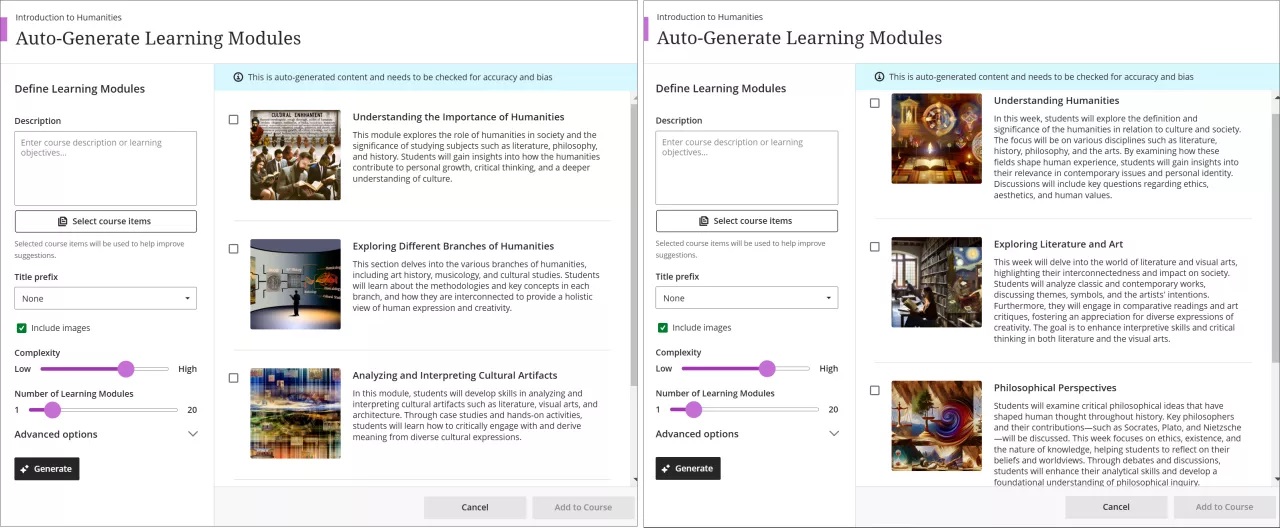
Blackboard have improved the auto-generation features within the AI Design Assistant to have faster and more complex outputs. When auto-generating Learning Modules for example, all you need is a few sentences to describe the Modules, and the AI Design Assistant creates longer descriptions and deeper focus on the topic:
Image 1: Auto-generated Learning modules with latest improvements (see right) for comparison.
As well as learning modules, they include improvements for auto-generating: Assignments, Discussions, Journals, Test questions and AI Conversation avatars. See our webpages for further information on the AI Design Assistant and training sessions are also available to book here.
More languages in AI Design Assistant
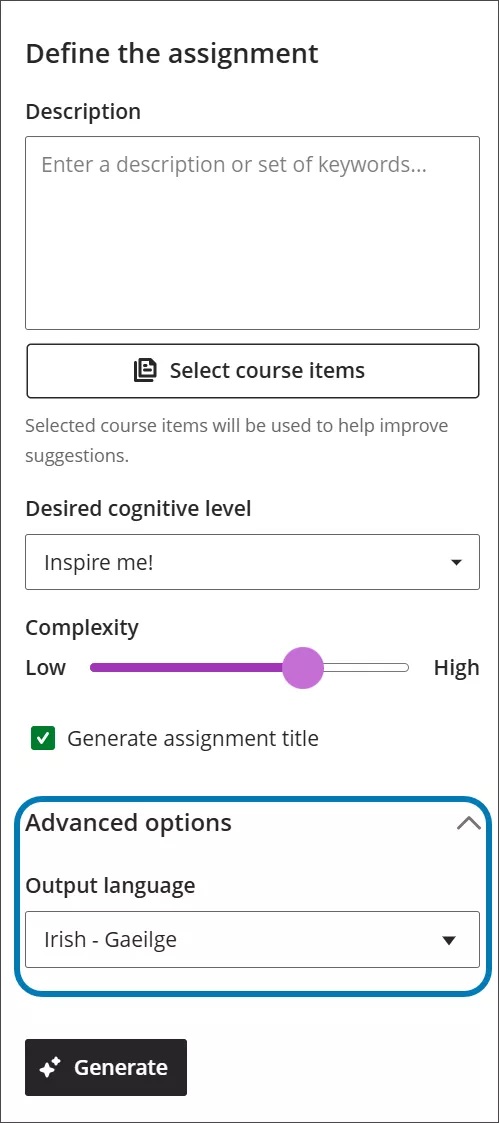
The AI Design Assistant now includes expanded language outputs. AI workflows now work in Greek, Catalan, Croatian, Irish, and Slovenian. For a complete list of languages available for AI outputs, see Blackboard’s AI Design Assistant for Instructors page. See below for how to change the language:
Image 2. Changing the output language is available as an advanced option in the AI Design Assistant.
Direct grade entry from the Grid view
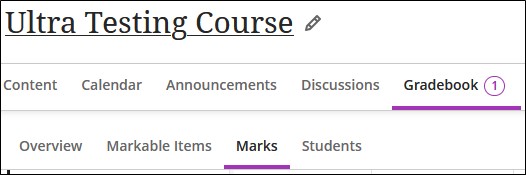
Instructors can now enter assignment grades directly in the Grid view (selected by choosing the Marks tab in the Gradebook) with improved accuracy and consistency.
Image 3: Screenshot of the Marks tab in the Gradebook.
Previously, grades entered in these views were stored at the override level, which caused confusion as underlying attempts remained ungraded and continued to display the Needs Grading and New Submission flags. This latest update ensures that grades entered this way are properly mapped to the underlying attempt or submission when applicable.
NOTE: This feature is only applicable in the Marks view, grades continue to be shown as override if you are in the Markable Items view. Also, grades entered via file upload continue to be stored as override grades.
Content blocks for designing Documents
Blackboard have improved the content designer when creating documents which makes it much easier to use. When instructors create or edit a document, the content block no longer closes when you collapse the menu in the editor. Also, the editor no longer closes when editing table setting
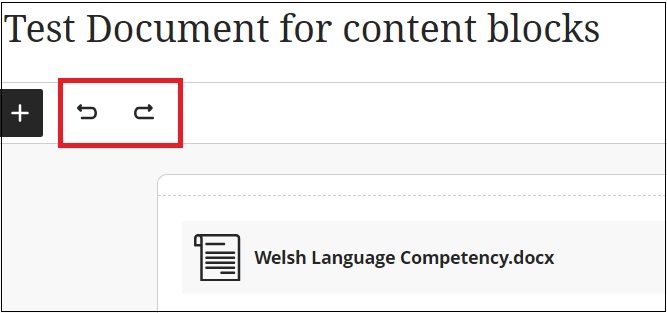
This latest update has updated the default file option when instructors upload files to documents. The default file option is now View and Download file. Also, it is now possible to use the Undo and Redo functions for file uploads. This is very useful if you’ve uploaded an incorrect file to your document, you can just click the ‘undo’ feature.
Image 4: New ‘Undo’ and ‘Redo’ functions highlighted below.
Submission attempts for Release Conditions
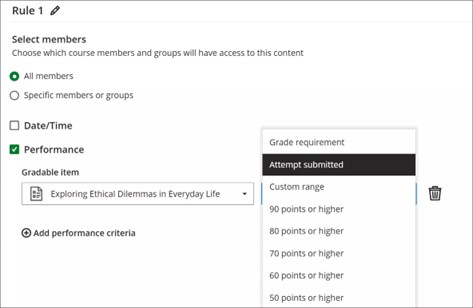
You can now use item submission status for a release condition. For example, an instructor who wants students to access a document only after submitting a quiz would use a release condition. Students can access content items without needing to wait for a grade to be posted.
Image 5: The new Attempt submitted option is in the dropdown menu for a gradable item in the Release Conditions panel.
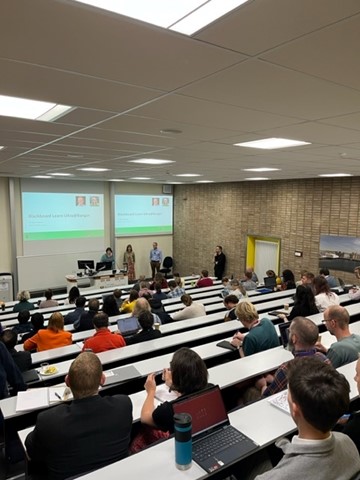
On Wednesday 18 December, the Learning and Teaching Enhancement Unit hosted an online mini conference taking a look at Blackboard Exemplary Practice. With over 40 attendees, and 5 sessions, it was one of our biggest mini conferences.
We were delighted to welcome Carol Chatten from Edge Hill University and Robert Farmer from Northampton University to showcase their award-winning courses.
Carol’s course is designed for medical professionals completing their placements. Robert’s course introduced undergraduates to critical thinking skills. Both courses have been awarded Blackboard’s Exemplary Course Programme Award.
We were then joined by Dom Gore and Richard Gibbons from Anthology (Blackboard). They gave an overview of the new developments that are coming in Blackboard, as well as introducing attendees to the new AI Conversations tool. We have enabled AI Conversations and have updated our Blackboard AI Design Assistant training. Take a look at our blogpost for further information.
Finally, Law and Criminology’s Lauren Harvey, and School of Education’s Panna Karlinger gave tours of their exemplary courses. Both submitted applications to last year’s Exemplary Course Award. The deadline for 2025 is Friday 31 January 2025. Further information is available on our blogpost.
As leader of our PGCTHE programme, I keep an eye out for resources to help staff teach effectively. These include webinars, podcasts, online toolkits, publications and more. Topics include active learning, online/blended teaching, accessibility/inclusion, and effective learning design based on cognitive science. Below I’ve listed items that came to my attention in the past week. In the interest of clarity, our policy is to show the titles and descriptions in the language of delivery.
WonkHE (4/12/2024), Practical innovation for education change with Debbie McVitty, Mark Andrews, Andrew Middleton, and Rachel Dodd (1-hour video with downloadable slides), Education Espresso: a shot of pedagogical inspiration
Other
Call for proposals (open dates)Unfiltered by EmpowerED: A Podcast Series where educators share unedited stories of inspiration and challenge
Monthly series European Network for Academic Integrity, ENAI monthly webinarsfree open webinars on various topics related to academic integrity.
Subscribe to SEDA’s mailing list for email discussions about educational development and emerging teaching practices. This is one of the sources I use when identifying useful material for the Roundup.
Join the #LTHEchat on Twitter Wednesday nights for one hour of lively discussion about learning and teaching in HE. I often find out about good resources for the Roundup from the chat.
Please see the Staff Training booking page for training offered by the LTEU and other Aberystwyth University staff. I hope you find this weekly resource roundup useful. If you have questions or suggestions, please contact our team at lteu@aber.ac.uk. You may also wish to follow my Twitter feed, Mary Jacob L&T.