Education and Student Experience Awards Mid Check-in Event

Last month we had the pleasure of welcoming our Education and Student Experience Award recipients to an event.

The Education and Student Experience Award fund was launched last year at our Education and Student Experience Conference.

The event aimed to give colleagues undertaking these projects and their supporters, as well as the panel, an update on progress – to share successes, as well as identify any challenges that colleagues might have come across.

Each of the four projects gave a presentation.

Please read below for an overview of each project and the PDF files associated with each presentation.

Project 1: The Aber Medieval Physic Garden

Led by Elizabeth New (History & Welsh History), alongside Sian Nicholas, Eleri Phillips, and a student steering committee. The aim of this project is to create an outdoor amenity for staff and students that support education and recreation on campus. The project seeks to enhance students’ learning through collaborative mentored historical research, gardening, and public engagement.

Eleri Phillips presented at the event.

Please see below for Eleri’s slides.

Project 2: Developing a Sustainable Student Gear Hub

This project is led by Emma Sheppard (DGES), alongside Toni Beardmore, Eleri Phillips, Morgan Jones, Emma Butler-Wray, Hywel Griffiths, and Tom Holt.

The aim of the project is to promote accessibility, inclusivity, and sustainability in the Department of Geography and Earth Sciences by developing a ‘library of things’ for student borrowing and use.

The library will make use of second-hand useable resources and students will be able to participate in repair cafes, making the library sustainable.

Toni Beardmore and Eleri Phillips presented at the event. Please see their slideshow below:

Project 3: Inclusivity and Accessibility in Assessment Design and Feedback Practices

This project is led by Theatre, Film, and Television Studies’ Kate Woodward.

The aim of the project is to ascertain student understanding of the role of feedback and to maximise student engagement with feedback.

The department is also looking to ensure staff familiarity with inclusive and compassionate feedback design and assessment criteria.

They are changing current practices by adapting and standardising rubrics, feedback and assessment criteria.

See below for Kate’s presentation from the event.

Project 4: Pulling together – supporting teamwork assessment more effectively

Department of Life Science’s Scott Tompsett is collaborating with Cal Walters-Davies and Caroline White from Student Journey to identify common issues for students in relation to group work.

They are investigating how to make groupwork more accessible to neurodivergent students.

They aim to develop a suite of resources for students and teaching staff to better facilitate group work and will test these in several modules.

Scott presented at the event and the slides from the presentation are below.

Next steps

We’re sure that you will agree that these are such worthwhile projects.

You can hear more about these projects at the 14th Education and Student Experience Conference between 08 and 10 September.

Bookings for the conference, as well as the call for proposals is now open. You can find further information on our blog.

We are delighted to announce that we will be running the Education and Student Experience Awards again next year. The awards will be tied to the conference theme and will be open to conference attendees.

Further information on the Education and Student Experience Awards is on our webpage.

What’s new in Blackboard April 2026

In the April update, we want to draw your attention to the following Blackboard enhancements:

  • Assignments
    • Assignment submission type
    • SafeAssign file size
    • Adjusting individual grades in group submissions
  • Tests
  • AI Conversations
  • Discussions
  • Announcements

Blackboard Assignment

Specify assignment submission type

Instructors

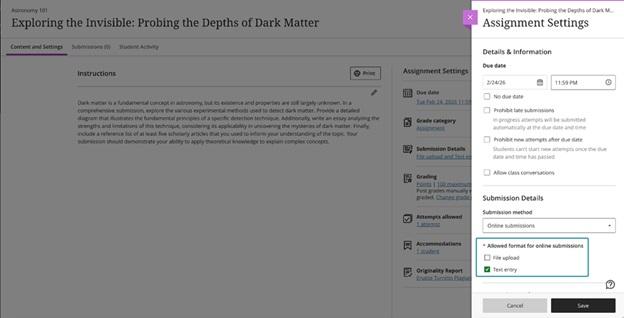
When creating or editing an assignment, instructors can define the expected submission type to guide how students submit their work. Selecting a specific submission type streamlines the student experience and reduces ambiguity about what is required.

Instructors can select one or more expected submission types when configuring an assignment:

  • File upload
  • Text entry

By default, File upload and Text entry are both selected.

The selected submission type is visible in assignment settings and student‑facing details. Instructors can change the selected submission type until students have started submitting attempts.

Image 1: Instructors can choose one or more submission types when configuring an assignment.

Students

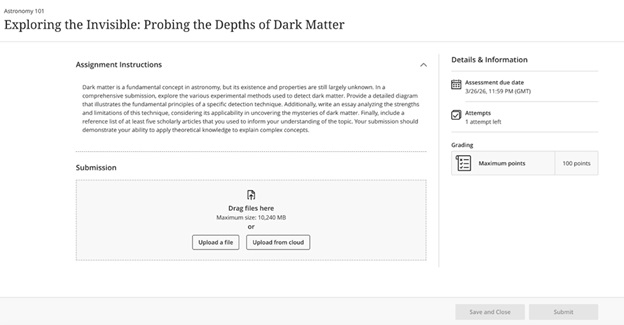
Students are informed of the expected submission type and see a submission workflow optimized for that format.

  • File submissions display a dedicated file drop zone where students can upload, preview (when supported), and remove files.
  • Text submissions provide a streamlined rich text editor experience without a general file attachment option and include access to the Content Market for supported tools.

Image 2: Students have a submission workflow optimized for the selected submission type.

Note that if you are using Blackboard for Panopto assignments, you need to have Text entry enabled.

Increased SafeAssign file size limit to 25 MB for Direct Submit

The SafeAssign file size limit for DirectSubmit submissions increased to 25MB. This change supports larger documents that include images, tables, and complex formatting, reducing submission issues for students.

Existing submissions and SafeAssign reports remain fully compatible, and related system limits were reviewed to ensure continued stability.

Adjust grades for individual student attempts in group submissions

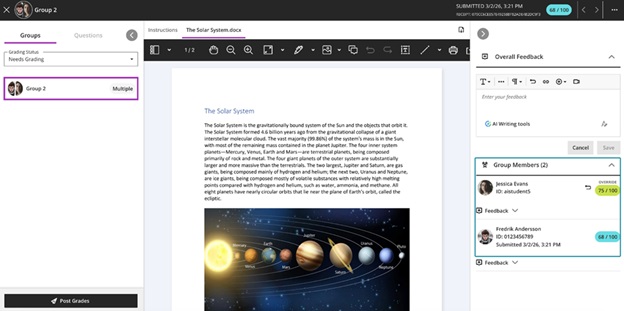
Flexible Grading has been extended to allow instructors to adjust attempt grades for individual students within a group submission. This update ensures that grades for group submissions can accurately reflect each student’s individual contribution, even when work is submitted as a single group attempt.

Instructors can override a group attempt score for individual group members directly from the grading interface. The interface clearly indicates when grades differ across group members, and adjustments can be removed by restoring a student’s grade to match the group attempt score.

Image 1: Instructors can adjust grades for individual students within a group submission.

Tests

Improvements to multiple choice and multiple answer questions

See below for changes to multiple choice and multiple answer questions:

  • For the multiple choice question, the default number of answer options a student can select from 4 to 1 has been modified.
  • When creating or editing a multiple choice or multiple answer question, instructors can change the number of answer options that a student can select.
  • Multiple choice answer options alphabetical labels (A, B, C, D) have also been restored.

AI Conversations

Use Message Limits

Instructors can now guide the length of AI‑supported conversations, including Socratic Questioning, by setting message limits. These controls help students understand when to complete an interaction and keep conversations focused on the intended learning activity.

Instructors

When instructors configure an AI conversation, they can set a maximum message cap to shape the conversation duration.

Image 1: Message limit settings for an AI conversation

Students

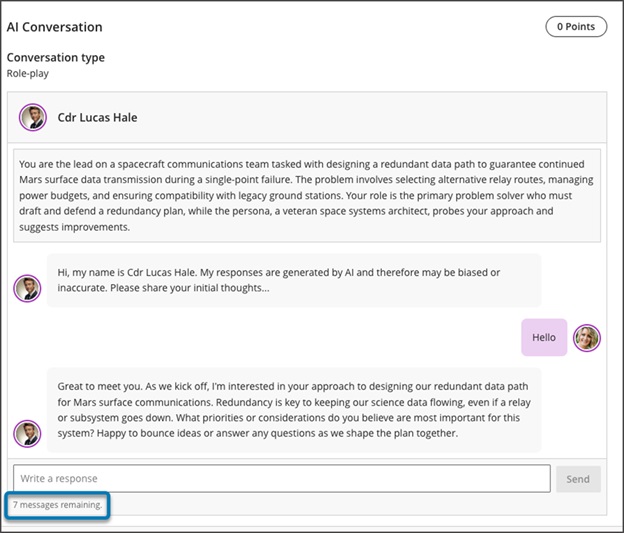
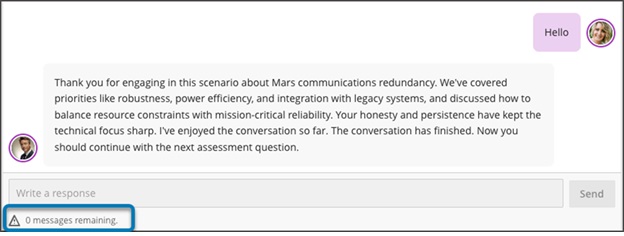
Students track their remaining responses during a conversation through a dynamic label. The label shows a caution icon when two responses remain. After the conversation reaches the message cap, students cannot add more responses. The message limit sets clear expectations for participation and completion.

Image 2: Student messaging guidance during an active interaction.

Discussions

Review both sets of Discussion due dates across multiple views in Blackboard

Blackboard now surfaces both sets of due dates and participation requirements for Discussions across key areas of the application. This improvement builds on the recent addition of a second due date and participation requirement. Instructors and students get clearer expectations wherever they access Discussion details.

Instructors and Students

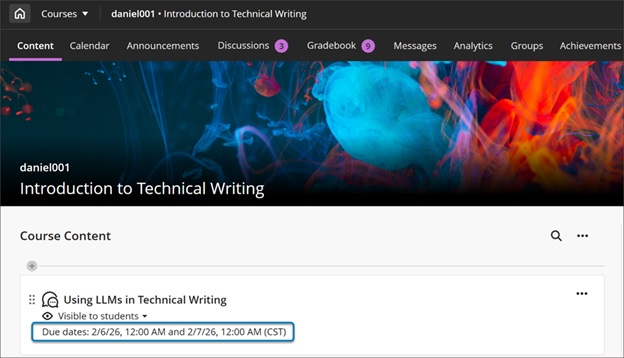
When instructors create a discussion with two due dates and participation requirements, both sets of requirements appear on the Course Content page, Discussion pages, the Gradebook student and instructor views, and the instructor’s Discussion analysis panel. Students can track expectations throughout the workflow without navigating back to the discussion itself.

Image 1: On the Course Content page, both due dates and participation requirements are displayed. For all entry points for Discussions, both dates and requirements are displayed.

  • On the Course Content and Discussion pages, both due dates and their requirements appear together for quick reference.
  • In the Gradebook student view, both dates appear.
  • Instructors also get a new Due Dates and Requirements section in the grading view for an individual student. This section shows both due dates and the student’s progress toward each requirement.

Announcements 

Handle images as thumbnail links in Announcement emails

Announcement emails now show images as thumbnail links instead of long URLs. This update gives users a clearer preview of announcement content and provides a direct path back to the full announcement in Blackboard. When users select a thumbnail, the system opens the original announcement so they can read it with full context.

Instructors and students

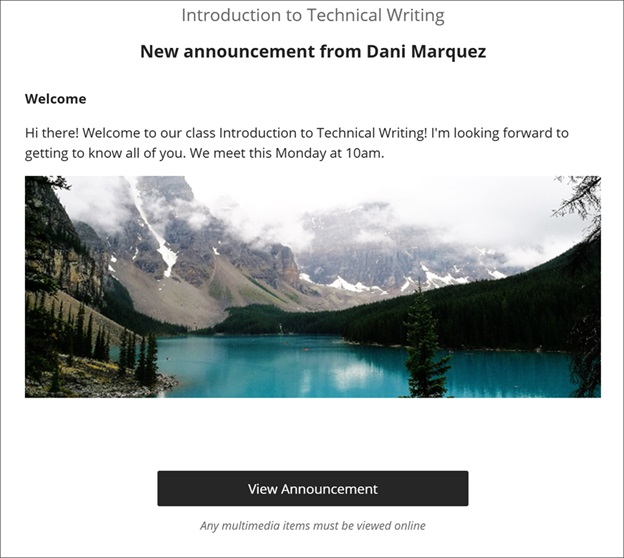
Announcement emails display a small thumbnail for each image instructors include in an announcement. Each thumbnail links to the announcement in Blackboard, so users return to the complete content instead of opening the image file by itself. Instructors continue to create announcements the same way they have before.

Image 1: Announcement email showing images as thumbnail links that open the announcement in Blackboard.

If you have any enhancements to request from Blackboard, please get in touch with us via elearning@aber.ac.uk.