Blackboard User Group: Exemplary Course Award Presentation

We had the pleasure of recently presenting at the Blackboard User Group on the Exemplary Course Award that we run here at Aberystwyth University. Blackboard run their own Exemplary Course Programme which we use as the basis for our award.

The session title, Celebrating Excellence, Shaping Practice: Aberystwyth University’s Exemplary Course Award Programme, charted the history of the event here at AU.

We’ve been running the ECA since 2014. In that time, over 50 modules have submitted applications.

Since the start of the award, we’ve had applications from all sections of the University. Those that offer on campus teaching provision, Lifelong Learning Courses, Distance Learning Courses, Welsh language and English medium courses, large and small courses have all been recipients of the award.

In the presentation, we gave an overview of how we manage the process and discussed the impact of running the award over the last 12 years. The ethos of the process has always foregrounded reflection giving applicants the opportunity to enhance and refine their course before submitting.

We’ve looked at the ways in which we have marked success over the years, as well as the changes we have applied to streamline the process.

We also discussed how we might change this for the future. We are exploring ways in which the student voice can be brought into the nomination process. We’re also considering running smaller awards alongside the Exemplary Course Award – an award that focuses on each of the 4 criteria: Course Design, Assessment, Interaction and Collaboration, and Learner Support.

We were joined by previous award winners: Lauren Harvey (Law and Criminology) and Mari Dunning (Lifelong Learning).

Both Lauren and Mari spoke about their courses as well as their experience of engaging with the process.

Colleagues are welcome to submit a direct application to Blackboard’s Exemplary course Programme.

Slides from our presentation can be downloaded here:
What’s new in Blackboard February 2026

In the February update, we want to draw your attention to the following Blackboard enhancements:

  • Use automations to remind students to check their feedback
  • Stack blocks vertically in Documents
  • Enhanced achievement usability

Use automations to remind students to check their feedback

Automations are a relatively new feature in Blackboard. The latest feature allows you to automatically send a reminder message to students who have unread feedback after an instructor-defined number of days. This feature saves time by automatically encouraging students to review their feedback, promoting student engagement.

Instructors

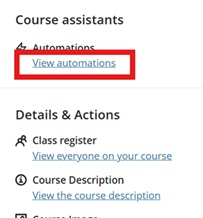
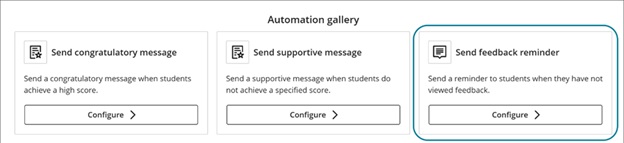
This release adds the Send feedback reminder option to the Automation gallery. Go to Automations:

Image 1: View automations under Course Assistants highlighted

Image 2: The Automation gallery now includes Send feedback reminder.

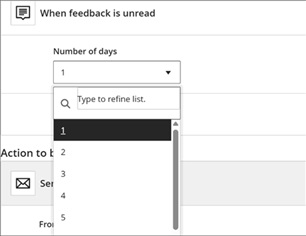
For the automation trigger, instructors select how many days feedback must remain unread before the message is sent.

Image 3: The Automation trigger includes a dropdown menu for the number of unread days.

A default reminder message is provided, and instructors can fully customise it at this stage. The message is sent to the student when the rule is triggered.

Stack blocks vertically in Documents

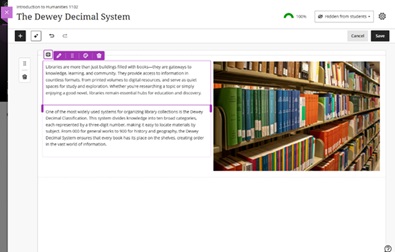
instructors can stack blocks in a single column in Documents to create cleaner layouts and reduce whitespace. A new toggle in the block toolbar allows switching between column-level and block-level editing. In column mode, actions apply to the entire column. In block mode, instructors can resize, move, or delete individual blocks.

Columns can also be dropped into another block’s area for more flexible layouts. These changes work with existing features such as undo/redo, printing, and AI layout generation. This enhancement also includes accessibility improvements for screen readers.

Image 1: Instructors can stack blocks in a single column, such as next to an image in a column.

Enhanced achievement usability

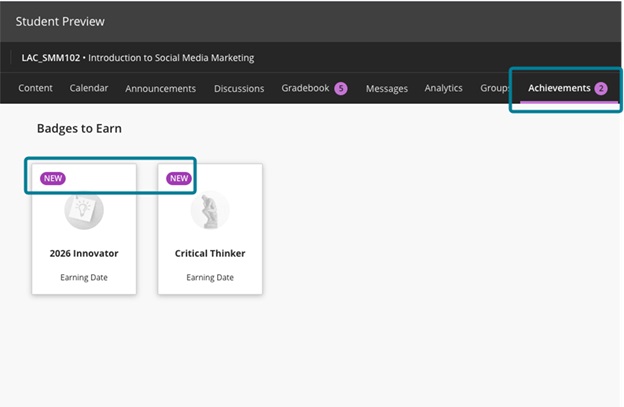
For students, the Achievements tab displays a count of unread badges. The New pill appears consistently in Earned and To Earn sections. The Delete Badge dialog uses clearer wording. Instructors and students can more easily distinguish between Course Badges and Open Badges with improved labels, icons, and descriptions.

Accessibility updates include improved aria-labels and alt-text. Styling for OpenBadge images has been updated to remove forced round shapes.

Image 1: In the student view, the Achievements tab displays a count of unread badges, and the new badges have a New pill.

If you have any enhancements to request from Blackboard, please get in touch with us via elearning@aber.ac.uk.

Call for Proposals: Mini Conference: Neurodiversity Network Conference

Inclusivity and Accessibility banner

We are pleased to announce our next Mini Conference taking place on Tuesday 14 April 2026.

In collaboration with the Department of Psychology, Student Accessibility and Wellbeing, and the Digital Education Team (Student Journey), we are looking for 15-minute presentations on the following topics:

  • Navigating university life as a neurodivergent student
  • Inclusive teaching and learning practices
  • The role of support services in fostering neurodivergent success
  • Neurodiversity in the workplace

Please fill out this form to submit your proposal.

Please indicate in the proposal if you are comfortable taking questions for 5 minutes at the end of your presentation. Please submit your proposal before Friday 6 March.

Booking for this in-person event is already open. You can book your place via the staff booking system.

We will be providing light refreshments. Please include any dietary requirements in the additional requirements field of the booking form.