
In the February update, we want to draw your attention to the following Blackboard enhancements:
- Use automations to remind students to check their feedback
- Stack blocks vertically in Documents
- Enhanced achievement usability
Use automations to remind students to check their feedback
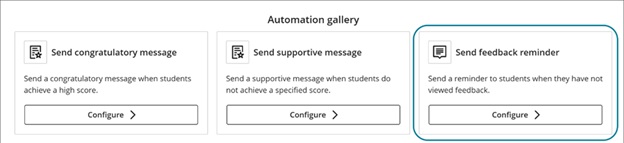
Automations are a relatively new feature in Blackboard. The latest feature allows you to automatically send a reminder message to students who have unread feedback after an instructor-defined number of days. This feature saves time by automatically encouraging students to review their feedback, promoting student engagement.
Instructors
This release adds the Send feedback reminder option to the Automation gallery. Go to Automations:
Image 1: View automations under Course Assistants highlighted
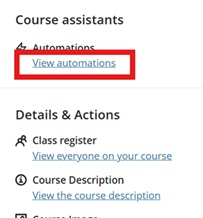
Image 2: The Automation gallery now includes Send feedback reminder.
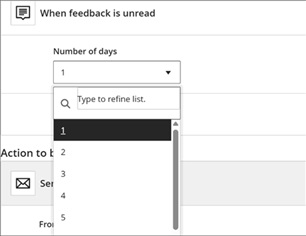
For the automation trigger, instructors select how many days feedback must remain unread before the message is sent.
Image 3: The Automation trigger includes a dropdown menu for the number of unread days.
A default reminder message is provided, and instructors can fully customise it at this stage. The message is sent to the student when the rule is triggered.
Stack blocks vertically in Documents
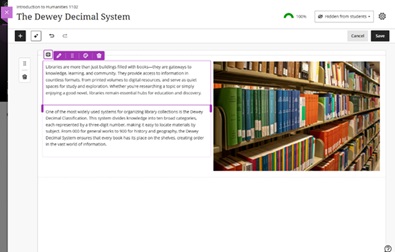
instructors can stack blocks in a single column in Documents to create cleaner layouts and reduce whitespace. A new toggle in the block toolbar allows switching between column-level and block-level editing. In column mode, actions apply to the entire column. In block mode, instructors can resize, move, or delete individual blocks.
Columns can also be dropped into another block’s area for more flexible layouts. These changes work with existing features such as undo/redo, printing, and AI layout generation. This enhancement also includes accessibility improvements for screen readers.
Image 1: Instructors can stack blocks in a single column, such as next to an image in a column.
Enhanced achievement usability
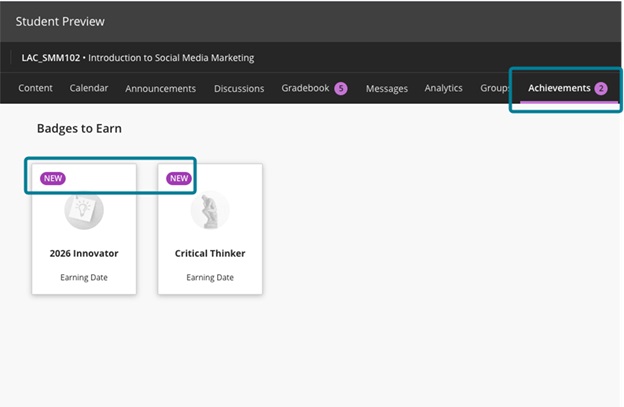
For students, the Achievements tab displays a count of unread badges. The New pill appears consistently in Earned and To Earn sections. The Delete Badge dialog uses clearer wording. Instructors and students can more easily distinguish between Course Badges and Open Badges with improved labels, icons, and descriptions.
Accessibility updates include improved aria-labels and alt-text. Styling for OpenBadge images has been updated to remove forced round shapes.
Image 1: In the student view, the Achievements tab displays a count of unread badges, and the new badges have a New pill.
If you have any enhancements to request from Blackboard, please get in touch with us via elearning@aber.ac.uk.