You’ve probably been writing on your computer before – be it Microsoft’s Word or any other word processor – and seen that red squiggly line under your writing indicating that you’ve misspelled something. It’s pretty helpful, and makes it effortless to go back and correct yourself while you write.
However, in this blog you’ll see how to take it one step further. While double-checking your spelling, you can also get an overview of your grammar, tone, punctuation and other typographical errors. It’s all the work of one little button available from the Home tab of Microsoft Word:
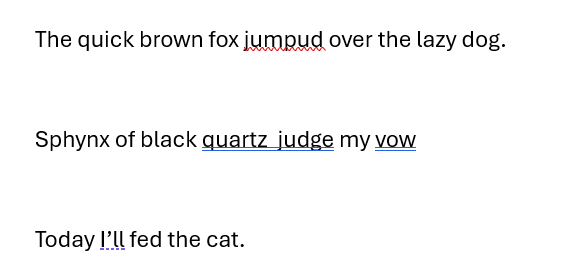
Clicking this brings up a side-window to go through everything that you might want to change with your document, and lets you work through them one by one. Let’s see what it does with this document:
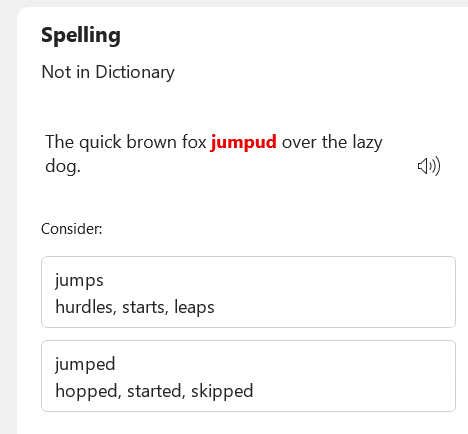
First, the Editor function alerts me to my embarrassing spelling mistake:
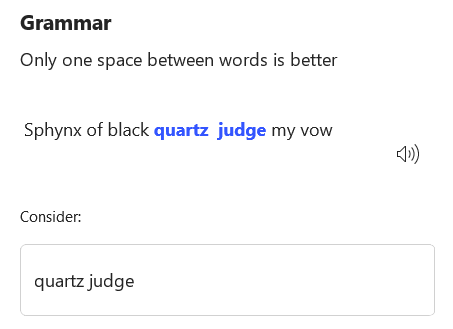
Next, the Editor has picked up on my awkward typesetting:
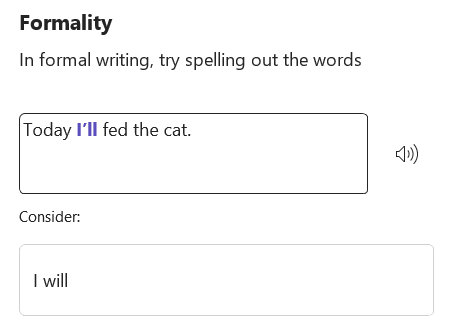
This next one is interesting, because it demonstrates what this kind of tool cannot do. Tools like this are not aware of the context of sentences, and so long as words are put together sensibly and spelled properly, it will often miss grammatical or logical errors that humans can much more easily spot.
Here, the Editor suggests removing a contraction to improve the tone, while missing the mixed tenses of the sentence:
Hopefully these examples together demonstrate exactly what spellchecking tools such as Word’s Editor can and cannot help with. It’s always a good idea to send your document through one of these to check for minor errors and awkward typesetting or tone, however they do not replace a proper proof-read with human eyes.
By making smart use of this tool, you can save time on your proof-reading and improve your writing all-round!
Mae’n debyg eich bod wedi bod yn teipio ar eich cyfrifiadur – boed hynny gyda Microsoft Word neu unrhyw brosesydd geiriau arall – a gweld y llinell goch o dan y geiriau yn dangos eich bod wedi camsillafu rhywbeth. Mae’n eithaf defnyddiol, ac yn ei gwneud hi’n ddiymdrech i fynd yn ôl a chywiro eich hun wrth i chi ysgrifennu.
Fodd bynnag, yn y blog hwn fe welwch sut i fynd ag ef gam ymhellach. Wrth wirio eich sillafu eto, gallwch hefyd gael trosolwg o’ch gramadeg, naws, atalnodi a gwallau teipograffig eraill. Un botwm bach sy’n gwneud y cyfan o dab Hafan Microsoft Word:
Mae clicio ar hwn yn dod â ffenestr ochr i fynd trwy bopeth y gallech chi ei newid gyda’ch dogfen, ac yn gadael i chi weithio trwyddynt fesul un. Gadewch i ni weld beth mae’n ei wneud gyda’r ddogfen hon:
Yn gyntaf, mae’r Golygydd yn fy rhybuddio am fy nghamgymeriad sillafu cywilyddus:
Nesaf, mae’r Golygydd wedi nodi fy nheipio lletchwith:
Mae’r un nesaf hwn yn ddiddorol, oherwydd mae’n dangos beth na all yr adnodd hwn ei wneud. Nid yw adnodd fel hwn yn ymwybodol o gyd-destun brawddegau, a chyn belled â bod geiriau yn cael eu rhoi at ei gilydd yn synhwyrol a’u sillafu’n iawn, bydd yn aml yn colli gwallau gramadegol neu resymegol y gall bodau dynol eu gweld yn llawer haws.
Yma, mae’r Golygydd yn awgrymu dileu cyfangiad i wella’r naws, tra’n colli amserau cymysg y frawddeg:
Gobeithio y bydd yr enghreifftiau hyn gyda’i gilydd yn dangos yn union beth y gall adnodd gwirio sillafu fel Golygydd Word ei wneud ac beth na all ei wneud. Mae bob amser yn syniad da rhoi eich dogfen trwy un o’r rhain i wirio am fân wallau a theipio neu dôn lletchwith, fodd bynnag, nid ydynt yn disodli prawf-ddarlleniad priodol gyda llygaid dynol.
Trwy wneud defnydd clyfar o’r adnodd hwn, gallwch arbed amser wrth brawfddarllen a gwella eich ysgrifennu ar y cyfan!
I ddilyn ein TipDigidol, tanysgrifiwch i’n Blog Sgiliau Digidol. Neu fel arall, gallwch lyfrnodi’r dudalen we hon, lle ychwanegir TipDigidol newydd bob wythnos!
Getting access to reliable and relevant information via internet search is becoming more and more difficult over time. With factors such as search-engine-optimisation (SEO) or unreliable GenAI integration, it can feel like far too much of a battle to get basic results from your searches in google or other search engines (Interested readers might learn more from Dr Cory Doctorow’s theories on the degradation of online infrastructure).
However, it does not have to be this way! By equipping yourself with the right tools, you can turn the tide in your favour and start to see more of the results you want. Operators are powerful tools, still left in the code of search engines, that can let them be just as useful as they were initially designed to be!
So, Operators: What are they? – Modifiers you can add to searches that can help you to change the results as you wish How are they used? – You can apply them from an ‘advanced search’ options menu, but more excitingly you can also just type them directly into the search bar alongside your query! What can they do? – I’m so glad you asked. Here are the most useful ones:
site:
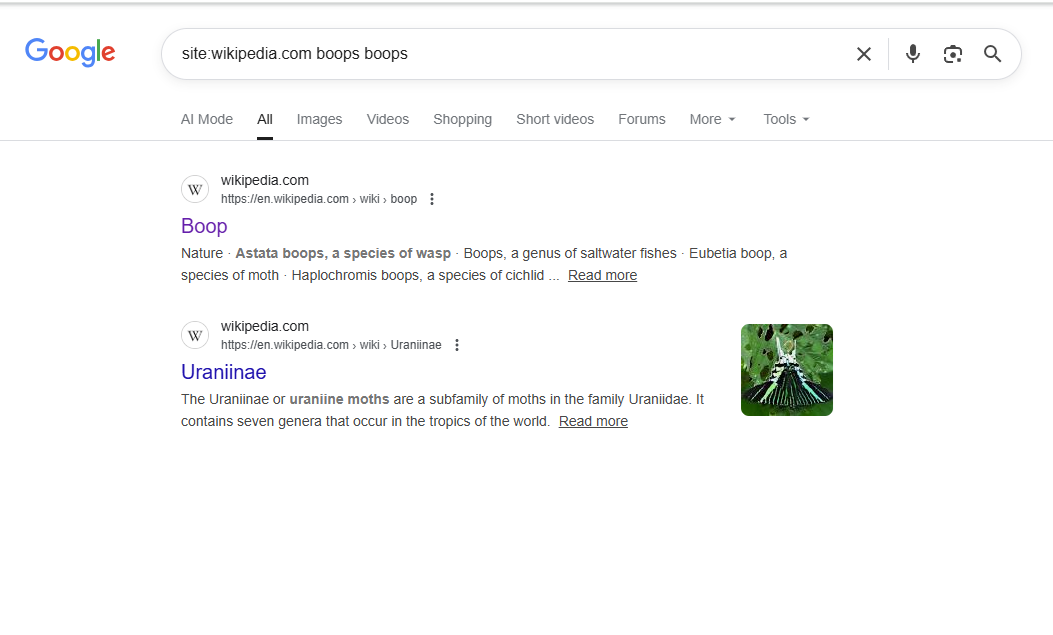
‘site:’ as applied to a search for “boops boops” on wikipedia.com. The disambiguation page for the boops genus appears, alongside a subfamily of moths that includes “Alcides boops“
The first operator is ‘site’. By including the site operator, formatted like this: ‘site:website.url’ in your search, the results will be limited to those from that exact website. This can be extremely useful if you are looking for information from a certain source, or want to narrow down the results in some way.
“”
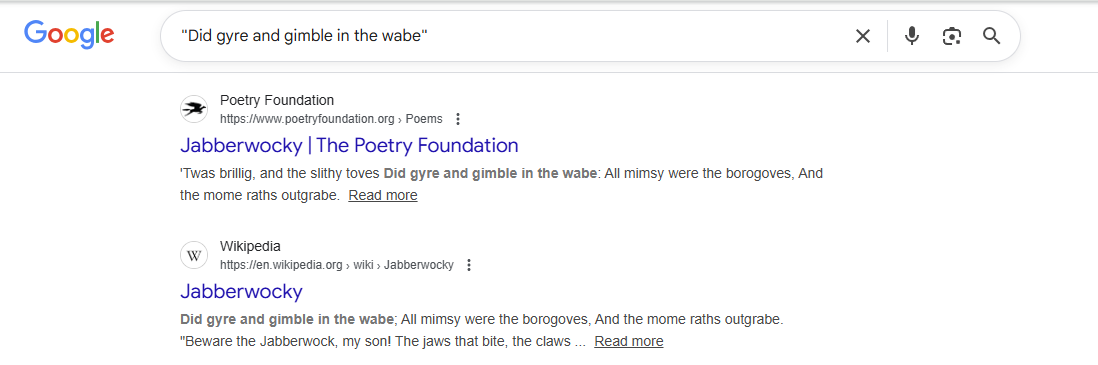
A search for a line from Jabberwocky in quotation marks, with each result including those specific words.
The next operator is “”. Just that – quotation marks around your search query. Doing this will ensure that every result contains that precise string of words. Perhaps unintuitively, this isn’t what the average search engine usually does with a search query, so specifying in this way can be massively helpful in finding what you’re looking for more precisely, or tracking down a specific source or website.
OR & AND
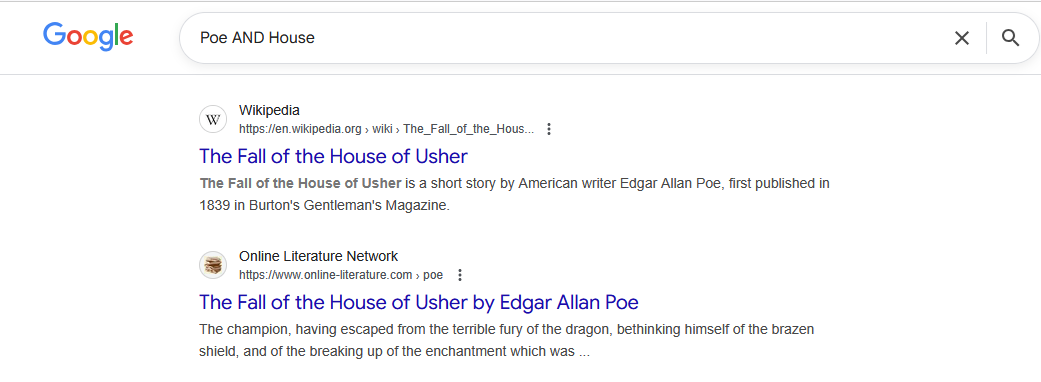
Search query “Poe AND House” gives results on The Fall of the House of Usher by Edgar Allan Poe
The operator AND (which some readers may be familiar with from Boolean logic) ensures that all results would appear as results from each of the separated search terms on their own. In this example, searching Poe AND House allows us to get results on the book by Poe, whereas simply searching “Poe House” would get us results on the Edgar Allan Poe Museum.
The operator OR is similar, and also from Boolean logic. If several search terms are combined with OR, the result will be everything that appears for any of those terms. To extend the example, searching “Poe OR House” mostly gets us results on the game “Path of Exile”, which is a common search result for “Poe”.
–
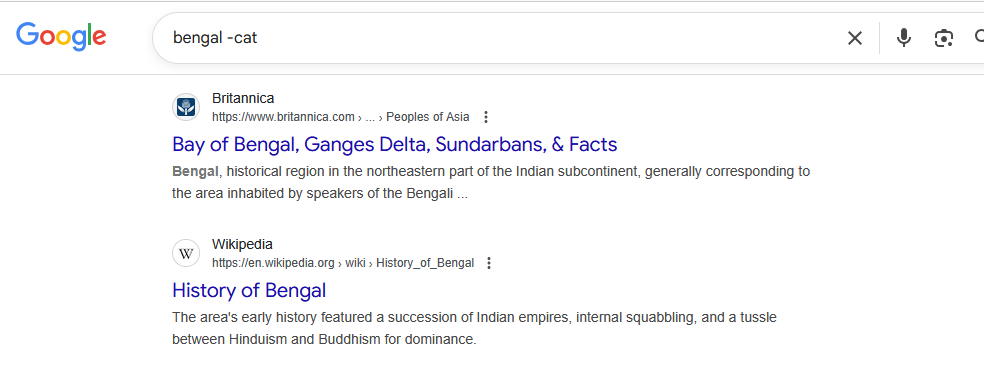
The search query “bengal -cat” giving results on the Bay of Bengal and History of Bengal
Preceding a search term with a minus sign (-) will remove everything that matches that search term from your results. This can be useful for narrowing down your search, especially when it’s mixed in with other similar terminology that is less relevant (E.g., in the above example I am searching for information on Bengal, so I have removed the search term “cat”). It is worth noting that using this can remove relevant search results as well if the contents happen to overlap. For example, the above search query also removes the primary Wikipedia page for Bengal, as it mentions the breed of cat.
That’s four useful search operators for everyday browsing, but there are dozens more that are useful in other scenarios. As such, expect a second part in another DigiTip going over more!
Mae cael mynediad at wybodaeth ddibynadwy a pherthnasol trwy chwilio ar y rhyngrwyd yn dod yn fwy a mwy anodd dros amser. Gyda ffactorau megis optimeiddio peiriannau chwilio (SEO) neu integreiddio GenAI annibynadwy, gall deimlo fel gormod o frwydr i gael canlyniadau sylfaenol o’ch chwiliadau yn google neu beiriannau chwilio eraill (Efallai y bydd gan ddarllenwyr ddiddordeb mewn dysgu mwy o ddamcaniaethau Dr Cory Doctorow ar ddirywiad seilwaith ar-lein).
Fodd bynnag, nid oes rhaid i bethau fod fel hyn! Trwy arfogi eich hun â’r offer cywir, gallwch droi’r llanw o’ch plaid a dechrau gweld mwy o’r canlyniadau rydych yr hoffech eu gweld. Mae gweithredwyr yn adnoddau pwerus, wedi’u gadael ar ôl yng nghod peiriannau chwilio, a all olygu eu bod yr un mor ddefnyddiol ag y cynlluniwyd hwy i fod o’r cychwyn!
Felly, Gweithredwyr: Beth ydyn nhw? – Addaswyr y gallwch eu hychwanegu at chwiliadau a all eich helpu i newid y canlyniadau fel y dymunwch Sut maen nhw’n cael eu defnyddio? – Gallwch eu cymhwyso o ddewislen opsiynau ‘chwilio uwch’, ond yn fwy cyffrous gallwch hefyd eu teipio’n uniongyrchol i’r bar chwilio ochr yn ochr â’ch ymholiad! Beth allant ei wneud? – Rwy’n falch eich bod wedi gofyn! Dyma’r rhai mwyaf defnyddiol:
Safle:
‘site:’ fel y’i cymhwysir i chwilio am “boops boops” ar wikipedia.com. Mae’r dudalen dadamwyso ar gyfer y genws boops yn ymddangos, ochr yn ochr ag is-deulu o wyfynod sy’n cynnwys “Alcides boops“
Y gweithredwr cyntaf yw ‘site’. Trwy gynnwys gweithredwr y safle, wedi’i fformatio fel hyn: ‘site:website.url’ yn eich chwiliad, bydd y canlyniadau yn cael eu cyfyngu i’r rhai o’r union wefan honno. Gall hyn fod yn hynod ddefnyddiol os ydych chi’n chwilio am wybodaeth o ffynhonnell benodol, neu eisiau cyfyngu’r canlyniadau mewn rhyw ffordd.
“”
Chwiliad am linell o Jabberwocky mewn dyfynodau, gyda phob canlyniad yn cynnwys y geiriau penodol hynny.
Y gweithredwr nesaf yw “”. Dim ond hynny – dyfynodau o amgylch eich ymholiad chwilio. Bydd gwneud hyn yn sicrhau bod pob canlyniad yn cynnwys yr union linyn hwnnw o eiriau. Efallai yn groes i reddf, nid dyma beth mae’r peiriant chwilio cyffredin fel arfer yn ei wneud gydag ymholiad chwilio, felly gall manylu yn y modd hwn fod yn ddefnyddiol iawn wrth ddod o hyd i’r hyn rydych chi’n chwilio amdano yn fwy manwl, neu olrhain ffynhonnell neu wefan benodol.
OR & AND
Mae ymholiad sy’n chwilio am “Poe AND House” yn rhoi canlyniadau ar The Fall of the House of Usher gan Edgar Allan Poe
Mae’r gweithredwr AND (y gall rhai darllenwyr fod yn gyfarwydd ag ef o resymeg Boole) yn sicrhau y byddai’r holl ganlyniadau yn ymddangos fel canlyniadau o bob un o’r termau chwilio ar wahân ar eu pennau eu hunain. Yn yr enghraifft hon, mae chwilio am Poe AND House yn caniatáu inni gael canlyniadau ar y llyfr gan Poe, ond byddai chwilio am “Poe House” yn rhoi canlyniadau i ni ar Amgueddfa Edgar Allan Poe.
Mae’r gweithredwr OR yn debyg, a hefyd o resymeg Boolean. Os cyfunir sawl term chwilio ag OR, y canlyniad fydd popeth sy’n ymddangos ar gyfer unrhyw un o’r termau hynny. I ymestyn yr enghraifft, mae chwilio am “Poe OR House” yn rhoi canlyniadau i ni’n bennaf am y gêm “Path of Exile”, sy’n ganlyniad chwilio cyffredin ar gyfer “Poe”.
–
Mae’r ymholiad chwilio “bengal -cat” yn rhoi canlyniadau ar Fae Bengal a Hanes Bengal
Bydd rhagflaenu term chwilio gydag arwydd minws (-) yn dileu popeth sy’n cyfateb i’r term chwilio hwnnw o’ch canlyniadau. Gall hyn fod yn ddefnyddiol ar gyfer cyfyngu eich chwiliad, yn enwedig pan fo’n gymysg â therminoleg debyg arall sy’n llai perthnasol (E.e., yn yr enghraifft uchod rwy’n chwilio am wybodaeth am Bengal, felly rwyf wedi tynnu’r term chwilio “cath”). Mae’n werth nodi y gall defnyddio hwn gael gwared ar ganlyniadau chwilio perthnasol hefyd os yw’r cynnwys yn gorgyffwrdd. Er enghraifft, mae’r ymholiad chwilio uchod hefyd yn dileu’r brif dudalen Wicipedia ar gyfer Bengal, gan ei bod yn sôn am y brîd o gath.
Dyna bedwar gweithredwr chwilio defnyddiol ar gyfer pori bob dydd, ond mae dwsinau yn rhagor sy’n ddefnyddiol mewn sefyllfaoedd eraill. Felly, disgwyliwch ail ran mewn TipDigidol arall!
I ddilyn ein TipDigidol, tanysgrifiwch i’n Blog Sgiliau Digidol. Neu fel arall, gallwch lyfrnodi’r dudalen we hon, lle ychwanegir TipDigidol newydd bob wythnos!
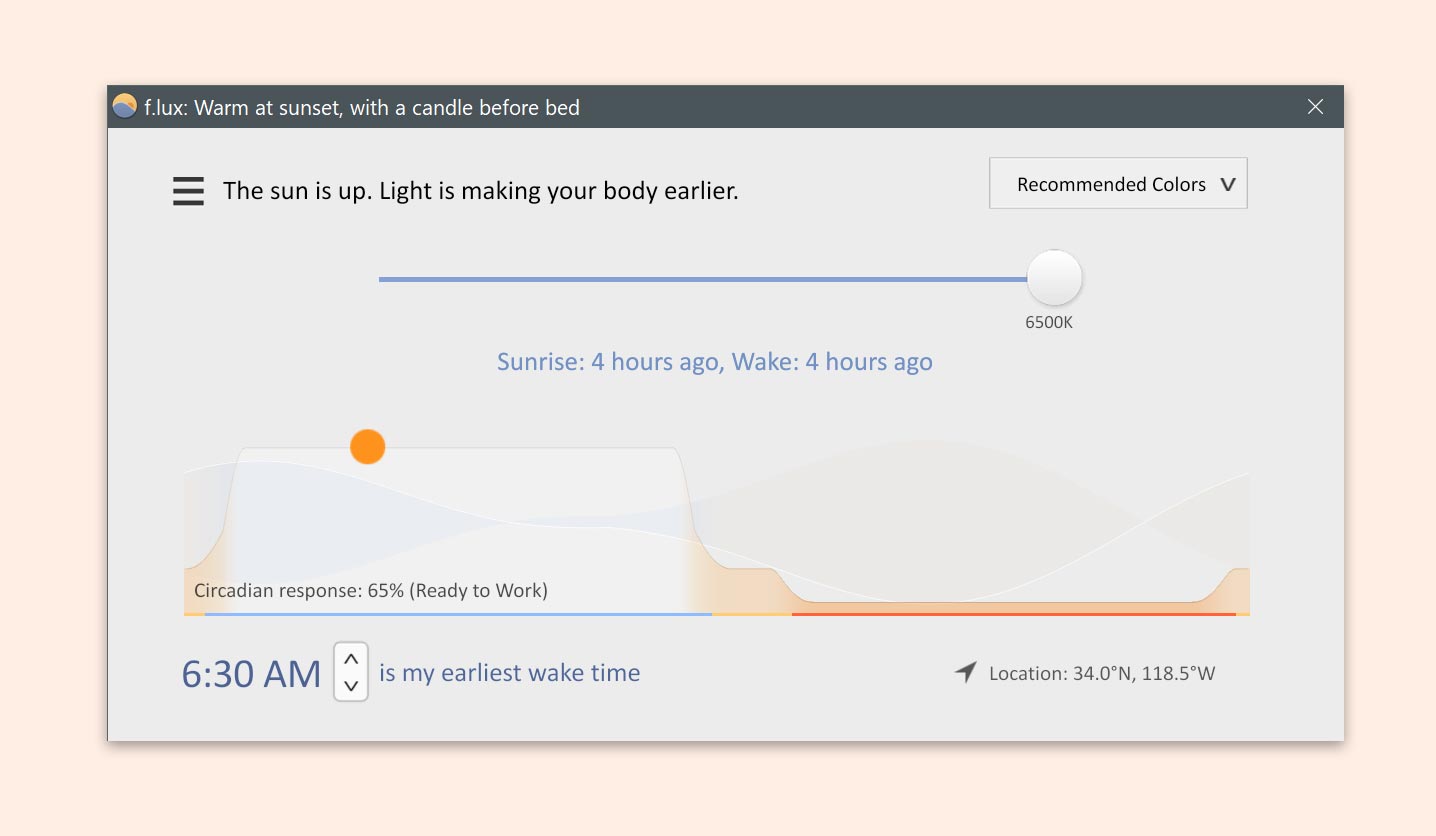
f.lux is a free utility application for your computer that can help with your sleep routine and health, eye health, and time management/awareness, all for practically no effort.
It works by gradually changing the amount of coloured light coming from your display monitor. During the day your screen will be bright and vibrant, like sunlight, before later becoming warmer and dimmer to match the setting sun. This reduction in blue light is scientifically proven to affect sleep health and circadian rhythm. Moreover, it also looks great.
f.lux works completely automatically. The first time you use it, you tell it your general location and the kind of lighting you have, and from there it’ll work silently for as long as you need. No more fiddling with screen brightness, or being blinded opening your laptop at night. It can also hook up to smart lighting systems to sync them to your devices and time zone, and automatically dim the lights alongside the sun.
Mae f.lux yn rhaglen rhad ac am ddim ar gyfer eich cyfrifiadur a all helpu gyda’ch patrwm cwsg a’ch iechyd, iechyd eich llygaid, a rheoli amser / ymwybyddiaeth, oll heb unrhyw ymdrech bron.
Mae’n gweithio trwy newid yn raddol faint o olau lliw sy’n dod o’ch monitor arddangos. Yn ystod y dydd bydd eich sgrin yn llachar ac yn fywiog, fel golau’r haul, yna bydd yn cynhesu a phylu i gyd-fynd â machlud yr haul. Mae profion gwyddonol yn dangos bod y gostyngiad hwn mewn golau glas yn effeithio ar iechyd cwsg a rhythm circadaidd. Ar ben hynny, mae hefyd yn edrych yn wych.
Mae f.lux yn gweithio’n hollol awtomatig. Y tro cyntaf i chi ei ddefnyddio, rhaid i chi egluro sut le yw eich lleoliad cyffredinol a’r math o oleuo sydd gennych, ac o hynny ymlaen bydd yn gweithio’n dawel cyhyd ag y mae ei angen arnoch. Dim mwy o addasu disgleirdeb y sgrin, na chael eich dallu wrth agor eich gliniadur yn y nos. Gall hefyd gysylltu â systemau goleuadau clyfar i’w cydamseru â’ch dyfeisiau a’ch parth amser, a phylu’r goleuadau yn awtomatig ochr yn ochr â’r haul.
Rhyngwyneb defnyddiwr f.lux
I ddilyn ein TipDigidol, tanysgrifiwch i’n Blog Sgiliau Digidol. Neu fel arall, gallwch lyfrnodi’r dudalen we hon, lle ychwanegir TipDigidol newydd bob wythnos!
If you’ve ever struggled with a cluttered file system, disorganised drive, or just flat ran out of storage space, you might benefit from JamSoftware’s TreeSize.
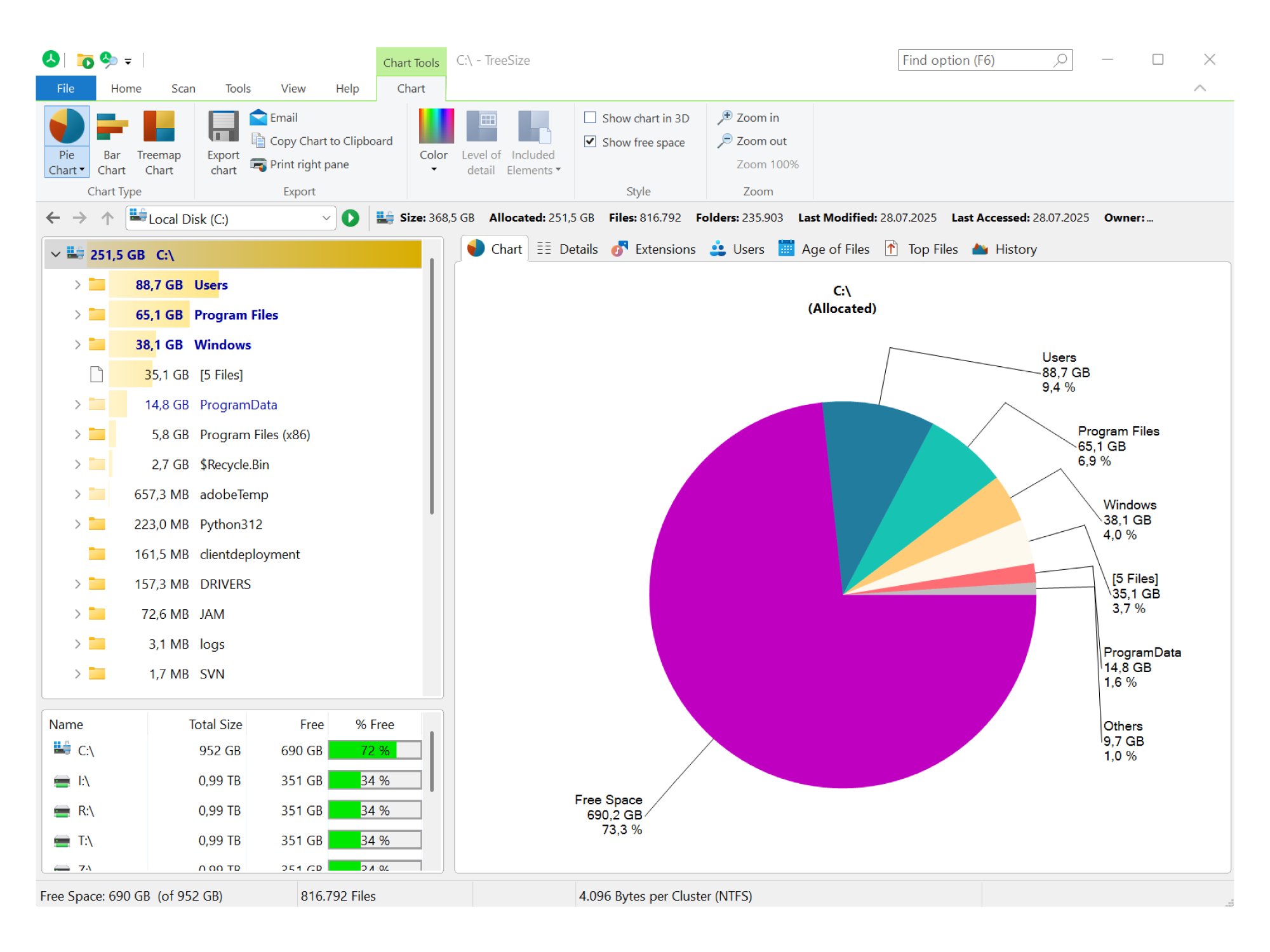
TreeSize is an “intuitive visualisation tool” that allows you to see the structure and contents of your file systems in various helpful formats. For example, you can view your files in a descending ‘Treemap’ chart to very intuitively display your folder structures and locate hidden storage hogs. Similarly, you can view it as a pie chart to see what is taking up large amounts of storage on your device.
An example of TreeSize’s UI, displaying a pie chart
I’ve personally found TreeSize extremely helpful for freeing up storage on my device, but you might also use it to reorganise your files, move files in bulk (to an external drive for archiving, for instance), or locating duplicate files.
Another UI example of a mode where folders are displayed visually according to their on-disk size
Os ydych chi erioed wedi cael trafferth gyda system ffeiliau anniben, gyriant anhrefnus, neu wedi rhedeg allan o ofod storio, efallai y byddwch yn elwa o TreeSize gan JamSoftware.
Mae TreeSize yn “offer delweddu sythweledol” sy’n eich galluogi i weld strwythur a chynnwys eich systemau ffeiliau mewn gwahanol fformatau defnyddiol. Er enghraifft, gallwch weld eich ffeiliau mewn siart ‘Map Coed’ ddisgynnol i arddangos strwythurau eich ffolder yn sythweledol iawn a dod o hyd i leoliadau storio cudd. Yn yr un modd, gallwch edrych ar eich ffeiliau ar ffurf siart cylch i weld beth sy’n cymryd llawer o le storio ar eich dyfais.
Enghraifft o ryngwyneb defnyddiwr TreeSize, sy’n dangos siart cylcht
Yn bersonol, mae TreeSize wedi bod yn hynod ddefnyddiol ar gyfer rhyddhau storfa ar fy nyfais, ond efallai yr hoffech hefyd ei ddefnyddio i aildrefnu eich ffeiliau, symud ffeiliau mewn swmp (i yriant allanol ar gyfer archifo, er enghraifft), neu ddod o hyd i ffeiliau dyblyg.
Enghraifft rhyngwyneb defnyddiwr arall o fodd lle mae ffolderi’n cael eu harddangos yn weledol yn ôl eu maint ar y ddisg
I ddilyn ein TipDigidol, tanysgrifiwch i’n Blog Sgiliau Digidol. Neu fel arall, gallwch lyfrnodi’r dudalen we hon, lle ychwanegir TipDigidol newydd bob wythnos!